Overview
Send a group certificate straight to a learner’s inbox the moment they complete every course in a LearnDash group. The PDF is attached to the completion email, and you can copy administrators, group leaders, or other addresses on the same message.
LearnDash can generate a certificate when a learner finishes all courses in a group, but they normally have to view or download it manually. The Email Group Certificates module delivers it automatically: when a learner completes every course in a group that has a certificate assigned, the module emails them the certificate as a PDF attachment. Copies can also go to the site administrator, group leaders, or additional recipients.
Use it when you want group completions confirmed in learners’ inboxes automatically, when administrators need a copy on file, or when group leaders should be notified as their members finish.
Important: This is a global module — it cannot be turned on or off per group. Once enabled, it emails the certificate PDF for any group that has a certificate assigned.
Configure It
Settings are decisions about delivery, storage, and email content.
Delivery and recipients
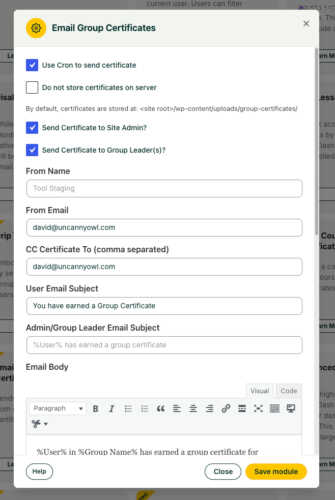
- Send Certificate to Site Admin / Group Leader(s): Check these to copy administrators and/or group leaders on the certificate email. Group leaders are an obvious choice here, since they’re tracking their group’s progress.
- CC Certificate To: Add one or more email addresses to receive a copy via CC — useful for a shared records mailbox.
- From Name / From Email: Set how the sender appears so the email matches your brand or a monitored address.
Storage
- Do not store certificates on server: By default, generated certificates are saved on the server. Check this if you’d rather not keep copies — for example, to limit disk use. Leave it unchecked if you want certificates retained on the server.
Rendering
- Use Cron to send certificate: Leave this off in most cases. Enable it only if shortcodes aren’t rendering correctly in the emailed certificate; sending via cron can resolve those output issues.
Email content
- Email Subject & Email Body: Customize the message learners receive. Available tokens are listed directly below the body field — use them to personalize with learner and group details.