
Overview
Mark a LearnDash lesson or topic complete the moment a learner submits a Formidable Forms form on that page. Use it when a step should require an action — a sign-off, a survey, or feedback — before the learner moves on.
With this module enabled and autocompletion turned on for a specific form, the Formidable Forms submit button replaces the standard Mark Complete button. When the learner submits the form, the lesson or topic is marked complete automatically.
Common use cases:
- Acknowledgement or consent forms a learner must submit before continuing.
- Surveys or feedback collected at a specific point in a course.
- Any step where completion should be tied to a deliberate form submission.
Important: For this module to work, lessons must be associated with a course, and topics must be associated with both a lesson and a course.
Configure It
Turn on autocompletion for the form
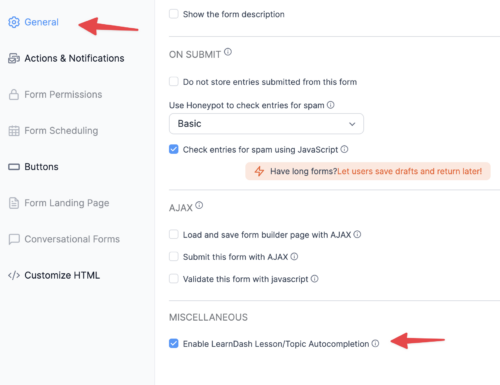
Open the form’s settings and enable Enable LearnDash Lesson/Topic Autocompletion. This makes the form’s submission the completion trigger for that lesson or topic.
Decide whether learners can resubmit a previously completed form
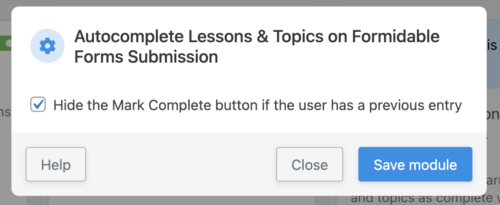
If the same form appears across multiple pages, lessons, or topics, use the Hide the Mark Complete button if the user has a previous entry setting:
- Keep it enabled when a single submission should count everywhere — the learner won’t be prompted again once they’ve submitted.
- Disable it when learners should submit the form fresh in each course context, even if an earlier entry exists.
Decide how learners advance after submitting
To advance learners to the next topic or lesson automatically after submission:
- Do not enable AJAX form submission.
- Disable any redirect settings in the form’s confirmation area.
Note: If the form is on the final topic of a lesson, learners return to that lesson after submitting rather than advancing to the next lesson.
Usage
The learner fills in and submits the Formidable Forms form as usual. On submission, the lesson or topic is marked complete.
Important: This module works alongside the standard Autocomplete Lessons & Topics module, which marks content complete on page load. That can conflict with form-based steps that require input first. On pages where a form submission should drive completion, disable page-load autocompletion for that lesson or topic.