
Overview
Email a learner’s quiz certificate automatically the moment they pass, with the PDF attached to their completion email. Learners get instant proof of their result without logging back in, and you can copy administrators or group leaders too.
LearnDash generates a certificate when a learner passes a quiz, but they normally have to view or download it manually. The Email Quiz Certificates module delivers it automatically: on successful quiz completion, the module emails the learner the certificate as a PDF attachment. Copies can also go to the site administrator, group leaders, or additional addresses.
This module handles certificates attached to quizzes specifically.
Note: For course-level certificates, use the Email Course Certificates module instead.
Configure It
Settings are decisions about delivery, storage, and email content.
Delivery and recipients
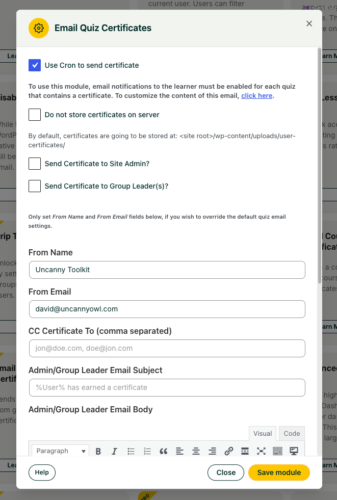
- Send Certificate to Site Admin / Group Leader(s): Check these to copy administrators and/or group leaders on the certificate email — useful when results need to live beyond the learner’s inbox.
- CC Certificate To: Add one or more email addresses to receive a copy via CC, such as a shared records mailbox.
- From Name / From Email: Set how the sender appears. If you leave these blank, the module falls back to your LearnDash quiz email settings.
Storage
- Do not store certificates on server: By default, generated certificates are saved on the server (under
/uploads/user-certificates/). Check this if you’d rather not retain copies.
Rendering
- Use Cron to send certificate: Leave this off in most cases. Enable it only if shortcode data isn’t rendering correctly in the emailed certificate; sending via cron can resolve those issues.
Email content
- Admin / Group Leader Email Subject & Body: Customize the message sent to administrative recipients. Available tokens are listed directly below the body field.
Developer Filters
| Filter | Parameters / Default | Purpose |
|---|---|---|
uo_quiz_certificate_save_path | Default: /uploads/user-certificates/ | Change where generated certificates are stored. |
uo_quiz_completion_certificate_filename | file_name, user_id, quiz_id, certificate_post, current_time_stamp | Customize the certificate filename. |
uo_generate_quiz_certificate | true / false (default: true) | Control whether a certificate is generated. |
uo_quiz_certificate_http_url | — | Update the HTTP URL when the save path changes. |
Is there a way to remove the attachment from the certificate email? I want them to be notified, but not have the file directly sent to them.
Can you confirm who you want to be notified? LearnDash natively supports notifying the user and admin about quiz results. If you disable our module that notification will go out. If you need Group Leaders and other users to be notified, however, our module would then be needed and it always includes the certificate. Another option may be using the LearnDash Notifications plugin instead from LearnDash, as I’m afraid our email modules always send the attachments.
Is there a way to send these emails for passing quizzes only? I do not want to send emails on failing quizzes.
That is unfortunately not currently possible.
The email trigger itself comes from LearnDash; emails are either sent or they’re not. Our module basically overrides that email to attach a certificate if one was earned, but whether or not the email is sent comes from LearnDash, and currently there is no option to only send notifications when quizzes are passed. We may consider overriding that for a future release, but for now, unfortunately, emails are sent regardless of passing or failing.
Do you have a plug-in for kajabi?
We don’t, sorry about that!
“currently there is no option to only send notifications when quizzes are passed” – Hello, is this still the case? I don’t want to send a certificate if the student hasn’t achieved the pass mark of 80%
This behaviour is on the LearnDash side; it means an email always goes out, not that a certificate will always be attached. So if this is turned on, the email goes out in all cases, but the certificate will only be attached if the user achieves 80% or higher.
Is it possible to change the file name of the quiz certificate pdf attached in the email?
The solution does require a code addition in your child theme and may be better handled via support ticket, but here’s a code sample to hopefully point you in the right direction:
/*** @param $file_name
* @param $user_id
* @param $quiz_id
* @param $certificate_post
* @param $timestamp
*
* @return string
*/
function update_quiz_certificate_filename( $file_name, $user_id, $quiz_id, $certificate_post, $timestamp ) {
$quiz_post = get_post( $quiz_id );
$quiz_title = $quiz_post->post_name; //sanitized title of the quiz
$user = get_user_by( 'ID', $user_id );
$first_name = sanitize_title( $user->first_name );
$last_name = sanitize_title( $user->last_name );
return "{$timestamp}-{$first_name}-{$last_name}-{$quiz_title}-{$user_id}";
}
add_filter( 'uo_quiz_completion_certificate_filename', 'update_quiz_certificate_filename', 20, 5 );
Is there an option that the certificate will be converted from pdf to jpg before sending by email?
Sorry Nenu, that’s unfortunately not possible right now nor planned. We’ll consider it though for possible inclusion in future!
I don’t want to send a certificate if the student hasn’t achieved the passing mark. Is there a way to achieve?
Hi, a certificate will only be issued and sent if the user achieves a passing score. This is set in the LearnDash settings described here: https://www.learndash.com/support/docs/core/quizzes/quiz-access/#quiz_progression_restriction_settings
A question, I made some short codes to be included in the Certificate Builder. They show fine when an user generates a Certificate, but in the .pdf that gets sent it shows empty on those places.
You can try the Cron option at the top of the modules settings to delay the certificate generation slightly, giving the system more time to populate data, but you may need to raise a ticket. What is likely happening is that the data needed by the shortcode isn’t available yet at the time the email is sent. If the Cron option doesn’t help, let us know what data you’re working with and how it’s populating when you open a ticket.