
Overview
Give each LearnDash Group its own private bbPress discussion forum, so members can talk with their own cohort rather than everyone in a course. This is for sites that organize learners into groups and want group-only conversations.
LearnDash offers an official bbPress integration plugin that ties forums to courses, giving enrolled students access to course-specific forums. Group Forums with bbPress extends that idea to groups — letting you associate a bbPress forum with one or more LearnDash Groups so only those group members can take part.
Common use cases:
- A separate discussion space for each client organization or cohort.
- Group-only forums layered on top of course forums, so a student sees both their course forum and their group forum.
Configure It
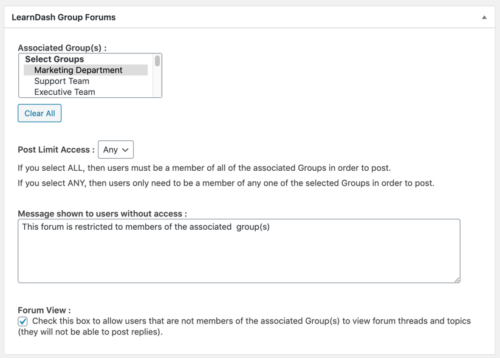
When the module is active, a new metabox appears on the Edit Forum page. Configure group access there:
- In the Associated Group(s) box, select which group(s) should have access to the forum.
- In the Post Limit Access dropdown, decide who can post:
- Choose ALL when a user must belong to every selected group to participate.
- Choose ANY when belonging to any one of the selected groups is enough.
- Decide whether the forum should be readable by everyone:
- Check Forum View to let all site users read the forum, while keeping topic and reply posting limited to selected group members.
- Leave it unchecked to hide the forum entirely from non-members.
Usage
Group Forums widget
When the module is active, it adds a Group Forums widget that displays links to all group-specific forums the current user can access — a convenient jumping-off point for members.
Combining group and course restrictions
You can use this module alongside LearnDash’s bbPress integration plugin so a forum is restricted by both course enrollment and group membership. Keep these rules in mind:
- To access a forum restricted both ways, a user must satisfy both the course enrollment and the group membership requirements.
- The Forum View checkbox is evaluated per restriction. If it’s checked for one restriction but not the other, a user who meets only the unchecked restriction can still view the forum.
Important — Forum View example: Suppose Forum View is checked for the course restriction but not the group restriction. A user who meets only the group restriction can view the forum, while a user who meets only the course restriction will see the access-denied message.