
Overview
Make LearnDash sample lessons obvious by adding a clear, customizable label to them. By default, sample lessons are only distinguishable because their title appears as a link — a cue many learners miss.
LearnDash’s sample lesson feature lets you offer a free preview of course material without unlocking the full course. The problem is that sample lessons aren’t visually distinct — the only signal is that the lesson title is clickable, which is easy to overlook.
This module adds a prominent label to each sample lesson so learners can immediately see what’s free to preview, which can encourage more clicks into your course content.
Note: This module is for the legacy LearnDash (LD25) theme only. The label is applied via CSS that targets the legacy theme’s .is_sample h4>a markup. The “Sample Lesson” label is native to LearnDash 3.0 theme.
Usage
Once the module is enabled, a label automatically appears on every sample lesson in your course materials — no per-lesson setup required.

Configure It
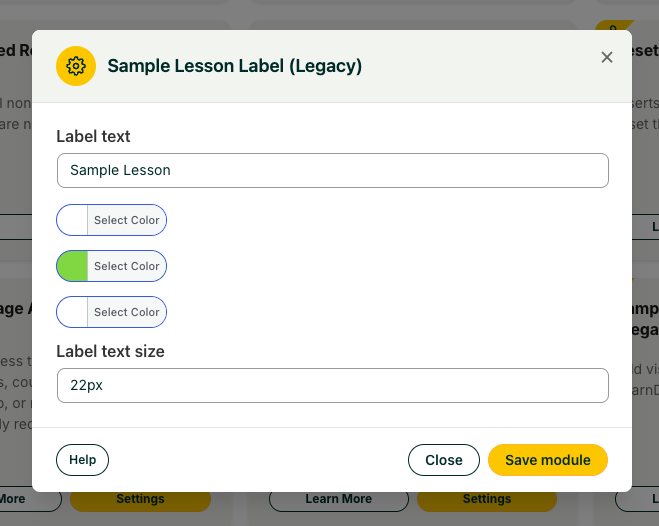
Customize the label in the module’s Settings window so it fits your course design:
- Label text — Set the wording, for example “Sample” or “Free Preview.” Defaults to “Sample.”
- Label background color — Set the background color to match your branding.
- Label text color — Set the label’s text color.
- Label border color — Set the color of the label’s border.
- Label text size — Set the font size for the label (defaults to 14px).
Important: Some themes can interfere with the label. On the University theme, for example, the label may render as a checkmark instead of the text. This is a CSS conflict and can be resolved with custom CSS. Because these issues are site-specific, open a support ticket for help with your particular theme rather than relying on the Knowledge Base.
I have tried to implement this feature but it is not showing the word Sample like in your posting.
Instead, it shows a check mark that is colored based on the settings in Uncanny Owl’s Sample Lesson Label module.
Hi Matthew, just wanted to follow up here as well for the benefit of others that might be experiencing the same issues. The CSS for the sample functionality was conflicting with the CSS in the University theme, which applies custom styling to LearnDash. We don’t typically provide support for theme conflicts, but here’s some CSS that should fix that issue:
@media (min-width:769px) {.learndash .is_sample h4 .notcompleted:after {
content: 'Sneak Peek';
float: right;
font-size: 14px;
background-color: #dd9933;
border-radius: 4px;
color: #ffffff;
font-weight: 400;
line-height: 1.2;
padding: 3px 10px;
margin-top: -2px;
text-transform: initial;
border: 1px solid #dcdcdc;
font-family: inherit;
}
}
I am having the exact same issue but I have a clean WordPress installation, no theme install, nothing. Just learndash and Uncanny ToolKit pro. I can’t see the SAMPLE text, everything is set up as explained.
This functionality does not work out of the box as specified. Could you please tell me how to make it work?
Thanks a lot
Alfonso
Hi Alfonso, for any site-specific issues we encourage you to log a support ticket, as we can’t provide the same level of support through the Knowledge Base. It definitely should work out of the box, and although you mention no third-party theme, it would be helpful to know what theme you are using. If the course is closed, you have a lesson set up as a sample, it’s a default theme like Twenty Seventeen and you’re still having issues, please do log a support ticket and we’ll be happy to take a closer look for you.