
Overview
Automatically mark LearnDash lessons and topics as complete the moment a learner opens them, so they progress through a course without hunting for the Mark Complete button. This is ideal for content-light steps, introductions, or any course where you want a frictionless flow.
When this module is active, opening a lesson or topic marks it complete on page load, and the standard Mark Complete button no longer appears. You control this behavior globally for the whole site, then override it on individual lessons or topics where you’d rather keep a manual completion step.
Common use cases:
- Welcome, overview, or “read this first” pages where there’s nothing for the learner to actively complete.
- Video- or text-only courses where you want learners to move through automatically.
- Mixed courses where most steps should autocomplete, but a few graded or timed steps should not.
Autocompletion is intentionally skipped when a learner still has something to do on the page. It does not occur when:
- The lesson or topic includes an incomplete assignment.
- The lesson or topic contains one or more incomplete quizzes.
- The lesson includes incomplete topics.
- The lesson or topic has a timer enabled.
- The lesson is being dripped (or Group Dripped) and is not yet available.
- The lesson or topic contains a Fluent Form and the Autocomplete Lessons & Topics on Fluent Form Submission module is enabled.
- The lesson or topic contains a Formidable Form and the Autocomplete Lessons & Topics on Formidable Form Submission module is enabled.
- The lesson or topic contains a Gravity Form and the Autocomplete Lessons & Topics on Gravity Form Submission module is enabled.
- The lesson or topic contains a WPForms Form and the Autocomplete Lessons & Topics on WPForms Form Submission module is enabled.
Important: For this module to work, lessons must be associated with a course, and topics must be associated with both a lesson and a course. Autocompletion is also disabled for any lesson or topic that contains modules uploaded with the Tin Canny plugin.
Configure It
Decide your site-wide default
When you enable the module, Enable auto-completion for all lessons and topics is turned on by default. This applies to every lesson and topic that isn’t already complete.
- Leave it on if most of your content should autocomplete and you’ll make exceptions case by case.
- Turn it off if you only want autocompletion on a handful of specific lessons or topics, then enable those individually.
Override on individual lessons and topics
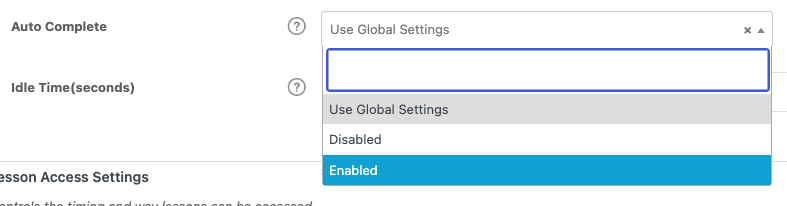
On the Edit screen for a lesson or topic, use the Auto Complete drop-down to override the global default:
- Disabled — No autocompletion on page load. The Mark Complete button stays visible. Choose this for steps that require deliberate action.
- Enabled — The lesson or topic autocompletes on page load, regardless of the global setting.
- Use Global Setting (default) — Inherits whatever you set globally.
Note: Topics do not inherit a lesson’s autocompletion setting. A setting applied to a topic does not roll up to its parent lesson, so configure topics individually where needed.
Usage
For the learner, an autocompleting lesson or topic simply marks itself done on open — there’s no button to click.
The Done button
So learners are never stranded without a way forward, a Done button automatically appears on the last incomplete lesson or topic. It acts as a final Mark Complete button and triggers course completion. Its behavior depends on your course progression mode.
Note: When a learner completes the last topic in a lesson that has autocompletion enabled, they are returned to that lesson — not moved straight to the next lesson.
When a lesson is complete, is there a way to display something to the learner so that they know they have completed the lesson?
I tried to see if this shortcode existed, but it doesn’t seem to work: [lesson_complete ] content [/lesson_complete]
Unfortunately LearnDash doesn’t offer anything like that currently. Typically users will need to look at the sidebar to see their completion status, or if they complete a lesson and revisit it, they should see a Next Lesson > link at the bottom of the page, which indicates they can move on to the next lesson.
Hello, my client wants to have their course for purchase online and also to give it to customers who attend the same course in person. For the online version, all lessons must be completed sequentially. For the free course given to physical students, all lessons are autocompleted complete, and the user can move to any lesson freely. Is there a way I can do this with autocomplete to differentiate between the online purchasers and the live event attendees? Thank you
This module can’t differentiate between learners; either it’s either on or off for everyone. For the scenario you’ve described, I would recommend creating two separate courses using LearnDash’s “Shared Course Steps” feature, and checking “Disable lesson progression” on the version for the students who attended the live class.
Hello, is there a way to turn of the completion function for just one course i have multiple courses but my client wants to have 1 course where the “students” can roam free between lessons and the other ones they have to follow sequentially is there a way to do that ?
It sounds like you just need to change the toggle for “Disable Lesson Progression” setting on the course edit page for courses that are exceptions. Autocompletion wouldn’t be a factor (though it can be controlled at the lesson/topic level if you want to).
Hi, I want to purchase your product, but I cannot find the functionality that interests me.
If I describe it to you, can you tell if I can use it? I tried the demo version and it was not there.
I suggest we use a course-finish as the trigger. Is that possible?
Just to be clear – from a user/front-end perspective:
We want to offer the user the possibility to “skip” certain courses by taking a quiz (“placement test”)
So, say the user thinks course 1, 2 and 3 are too simple for him.
There is a “placement test” available after course 3. The user can select this.
He takes the quiz, passes it.
Course 1, 2 and 3 and all their lessons are then marked as completed, so he can proceed to course 4.
Regards,
Stan.
Hi Stan, none of our LearnDash-specific plugins could do this, but Uncanny Automator was designed to handle that sort of scenario. You could give that a try. 🙂
I am having an issue where the autocomplete function is working when the user restrictions are enabled. Is there a way to incorporate autocomplete when a topic is restricted for a user?
Hi Mark, definitely log a ticket if you’re having trouble with this, but it would help to know how you’re restricting access to the topic. Our module shouldn’t autocomplete it if the restriction is on the LearnDash side, but if you’re using something else, it’s possible that they’re loading part of the post (and triggering our autocompletion) before redirecting the user.
Is there an option to automatically mark a Topic complete once the user has viewed the video in it (or a percentage of it)? I don’t want a Topic to be marked complete once the user lands on the segment. Thanks!
No, for that behaviour you should rely on LearnDash video progression (https://www.learndash.com/support/docs/guides/video-progression/) and disable functionality on any lessons and topics where you use the LearnDash video option.
Thank you very much for answering the questions, excellent support. Question is there a way when a video ends automatically go to the next lesson
Hi Alan,
As a general rule, assume that there is no way to advance on video completion out of the box. There are possible workarounds, like if you use Presto Player for the video player and Uncanny Automator, you could set up recipes to advance the user, or if the video were wrapped in an xAPI module (e.g. Storyline) that can pass a verb, our Tin Canny plugin could advance the user on completion. These are pretty advanced and cumbersome though, so the safer answer (without a custom solution) is that we unfortunately can’t support it.
Hi guys, we need a solution for auto-completing a topic when a Vimeo video reaches the end – is this possible please? Thank you. Paul
Hi Paul, this unfortunately isn’t something that we support right now. We’ll consider it for a future release though.
You would probably have some options here with Grassblade and its video tracking features, and with Automator and Presto Player you could build in a lot of rules for autocompletion, but it would be very cumbersome.
Hi, is it possible to custom the “Done” button ?
Hi Evelyne, maybe you can open a ticket with more details about what you’d like to do and we can provide feedback about how to achieve it.