
Overview
Generate and download a whole batch of LearnDash certificates at once instead of saving them one learner at a time. Administrators and Group Leaders pick a group, course, or quiz, and the module bundles every matching certificate into a single downloadable zip file.
Collecting certificates individually doesn’t scale once you have dozens or hundreds of learners. The Download Certificates in Bulk module solves this by letting admins and Group Leaders select a certificate type and target, then generating all the PDFs together as one zip file.
Common use cases include sending a Group Leader every certificate for their cohort, archiving course completions for compliance, or pulling quiz certificates for an entire class. Because generation can be heavy, the module runs the job in the background (processing in batches via cron) and emails a download link when the zip is ready.
Requirement: The server must have PHP’s ZipArchive class available to build the zip. If it isn’t, the module shows a notice on its settings screen asking you to contact your host to enable the zip module.
Access: The bulk download form is available to users with the Administrator or Group Leader role by default (capability manage_options). Both the capability and the allowed roles are filterable (uo_bulk_downlad_cert_capability, uo_bulk_downlad_cert_allowed_roles).
Setup
Add the shortcode below to any page where authorized users should generate certificates:
[uo_download_certificates]
The form appears wherever the shortcode is placed and is intended for administrators and Group Leaders.
| Shortcode | Attributes | Description |
|---|---|---|
[uo_download_certificates] | allow-clear (default no) | Renders the bulk certificate generation form. Set allow-clear="yes" to show a “Clear previous runs” checkbox on the form. |
Usage
From a page containing the shortcode:
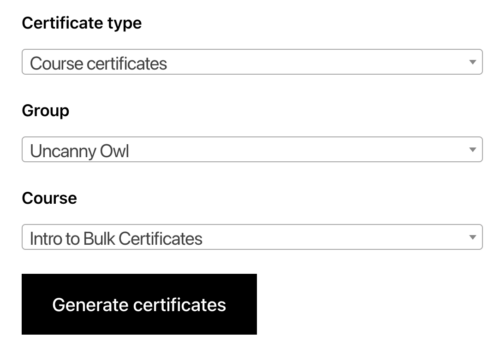
- Choose the certificate type — LearnDash Group, Course, or Quiz.
- Select the target. Depending on the type, pick the relevant group, course, and/or quiz.
- Click Generate certificates. The zip file is built in the background.
- Watch for the email. When the zip is ready, the user who started the job receives an email with a download link.
Module settings
The module settings screen controls notifications and storage. The available options are:
- Minimum free space required (in GB): The module checks available disk space before generating; default is 2 GB. If less than this is free, generation is blocked.
- From Name / From Email: Set how the notification email’s sender appears.
- Email Subject / Email Body: Customize the email that delivers the download link. Available variables (
%User First Name%, %Link%, %Certificates for%, %Time requested%) are listed below the body field. - Delete certificate zip files from the server: A button that removes all generated certificate zip files from the server immediately, to reclaim disk space.
- Clear previous runs: A button that clears records of previous generation runs.
Note on storage: Generated zip files are stored under /wp-content/uploads/bulk-certificates. The download link in each notification email is a transient that expires 24 hours after creation (filterable via uo_file_expiry_time, default 86400 seconds), so retrieve the file promptly.
Important: Generating certificates is a background process and large batches can take a while. The job is processed in batches of 100 via cron.