When we set out to reimagine Tin Canny Reporting for LearnDash, we knew we weren’t just releasing another update. We were laying the foundation for the future of LearnDash reporting—and today, we’re thrilled to announce that Tin Canny Reporting 5.0 is here.
This isn’t just an incremental update. It’s a complete transformation that brings massive performance improvements, a streamlined architecture, and the building blocks for exciting innovations to come. If you’ve been waiting for reports that load faster, work smoother, and scale better, your wait is over.
What’s New in Version 5.0 and Above
Lightning-Fast Performance, and a Foundation Built for the Future
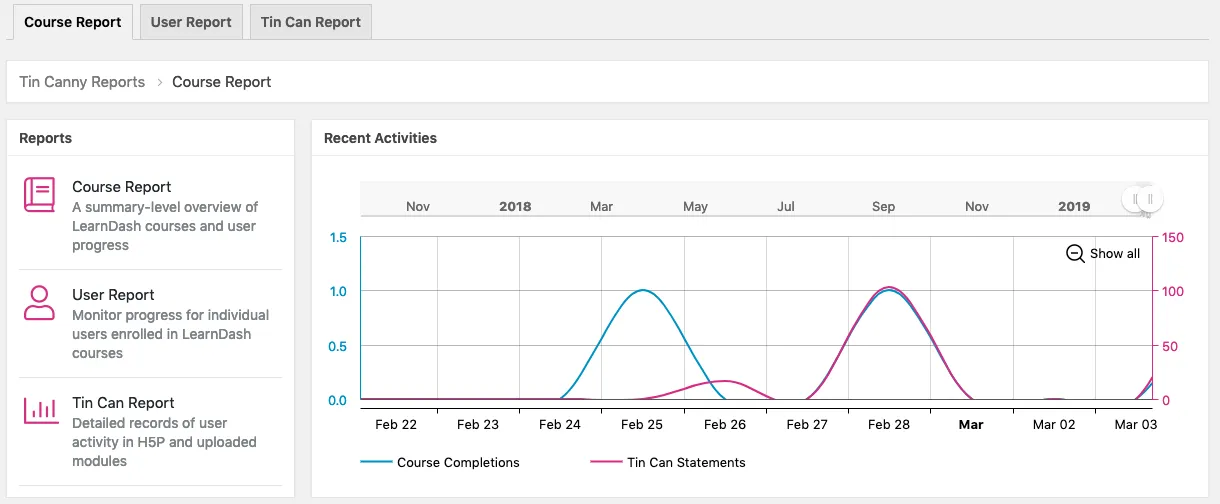
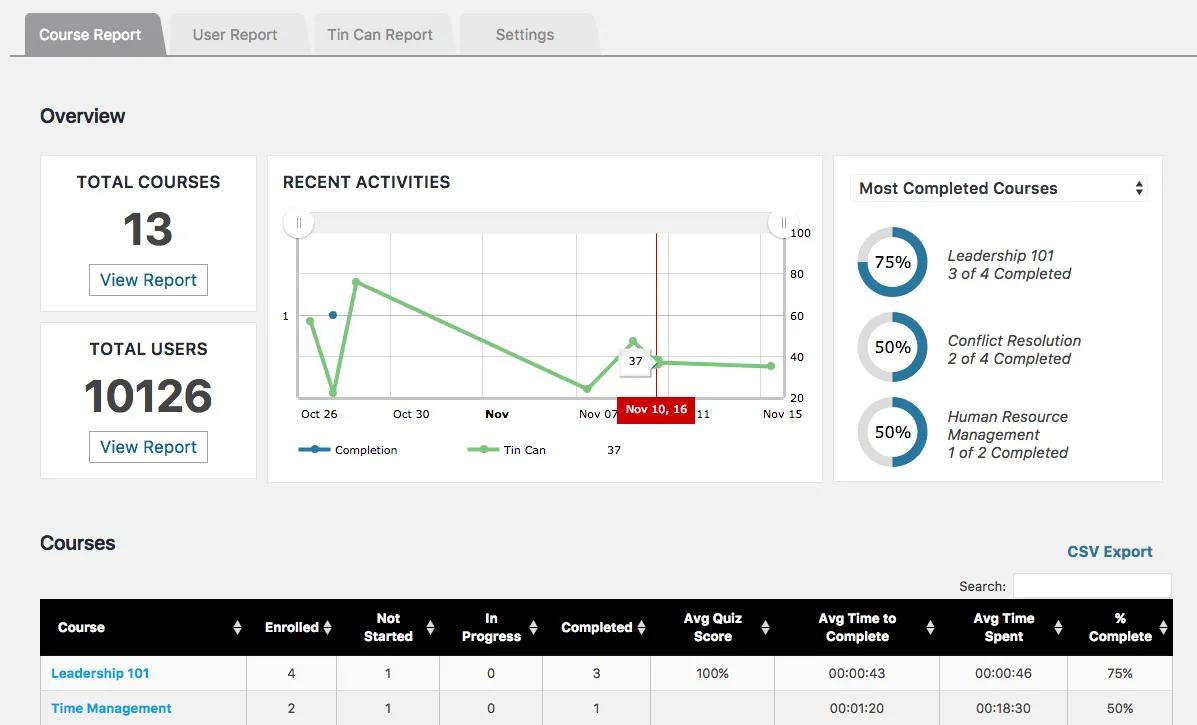
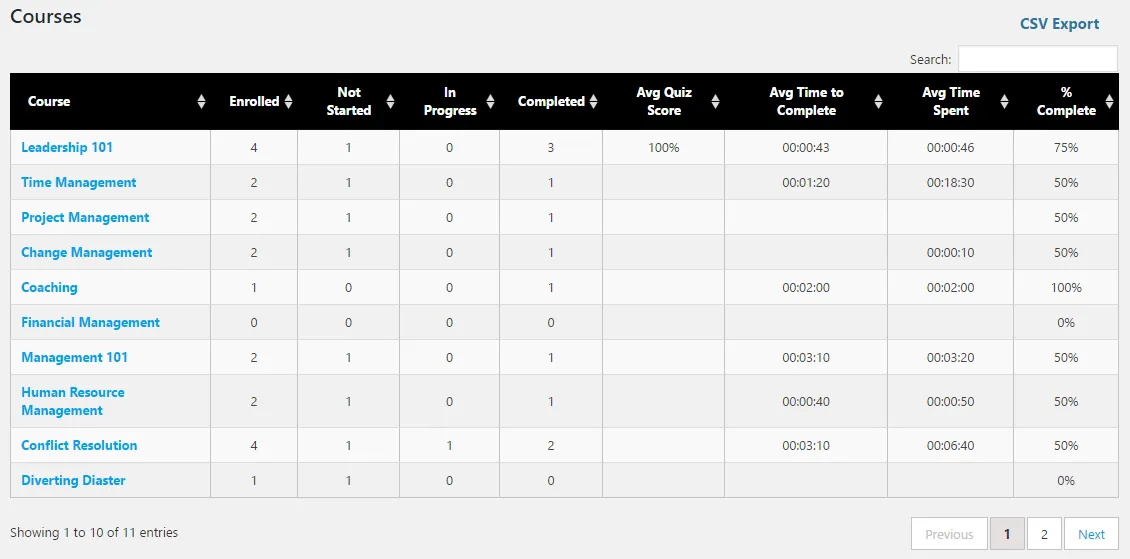
Remember waiting for reports to load while you grabbed another cup of coffee? Those days are behind you. Version 5.0 introduces massive performance improvements across all reports. The Course Report, User Report, Tin Can Report, and xAPI Quiz Report have all been refactored from the ground up.
We’ve optimized database queries and improved caching, delivering reports that load in seconds, not minutes—even on sites with thousands of learners.
Under the hood, we’ve completely overhauled Tin Canny’s core architecture. We’ve also updated all major libraries to their latest versions, including charting, DataTables, lightbox, and module search components. This isn’t just about making things run faster today (though it definitely does that). It’s about making it easier to maintain, extend, and enhance Tin Canny Reporting in the future. This means faster bug fixes, smoother updates, and more innovative features coming your way.
Modernized Experience
The Manage Content page got a complete visual overhaul with a modernized design that’s both beautiful and functional. We’ve added new columns showing upload dates and file sizes for each module, making it easier than ever to manage your e-learning content library.
The Tin Canny front end Group Quiz Report now includes caching to dramatically improve load times, plus a loading animation to enhance the user experience. No more wondering if the report is working—you’ll see exactly what’s happening.
Smarter Data Management
New in version 5.0, you’ll find powerful options for managing your Tin Canny data:
Course and User Report settings to select default groups and page lengths
User Report added “Completion date” column for lessons/topics and “Start date” for courses
Smart fallback for statement capture when email data is unavailable
Purge specific statement types instead of all-or-nothing
Option to remove all Tin Canny data on plugin deletion
What This Means for You
If you’re a LearnDash site administrator dealing with hundreds or thousands of learners, version 5.0 is a game-changer. Reports that you had to wait for now load in seconds. Data that was difficult to access is now at your fingertips.
For developers and agencies, the simplified architecture means easier customization and fewer compatibility issues. The improved performance means happier clients and fewer support tickets.
And for everyone, the modernized interface and enhanced features mean a better experience every time you use Tin Canny Reporting.
A Note About Testing
Because version 5.0 is such a major update, we strongly recommend testing it on a staging site before deploying to your live environment. While we’ve tested extensively, every site is unique, and it’s always better to be safe than sorry.
Looking Ahead
Version 5.0 isn’t the end of our journey—it’s just the beginning. With this new foundation in place, we’re already working on new features that will make Tin Canny Reporting even more powerful and intuitive.
We’re committed to making Tin Canny Reporting the most comprehensive, reliable, and user-friendly reporting solution for LearnDash. Version 5.0 is a major step toward that goal.
Ready to Upgrade?
Tin Canny Reporting for LearnDash version 5.0 is available now. Check out the full changelog for all the details, and remember to test on a staging site first.
We can’t wait to hear what you think of the new version. Your feedback has been instrumental in shaping these improvements, and we’re always listening for ways to make Tin Canny Reporting even better.
Have questions about upgrading to version 5.0? Check out our knowledge base or open a support ticket. We’re here to help make your upgrade as smooth as possible.
https://www.uncannyowl.com/wp-content/uploads/2025/06/Uncanny-Owl-Blog-Tin-Canny-update-1.png320830Kenhttps://www.uncannyowl.com/wp-content/uploads/2016/04/uncannyowl-logo-600.pngKen2025-06-24 14:33:302025-06-24 14:47:26Tin Canny Reporting 5.0: A Major Milestone in LearnDash Reporting
Learn how to integrate H5P and LearnDash to create fully immersive and interactive course content. Plus get Tin Canny for detailed course and quiz reports.
H5P can transform the e-learning experience, making it more engaging and effective for learners of all kinds. If you’ve been wondering how to integrate H5P interactive content with your LearnDash courses, then this is the guide for you.
In this walkthrough, we’ll take you from installation to implementation and beyond so you can harness the power of H5P for LearnDash.
Learn how to create interactive and dynamic content that engages your learners and delivers results. Finally, we’ll introduce you to Tin Canny Reporting for LearnDash, the most comprehensive LearnDash course and quiz reporting tool, to track your learners’ progress through your augmented content.
Get ready to elevate your e-learning game and captivate your students like never before.
Benefits of Integrating H5P and LearnDash
According to this 2023 study, learners who engaged with H5P interactive content “reported a positive experience and indicated a preference for more interactive elements”.
But an enhanced user experience is just one of a host of benefits that comes from integrating H5P with LearnDash. Here are some more of the key advantages:
Increased Engagement: H5P allows you to create interactive content like quizzes, interactive videos, drag-and-drop activities, and more. These elements engage learners actively, making the learning process more enjoyable and effective.
User-Friendly Interface: H5P’s intuitive, browser-based editor makes it easy for educators to design and integrate rich media elements into their content—no coding skills required. This ease of use can encourage educators to make frequent and meaningful updates and customizations to course material.
Enhanced Learning Outcomes: By combining different content types, H5P supports varied learning styles and fosters deeper comprehension.
No Additional Cost: H5P is FREE to use! Educators looking to enhance their content can do so without taking on an additional financial burden.
Compatibility with LearnDash and Tin Canny: H5P content is fully compatible with LearnDash, and when used with Tin Canny Reporting, provides detailed insights into learner performance. This integration helps educators track progress, identify learning gaps, and tailor instructions to meet the needs of their students.
Versatility and Flexibility: H5P supports a wide range of content types, including interactive presentations, memory games, fill-in-the-blanks, and more. This versatility allows educators to create diverse learning experiences that can adapt to various educational contexts, environments and objectives.
By leveraging the power of H5P, educators can create more interactive, engaging, and effective online courses in LearnDash, leading to improved learner outcomes and satisfaction.
In the next section, we’ll talk a little bit more about what, exactly, H5P is and how it integrates with LearnDash. Then we’ll start creating some H5P content.
H5P, xAPI, LearnDash: What You Must Know
Before we start creating interactive content, there are a few things you should know about H5P, xAPI and how these tools integrate with LearnDash.
Introduction to H5P
H5P (HTML5 Package) is an open-source content collaboration framework for creating and sharing interactive content.
This tool supports various types of content, such as interactive videos, quizzes, presentations, and more, making learning experiences more engaging and dynamic.
What is xAPI?
Want to know how, exactly, H5P integrates with LearnDash? In a word: xAPI.
The Experience API (xAPI), also known as Tin Can API, is a specification for learning technologies that enables tracking and recording of learning experiences across diverse platforms and environments.
In other words, xAPI is the mechanism that communicates H5P data to LearnDash.
xAPI statements are structured as “Noun, Verb, Object” (for example, “John passed the quiz” or “John completed the course”) and provide detailed information about learner interactions. Each statement can contain additional information such as scores and timestamps.
As an educator or educational administrator, that’s all you’ll really need to know about xAPI. However, if you would like to know more about xAPI, you can dive into the details here.
H5P Content Types with xAPI Support
Not all H5P content types have xAPI support. This means that not all of the interactive content that you create with H5P can contribute to a learner’s progression through a LearnDash course, lesson or topic.
Below, you can find a list of H5P content types with documented xAPI support.
Drag and Drop
A free HTML5-based drag and drop question type allowing creatives to create many forms of drag and drop using only a web browser.
Drag the Words
A free HTML5 based question type allowing creatives to create text based challenges where users are to drag words into blanks in sentences. Excellent for language training among other things.
Fill in the Blanks
A free HTML5 based question type allowing learners to fill in the blanks, also known as cloze tests, with H5P in publishing systems like WordPress.
Find the Hotspot
A free HTML5 based question type allowing creatives to create an image based test where the learner is to find the correct spot on an image.
Mark the Words
A free HTML5 based question type allowing creatives to create challenges where the user is to mark specific types of verbs in a text.
Multiple Choice
A free HTML5 based question type allowing creatives to create challenges where the user is to identify one or more correct choices.
Quiz (Question Set)
A free HTML5 based content type allowing creatives to create quizzes. Many question types are supported like multiple choice, fill in the blanks, drag the words, mark the words and regular drag and drop.
Single Choice Set
A free HTML5 based content type allowing creatives to create simple and smooth quizzes consisting of single choice questions.
Summary
A free HTML5 summary builder. This content type allows creatives to create challenges where the user is to choose between statements and build the correct summary.
Interactive Video
An HTML5-based interactive video content type allowing users to add multiple choice and fill in the blank questions, pop-up text and other types of interactions to their videos using only a web browser.
Course Presentation
A free HTML5-based presentation content type which allows users to add multiple choice questions, fill in the blanks, text, and other types of interactions to their presentations using only a web browser.
Note: These are simply the H5P content types with documented xAPI support at the time of writing. Some additional content types might have xAPI support that is not explicitly stated and/or documented. It is recommended to always test content types with your LearnDash courses, lessons and topics before publishing them to learners.
Note as well that Tin Canny Reporting can still track some interactions that do not contribute to course completion. For example, Tin Canny can track a user’s interaction with the H5P content type “Accordion”. We’ll explore more of this in a later section.
LearnDash Post Types and H5P Content
Even if a H5P content type has xAPI support, it may not necessarily contribute to a learner’s progress depending on the LearnDash post type in which the H5P content is embedded.
In essence, LearnDash has four post types: Courses, Lessons, Topics and Quizzes.
Only Lesson and Topic post types will support embedded H5P content that contributes to LearnDash course progress.
However, if you have the Uncanny Toolkit Pro plugin and enable the “Single Course Page” module, you can embed H5P content directly into LearnDash courses. We will talk more about that “uncanny” feature in a later section.
Integrate H5P and LearnDash: Download, Install and Engage
Now that we know a little bit more about H5P and how it integrates with LearnDash, let’s get started creating some engaging interactive content.
Step 1: Install H5P
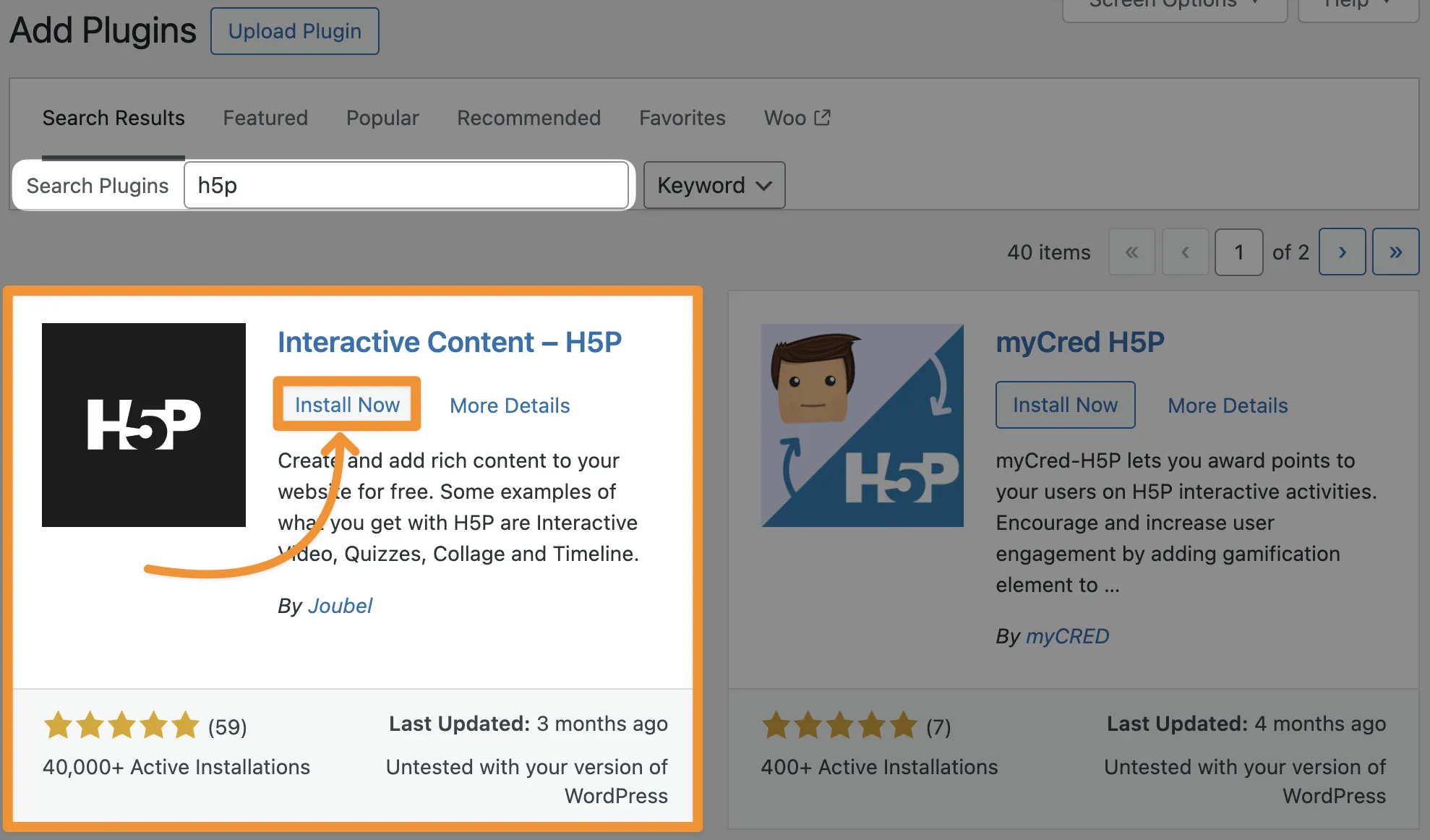
From your WordPress Admin Dashboard, navigate to Plugins > Add New Plugin. Search for the H5P plugin and click Install Now.
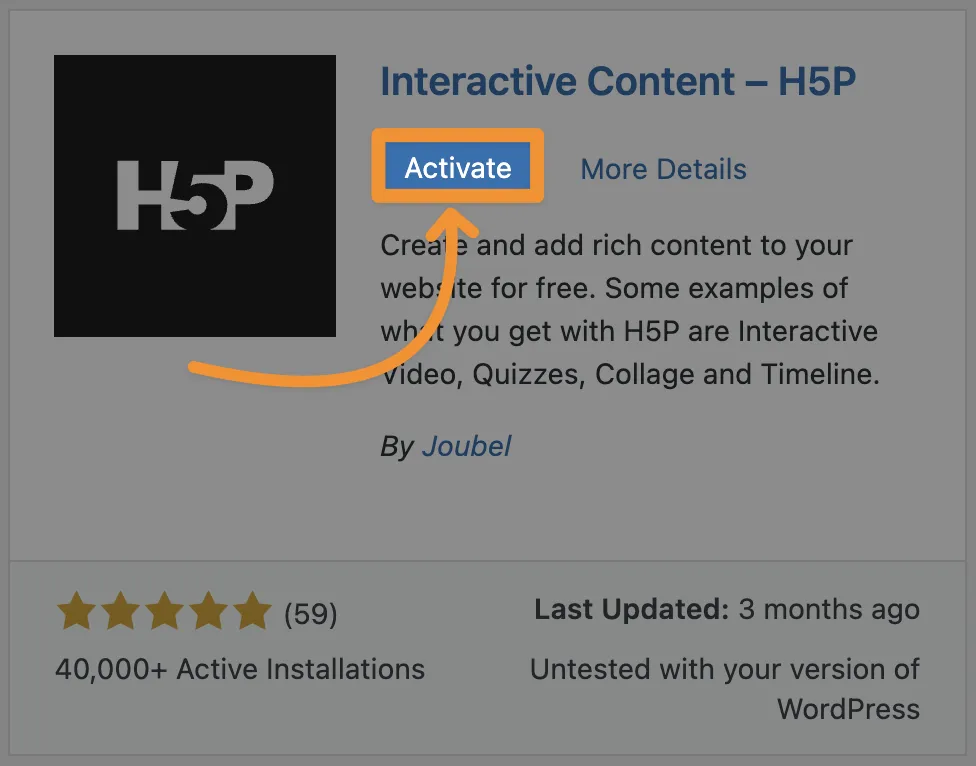
Once you’ve installed the H5P plugin, click Activate.
Step 2: Select H5P Content Type
From your WordPress Admin Dashboard, navigate to H5P Content > Add New.
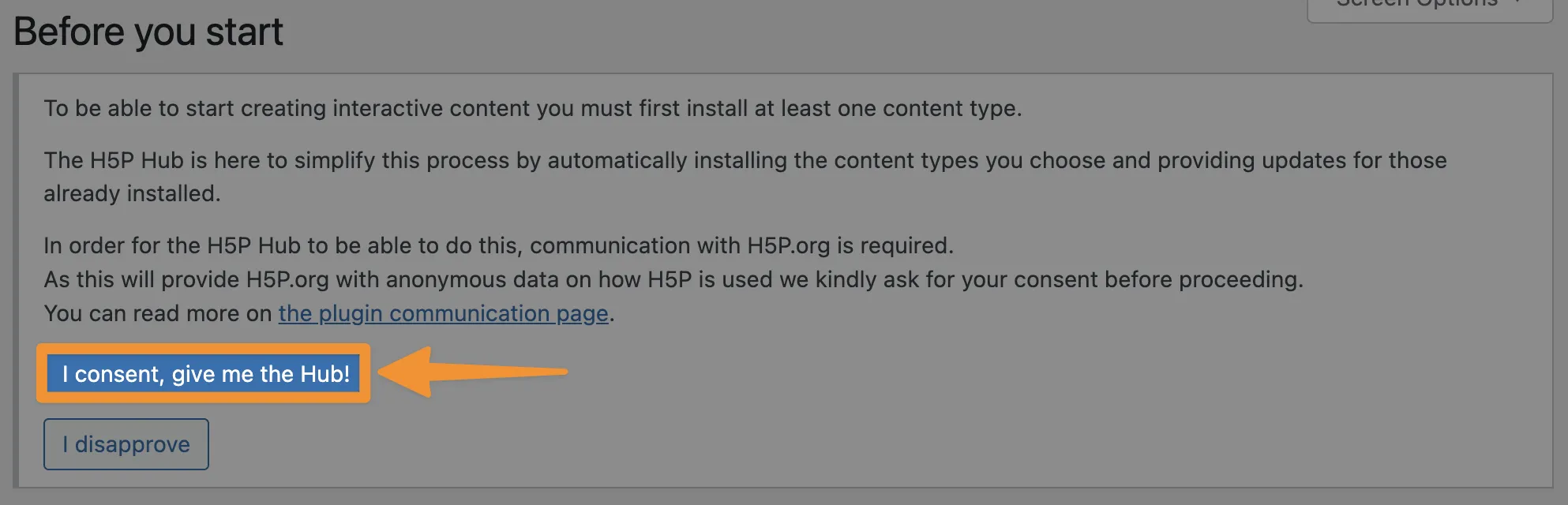
A panel may appear in the new screen, explaining that you will need to install a content type before continuing.
If the panel did appear, click I consent, give me the Hub!
A panel may appear in the new screen, explaining that you will need to install a content type before continuing.If the panel did appear, click I consent, give me the Hub!
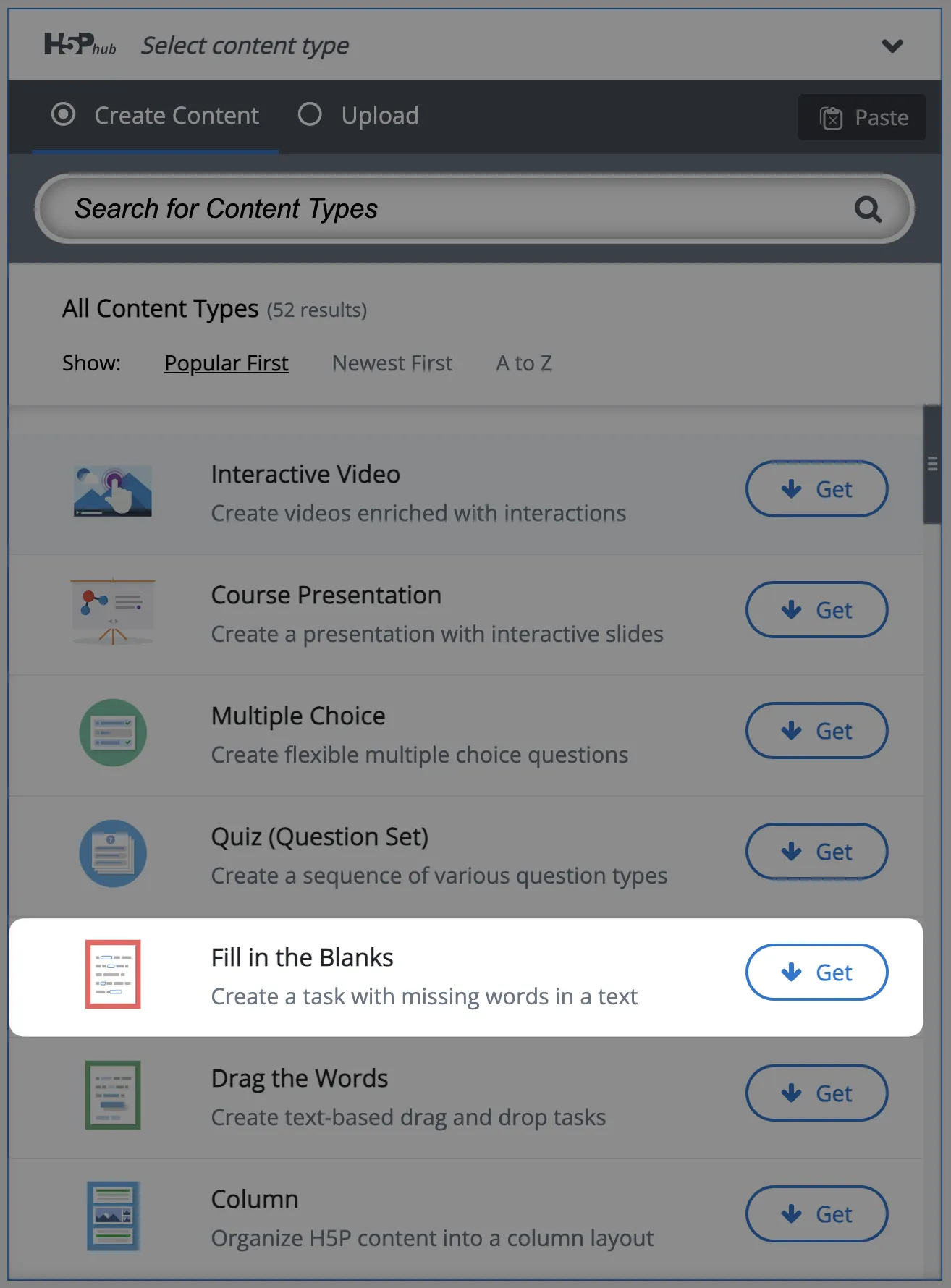
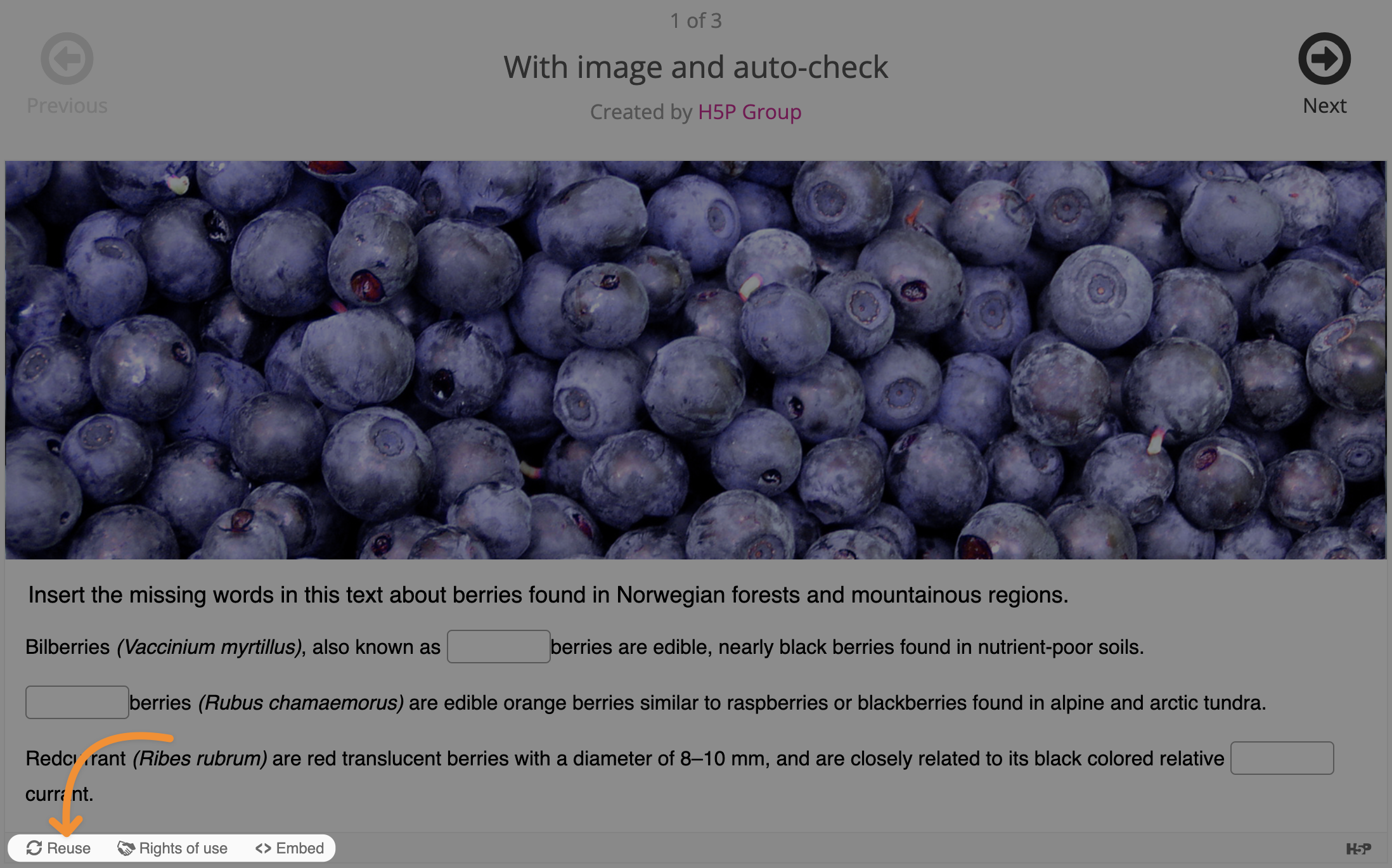
Select the type of interactive content that you want to create. For example, we have selected “Fill in the Blanks”.
Install the content type if you haven’t already then click Use.
Step 3: Create H5P Content
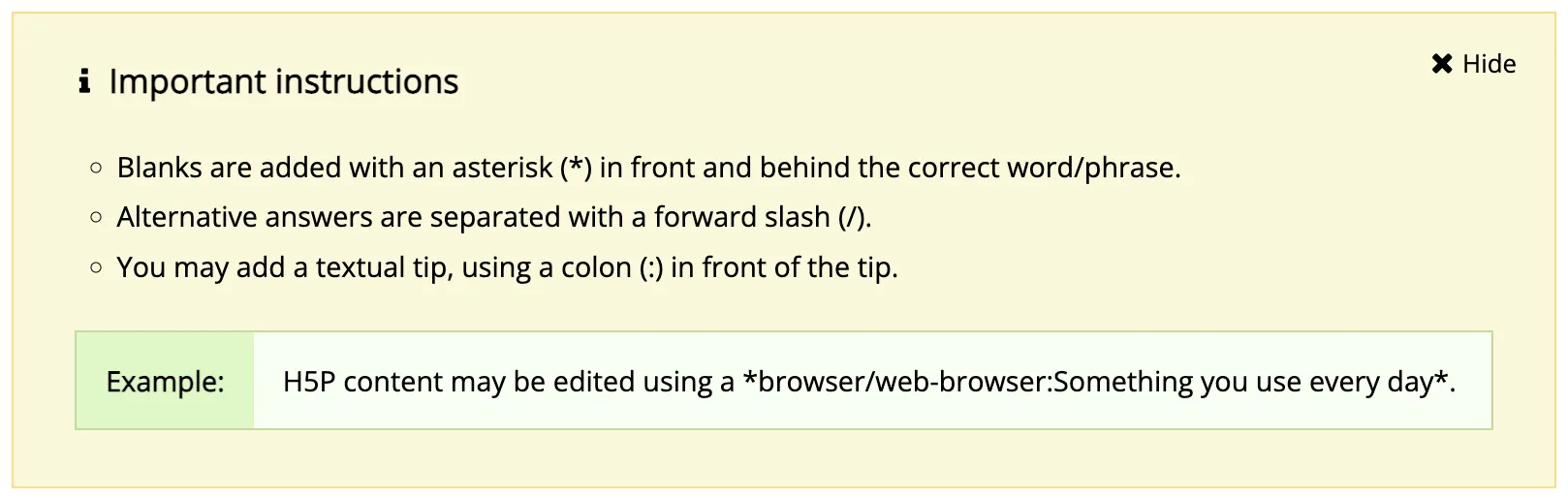

Regardless of the content type that you have selected, H5P will have instructions on how to create your interactive content. For example, if you have selected “Fill in the Blanks” as we have, you will see these instructions:
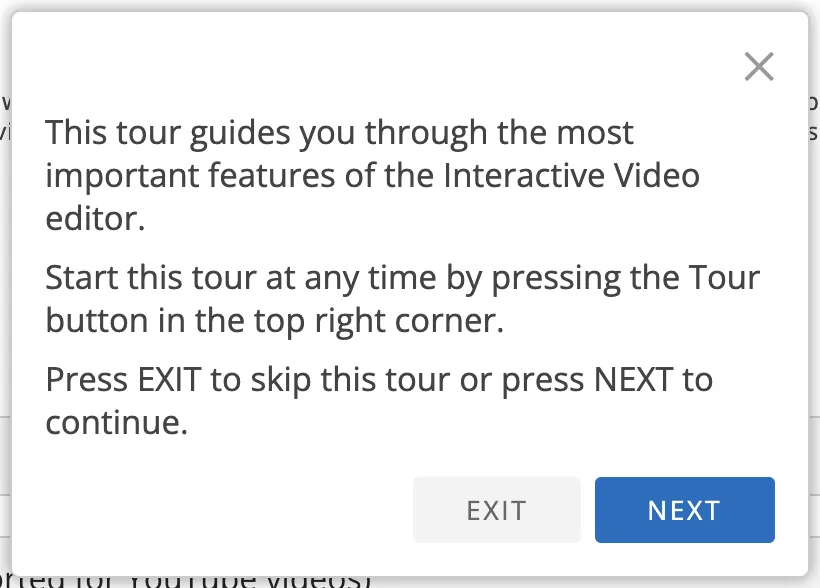
Or, if you had selected the “Interactive Video” content type, you would see these instructions:
Once you’re finished, click Create. H5P will generate the content for you and provide you with a shortcode that you can use to embed it in your LearnDash courses, lessons, topics and quizzes. (Recall, however, that embedded H5P content will only contribute to learner progress in lessons and topics unless you have the Uncanny Toolkit Pro plugin.)
Not sure where to start? You can download sample content from H5P here. Select the type of content you want to sample and click Reuse on the content page.
Step 4: Embed H5P Content Into LearnDash
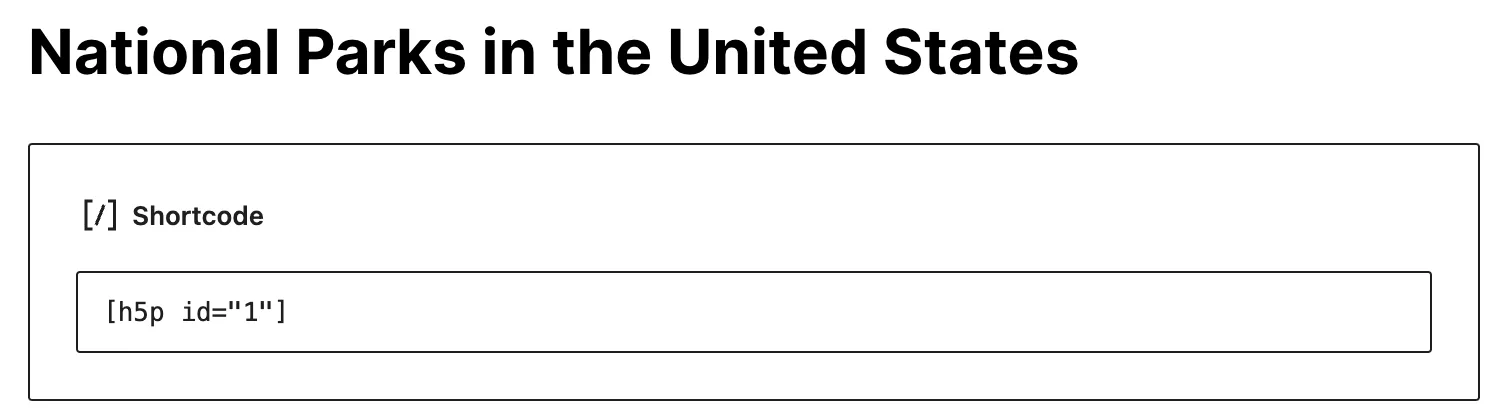
After creating your H5P content, Copy the shortcode. Open the lesson or topic you want to embed the content in.
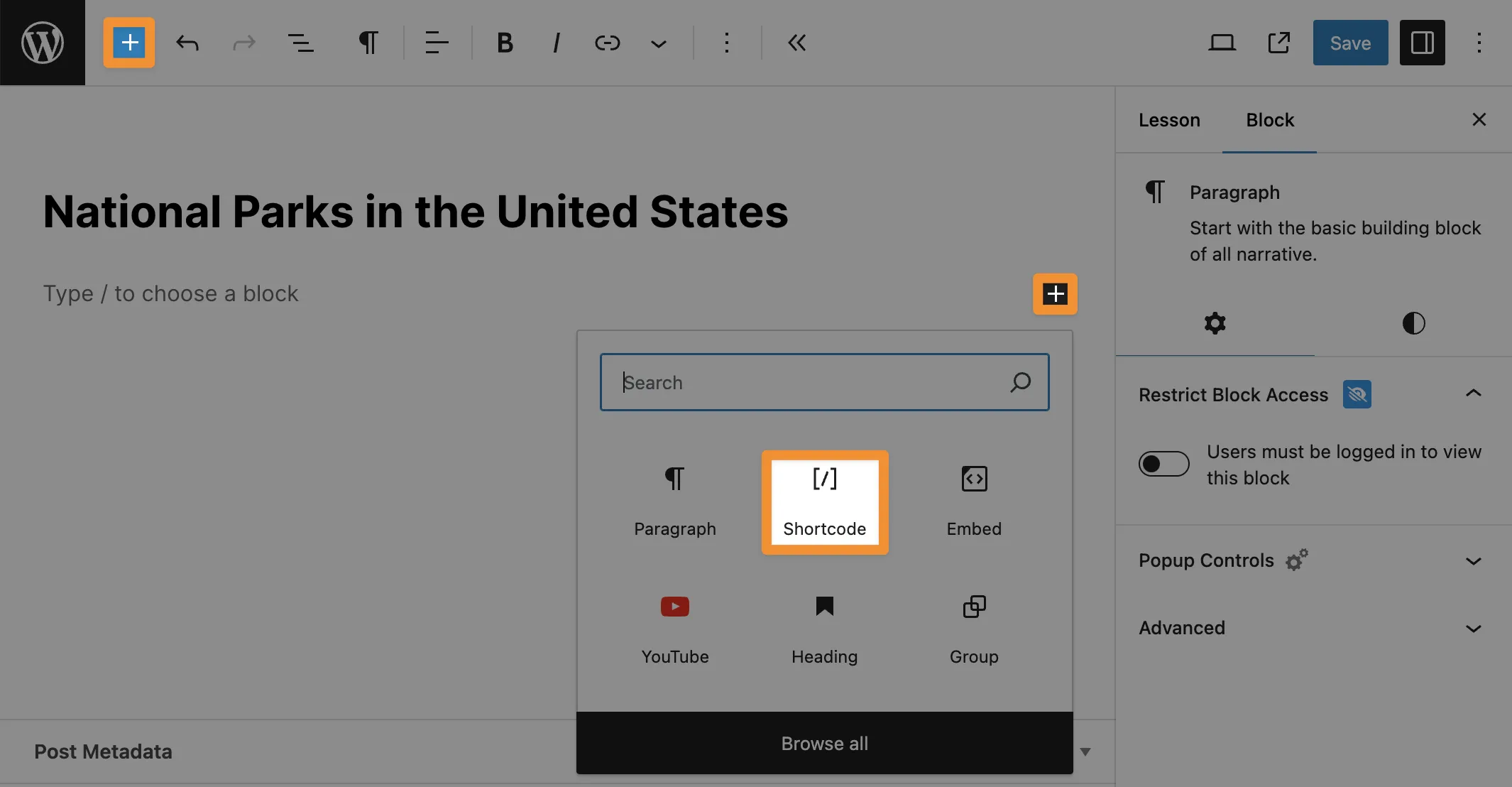
In the Lesson or Topic page, click the Plus sign “+” to add a block and select the Shortcode block.
Paste the H5P shortcode into the space provided.
Complete building the rest of your lesson/topic. Once you’re finished, click Publish (or Save if you had previously published the post.)
Step 5: Test Your Interactive Content
You’re just about done! Add the lesson/topic to one of your courses from the LearnDash course builder.
Before you open the enrollment process to your learners, we recommend testing your new interactive content.
Great! Now that your interactive content is up and running, you’re probably wondering, “How can I track my learners’ progress?” In the next section, we’ll take a look at the only tool that can track your learners’ progress as well as their interactions with H5P content and generate detailed reports.
Integrating H5P interactive content with your LearnDash courses adds another dimension to your LMS data. Tin Canny Reporting for LearnDash is the advanced reporting tool that provides in-depth insights into learner activities and engagement with interactive content.
By integrating with H5P content, Tin Canny extends the capabilities of LearnDash, allowing educators to track detailed learner engagement and performance metrics. This section explores how Tin Canny Reporting works with H5P content and highlights its key features.
Detailed xAPI and H5P Reports
Tin Canny captures detailed xAPI statements from H5P content, providing granular insights into learner interactions. This includes tracking quiz responses, video interactions, and other H5P activities.
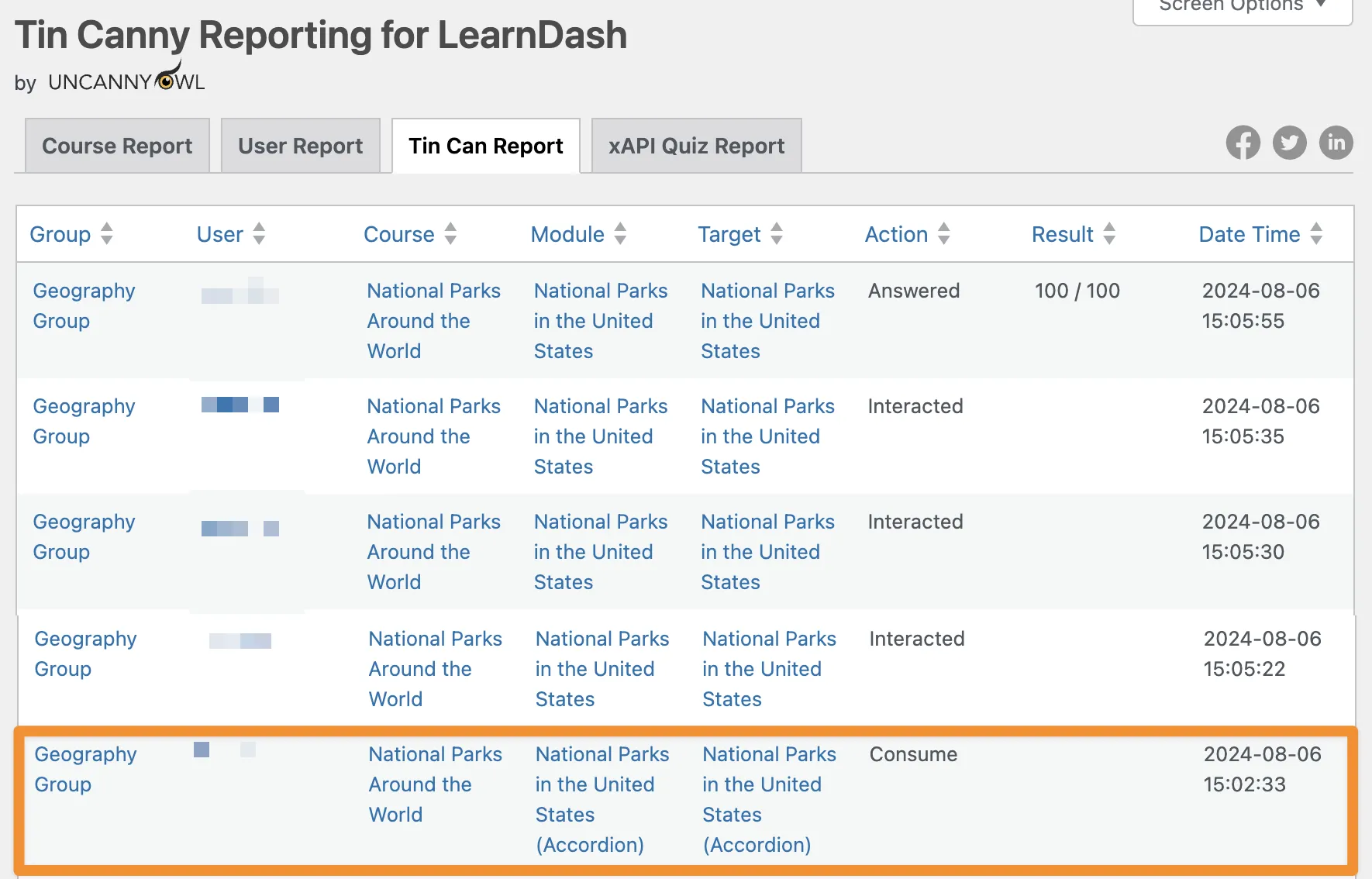
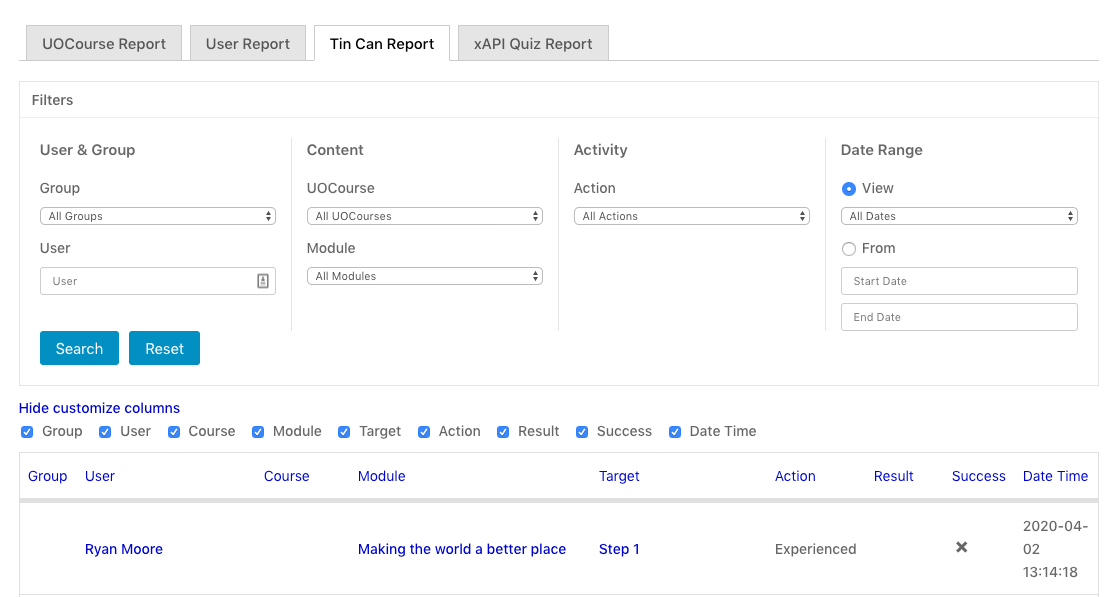
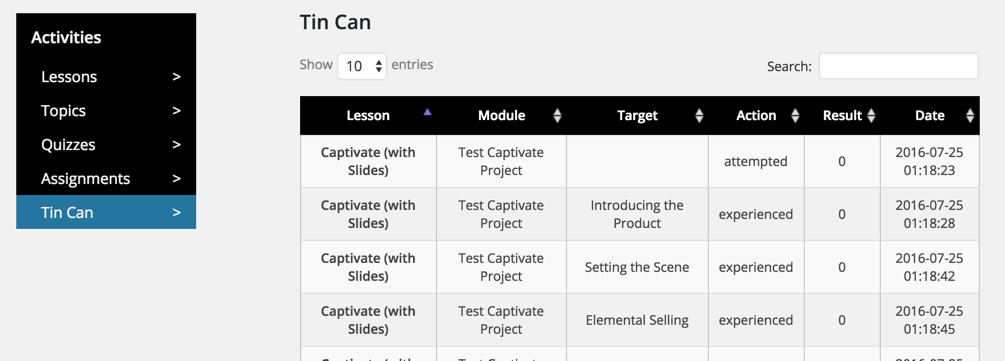
For example, the “Tin Can Report” allows us to track our users’ engagement with all kinds of H5P content, even if it does not contribute to course progression.
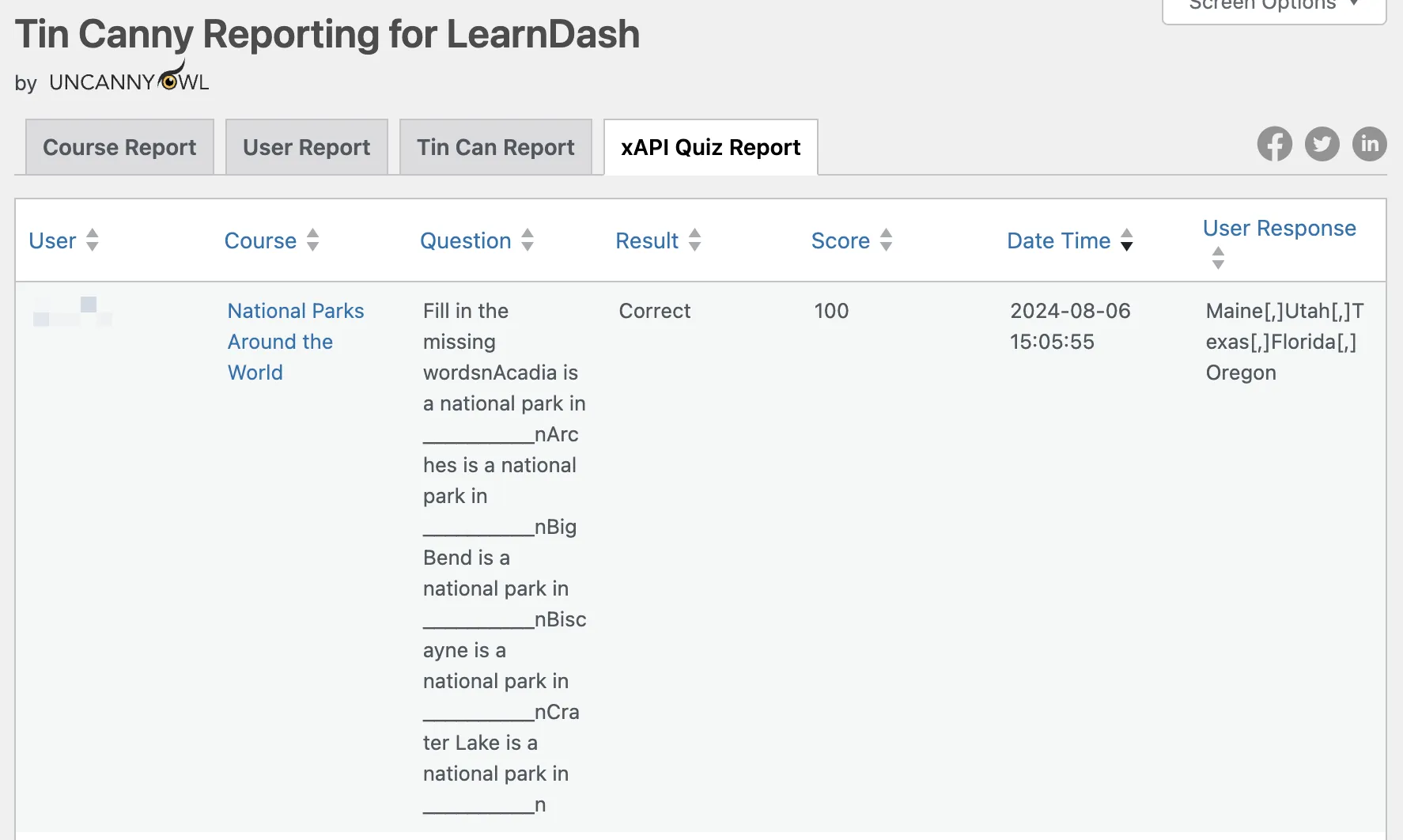
The “xAPI Quiz Report” is another powerful tool for tracking even more granular xAPI data such as a learner’s responses to H5P interactive content.
Tin Canny includes useful filters so that you can generate reports based on types of interactions, users, courses groups and more.
With Tin Canny, educators can generate comprehensive progress reports that detail each learner’s journey through a course. These reports include data on which H5P activities have been completed, scores achieved, responses given, time spent on each activity and much more.
So far, we’ve looked at embedding H5P interactive content into two types of LearnDash posts; lessons and topics.
But what if you wanted to embed H5P content directly into a LearnDash course post type? This would be the case if you had a simple course that did not consist of lessons and its subordinate topics.
On their own, H5P and LearnDash can’t accommodate such a scenario. But, with the Uncanny Toolkit Pro plugin, you can unlock more learning possibilities.
The Toolkit Pro plugin is designed specifically for augmenting and expanding LearnDash’s already impressive capabilities. If you’ve ever thought, “I sure wish LearnDash could do this,” there’s a good chance that the feature you’re looking for is in the toolkit—the Uncanny Toolkit.
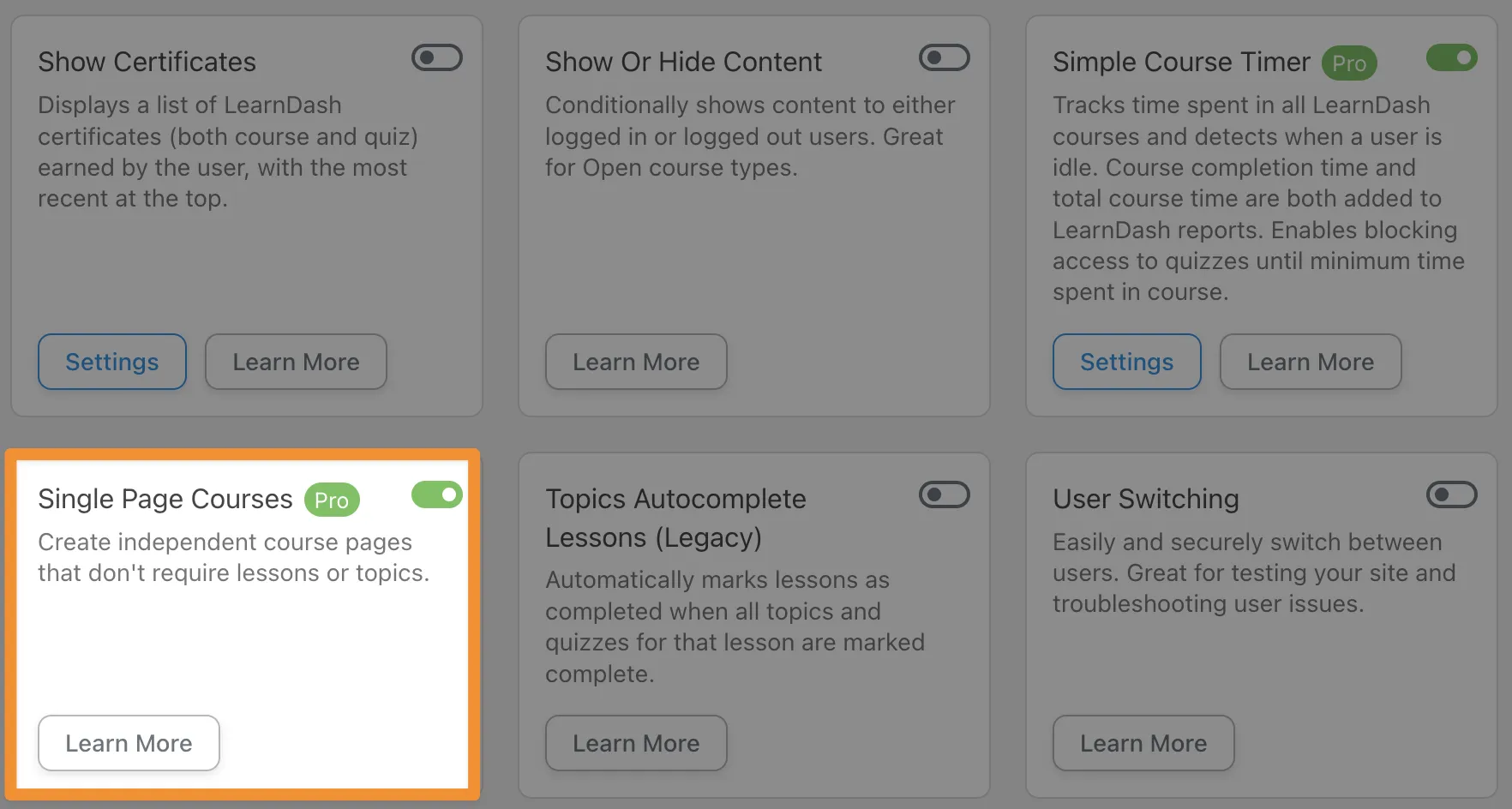
“Modules” such as “Group Expiration” and “Simple Course Timer” add much-needed functionality to a LearnDash website. However, it’s the “Single Course Pages” module that H5P users will find particularly interesting.
The module makes it possible for users to create LearnDash courses that do not include lessons or topics. With this module enabled, users can embed H5P/xAPI supported content directly into a LearnDash course and still track progress and completions.
Want to make a course out of an interactive video? Or an interactive video paired with a quiz that included a question set? You can make that happen with Tin Canny Reporting.
More H5P and LearnDash Integrations with
Automator
Still looking for more ways to integrate H5P and LearnDash? The Uncanny Automator plugin may just be the tool you’re looking for.
Automator is the #1 automation and integration tool for WordPress websites, allowing you to connect H5P content to your whole LMS ecosystem.
Using simple combinations of triggers and actions, you can do anything from sending an email in your preferred CRM to creating a card or task in Trello or ClickUp based on a learner’s journey.
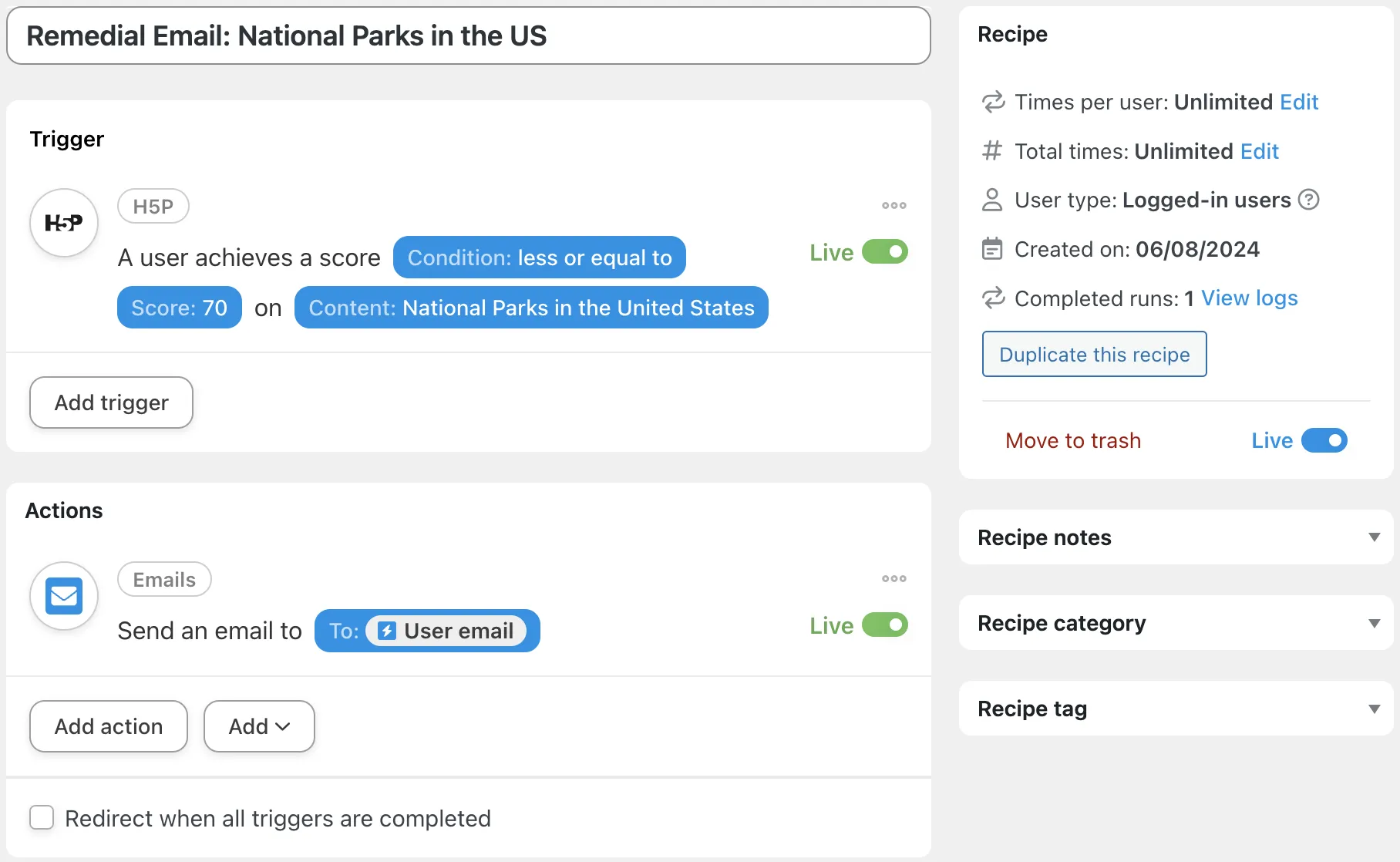
In the recipe pictured below, for example, we’re able to send an email to learners who score at or below a threshold with links to remedial content.

We could also choose from any number of LearnDash specific actions, from adding learners to groups or enrolling them in courses based on their H5P content completions.
By now, you’re ready to create just about any kind of interactive content and integrate it with your LearnDash courses. But, as you continue to use H5P and LearnDash together, here are some best practices to keep in mind.
1. All H5P Interactive Content Has a Place
Different types of H5P content serve different purposes. Even if a content type does not have xAPI support and will not contribute to course progression, it may still be a valuable tool for reaching course objectives.
2. Test Compatibility and Functionality
Before deploying H5P content in live courses, thoroughly test each interactive element to ensure it functions correctly within the LearnDash environment. Verify that xAPI statements are being correctly sent and received, and that the content tracks learner progress accurately.
3. Use Tin Canny Reports to Monitor Engagement
Regularly review the data and reports generated by Tin Canny Reporting for LearnDash to monitor learner engagement with your interactive elements. You can use engagement metrics to inform content creation in the future and improve learner performance.
1. All H5P Interactive Content Has a Place
How can I integrate H5P content with my LearnDash courses?
To embed H5P content into a LearnDash course:
1. Install and activate the H5P plugin on your WordPress website. 2. Create H5P content from the H5P Content menu. 3. Copy the generated shortcode for the H5P content. 4. Paste the shortcode into the LearnDash lesson(s) and/or topic(s) where you want the content to appear. 5. Add the lesson(s) and topic(s) with your H5P content to a LearnDash course.
This process allows you to integrate interactive H5P content seamlessly into your LearnDash courses, enhancing the learning experience.
Does progress in H5P and/or xAPI supported content equal progress in a LearnDash course?
Completion of H5P and/or xAPI supported content does not necessarily equal completion of a LearnDash course. LearnDash course progression is measured strictly by completion of the course’s lessons and subordinate topics. In other words, if a learner completed 50% of a lesson’s H5P/xAPI supported content, they would not have completed 50% of the course. This is true even if you are using the Uncanny Toolkit Pro plugin with the “Single Course Pages” module activated.
Which H5P content types can I use with LearnDash?
Technically, you can use any H5P content type with LearnDash. However, only the content types with xAPI support will contribute to LearnDash course progression. Check out our list of H5P content types with documented xAPI support above. Note, however, that this list is not exhaustive and subject to change with updates.
What is Tin Canny Reporting and why do I need it for H5P and xAPI content?
Tin Canny Reporting for LearnDash is an advanced reporting tool that provides in-depth insights into learner activities and engagement with interactive content. It is the only plugin for LearnDash-powered websites that will capture, collate and combine your LearnDash data with H5P and xAPI supported content data.
2. Test Compatibility and Functionality
Conclusion
3. Use Tin Canny Reports to Monitor Engagement
In this post, we’ve shown you how integrating H5P with LearnDash adds another dimension to your e-learning platform with interactive and engaging learning experiences.
This comprehensive guide walked you through the essential steps to integrate H5P content, explained the significance of xAPI, and highlighted the importance of tracking learner progress with Tin Canny Reporting.
https://www.uncannyowl.com/wp-content/uploads/2024/08/h5p-for-learndash-uncanny-featured-image.jpg330830Brendan Da Costahttps://www.uncannyowl.com/wp-content/uploads/2016/04/uncannyowl-logo-600.pngBrendan Da Costa2024-08-07 11:55:442024-08-07 11:55:53H5P for LearnDash: How to Create Interactive and Engaging Course Content
Give your students a new way to study and learn. Share LearnDash quiz results directly with students and give group leaders access to insightful quiz reports with Uncanny Groups, Tin Canny Reporting and Uncanny Automator.
Are you looking for a way to share your students’ quiz results? Or, maybe you want to give your group leaders and educators access to powerful reporting tools so that they can analyze quiz data.
Regardless of the reason, if you want to do more with your LearnDash quiz results, you’ve landed on the right page.
In this article, we’ll show you a handful of different ways to use your LearnDash data to empower group leaders and educators and optimize student learning. By the end of this article, you’ll have solutions for:
sharing quiz records with students and instructors via email, and/or private message in BuddyBoss, SMS, WhatsApp, and more,
Uncanny Automator is the #1 automation and integration plugin for WordPress websites. Using simple combinations of triggers and actions, you can create seamless workflows across your entire website.
When it comes to disseminating LearnDash quiz data, Automator offers unparalleled flexibility. Instantaneously share quiz results with students, group leaders and/or administrators across any number of your chosen platforms, including emails, BuddyBoss, Slack, WhatsApp, Twilio and more.
LearnDash Groups are an essential component of any LearnDash-powered elearning platform. For those administrators looking to improve the student and educator experiences, however, the Uncanny Groups plugin adds invaluable features.
Uncanny Groups gives LearnDash Group leaders, students and administrators new tools such as:
front-end group reporting, including essay and assignment management,
control for Group Leaders to add, edit and remove users,
individual and group sales for ecommerce (sell licenses to organizations and schools that they can manage themselves!)
Tin Canny is a powerful plugin, optimally designed to revolutionize the way elearning platforms track, disseminate and analyze data within their LMS. Developed with a focus on user-friendly functionality and robust data insights, Tin Canny puts detailed LearnDash data at your fingertips. You can also leverage SCORM / xAPI records and H5P data to drill down into quiz-level analytics and/or get summary level data.
With Tin Canny Reporting, users can seamlessly extract, manipulate, and visualize data from their LMS in as many ways as they choose. Whether it’s monitoring learner progress, assessing course effectiveness, evaluating engagement metrics or drilling down into quiz questions, Tin Canny Reporting provides the tools you need.
Empower your educators and administrators with Tin Canny Reporting to gain deeper insights into your LearnDash data.
Send Students a Copy of Their LearnDash Quiz Results with Automator
Quiz data can be an invaluable study aid for students and an important resource for educators. Automator puts that all-important quiz data right at your fingertips to disseminate as you choose.
In the Automator recipe pictured above, for example, we’re able to email quiz results directly to our students so that they can keep a record for themselves as a study guide for later on. We can then use features like tokens and filters to customize the email content (including which datum to send) and create a personalized learning experience.
Additionally, we can use Automator to help our students find immediate remedial assistance.
For example, in the recipe pictured below, we’re able to notify a student’s group leader if/when they fail a quiz. Using tokens, we can include information about the student’s quiz experience—such as how long it took them to complete the quiz and the number of times they’ve attempted it—to help group leaders give their students the assistance they need.
Recipes like these ones are just simple examples of how you might choose to share LearnDash quiz data with your students and educators. You can even integrate quiz results into your CRM, such as ActiveCampaign, Groundhogg and HubSpot to launch personalized engagement and improvement campaigns.
Want to give your students even more options for reviewing their LearnDash data? Scroll down to the Front-End Reports section for solutions that keep your students on your LearnDash-powered site.
Create Custom LearnDash Reports in Google Sheets and Airtable with Automator
External apps such as Google Sheets and Airtable allow you to perform powerful analyses of your LearnDash quiz data. With Automator, you can easily send all of your quiz results to these analysis-focused apps to keep track of your metrics, create custom reports and optimize your quizzes for student learning.
In the recipe pictured above, for example, we’re able to store all of our students’ quiz attempts in Google Sheets. We can store minute data such as their answers to specific questions and broader data such as the number of correct answers. Keeping track of metrics such as the average amount of time it takes our students to complete a quiz and the number of attempts they’ve made can help us to optimize our quiz content.
Additionally, Automator allows you to store your LearnDash quiz data in a relational database like Airtable so you can visualize quiz results in any number of ways. Click the image below to learn how to connect your WordPress website to Airtable.
Front-End Essay and Assignment Management with Uncanny Groups
Particularly in B2B sales, LearnDash group leaders often need greater access and control over their group’s content than administrators can reasonably give.
Fortunately, Uncanny Groups takes essay question and assignment access and grading out of the back-end of your WordPress website (i.e., out of /wp-admin/) and puts it comfortably on the front-end. Using a simple shortcode, you can give your LearnDash group leaders greater control of essay questions and assignments.
Essay Question Management: With the front-end management solution, group leaders can review essay questions submitted by users in their group, access the associated lesson, course, quiz or comments, grade and assign points to essay questions submitted by users in their group, and do a whole lot more.
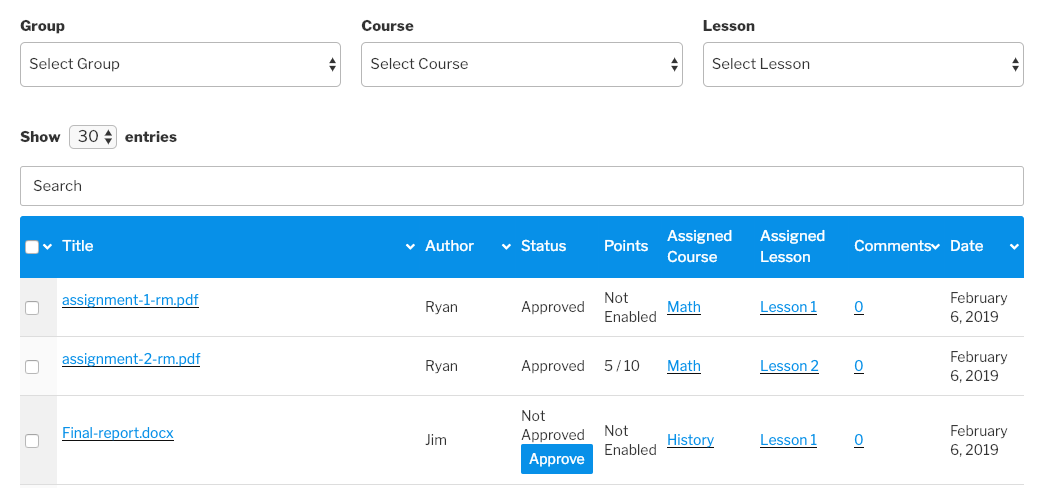
Assignment Management: Similarly, with the front-end management solution for assignments, group leaders can download and review assignments submitted by users, approve and assign points to assignments submitted by users, filter assignments by group, course, lesson and status (approved/not approved), and do a whole lot more.
Front-End Reporting with Tin Canny
Tin Canny puts versatile user, group, course and even question level reports directly on the front-end of your LearnDash-powered WordPress website. Click the links below to learn how to implement these solutions on your site for your students, group leaders and administrators. (Spoiler Alert: you’ll only need to copy and paste a shortcode or two!)
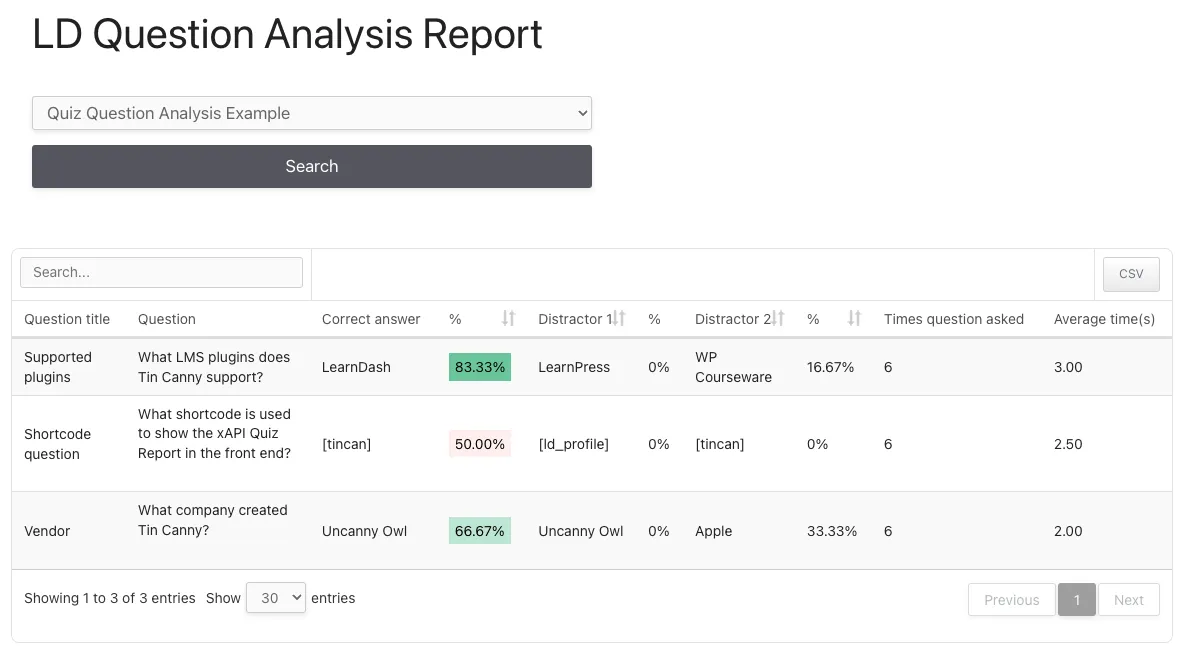
LearnDash Quiz Question Report: Ever wanted to optimize your LearnDash quiz questions? Want to know which single-choice, multiple-choice or true/false questions are too difficult or too easy? The Quiz Question Analysis Report gives LearnDash group leaders and WordPress administrators question-level data so they can optimize questions and improve student learning.
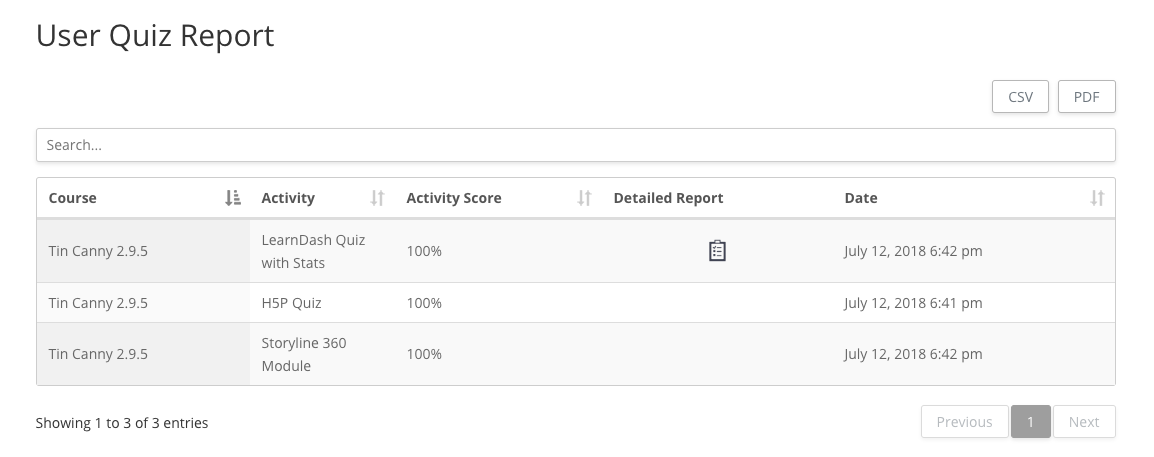
Front-End Quiz Report for Group Leaders: The front-end Quiz Report allows administrators and group leaders to view consolidated quiz data. If you’ve enabled quiz statistics, there will also be a link to detailed quiz results for that user and quiz attempt.
Front-End Quiz Report for Students: The User Quiz Report outputs LearnDash quiz scores across all courses for the user viewing the page. This report can be used by students, Group Leaders and administrators to see a consolidated list of results.
Detailed Quiz Report: If educators need to see all data for a quiz, across all courses and groups, the Detailed Quiz Report is the best option. This report outputs all quiz attempts by all students, and shows the most complete set of results for a specific quiz.
Conclusion
In this article, we introduced you to Uncanny Automator, Uncanny Groups and Tin Canny Reporting; three powerful tools for gathering, disseminating and analyzing your LearnDash quiz data.
We showed you some of the simple ways to share quiz data with your students and group leaders and store it in external apps such as Airtable. Next, we covered some of the versatile reporting features of Uncanny Groups and Tin Canny, including the types of data that you can collect and where you can include these reports.
Hopefully, you’re now feeling confident in your ability to gather the elearning data that matters most to you and your students. However, if you’re uncertain how exactly to generate the kind of data that you’re looking for, drop us a line in the comments section below.
Until then, happy learning!
https://www.uncannyowl.com/wp-content/uploads/2024/02/share-learndash-quiz-data-with-students-and-educators-featured-image.jpg330830Brendan Da Costahttps://www.uncannyowl.com/wp-content/uploads/2016/04/uncannyowl-logo-600.pngBrendan Da Costa2024-02-29 12:38:562024-02-29 12:39:05Share LearnDash Quiz Results with Students & Educators
Tin Canny 4.4 is now available, and the biggest new feature is the addition of a new type of LearnDash quiz report. There are also a number of usability improvements for existing Tin Canny users.
LearnDash Detailed Quiz Report
Yes, we have the Group Leader Quiz report in Tin Canny, and the Group Quiz report in Uncanny Groups, but we still invariably had requests for more quiz data presented in different ways. If an admin wanted to see records for users not in groups, or to identify users that hadn’t yet taken a quiz they were assigned, for example, it was very difficult to retrieve this data.
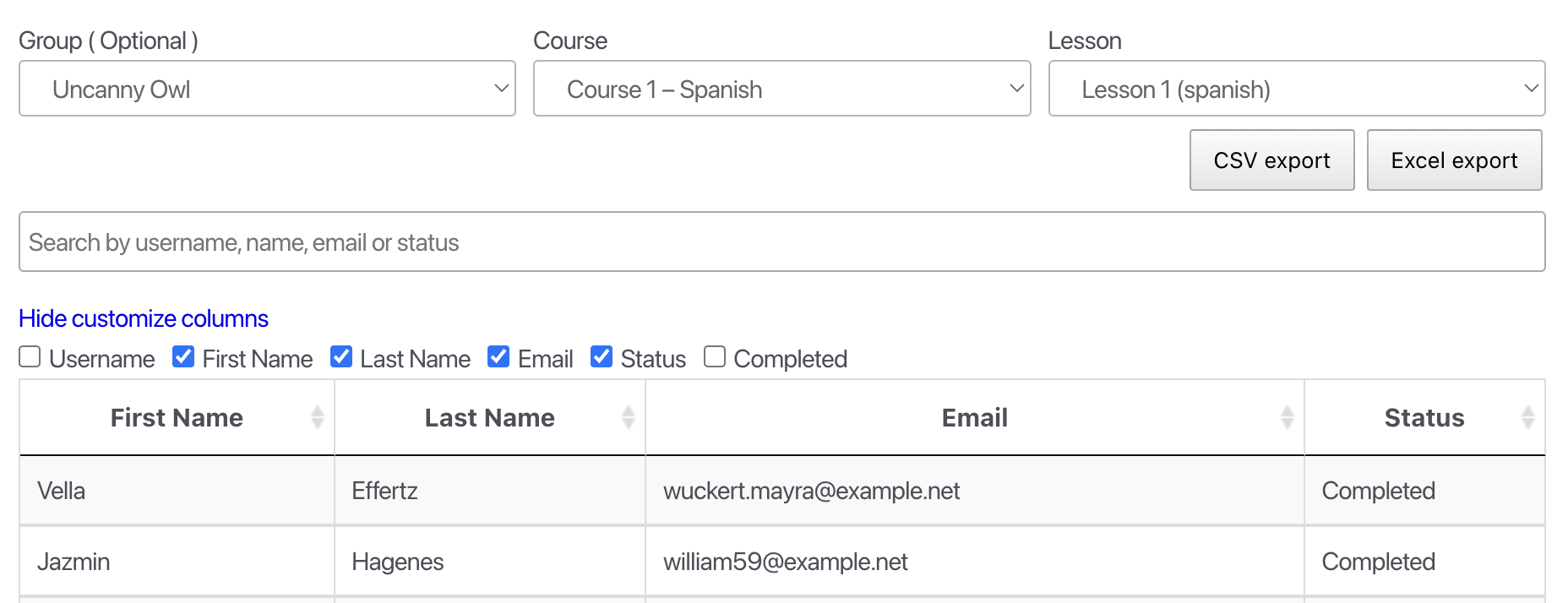
The new LearnDash Detailed Quiz reports offer a new alternative that removes some of these constraints. This is what it looks like:
There are a few key things to note in the screenshot above that differ from other quiz reports:
In the “Group” drop-down list, you can either choose a group or admins can show records for any group as well as users not in a group. This is a key difference, because most other reports are group-based.
There is no course selection. The report shows all records for a quiz, even if it’s included in multiple courses.
Columns are customizable.
Records are shown for all users with access to a quiz, not just users with quiz attempts. This makes it easy to identify users that haven’t yet completed quizzes but are assigned to them. If you don’t want this behaviour, you can easily turn it off by adding this filter to the functions.php file of your child theme:
add_filter( ‘uotc_quiz_report_hide_unattempted_users’, ‘__return_true’ );
All attempts are shown, not just the highest-scoring quiz attempt.
To use the new report, add this shortcode to any page:
[uotc_ld_quiz_report]
Besides the new report, there are a number of minor improvements, including showing the maximum file upload size when uploads are via full zip files, and removing the cancel button for full zip uploads (since the upload can’t actually be cancelled).
Over the years, a common challenge elearning course authors have had with WordPress is uploading and managing really large files. It’s not uncommon to see xAPI and SCORM file sizes in the hundreds of MB, and a few weeks ago, we helped a user with a file that was over 5 GB in size. The WordPress upload system wasn’t really designed for files of this size, so a few months ago we started building a completely different upload system for our Tin Canny users.
Introducing the new Tin Canny Uploader
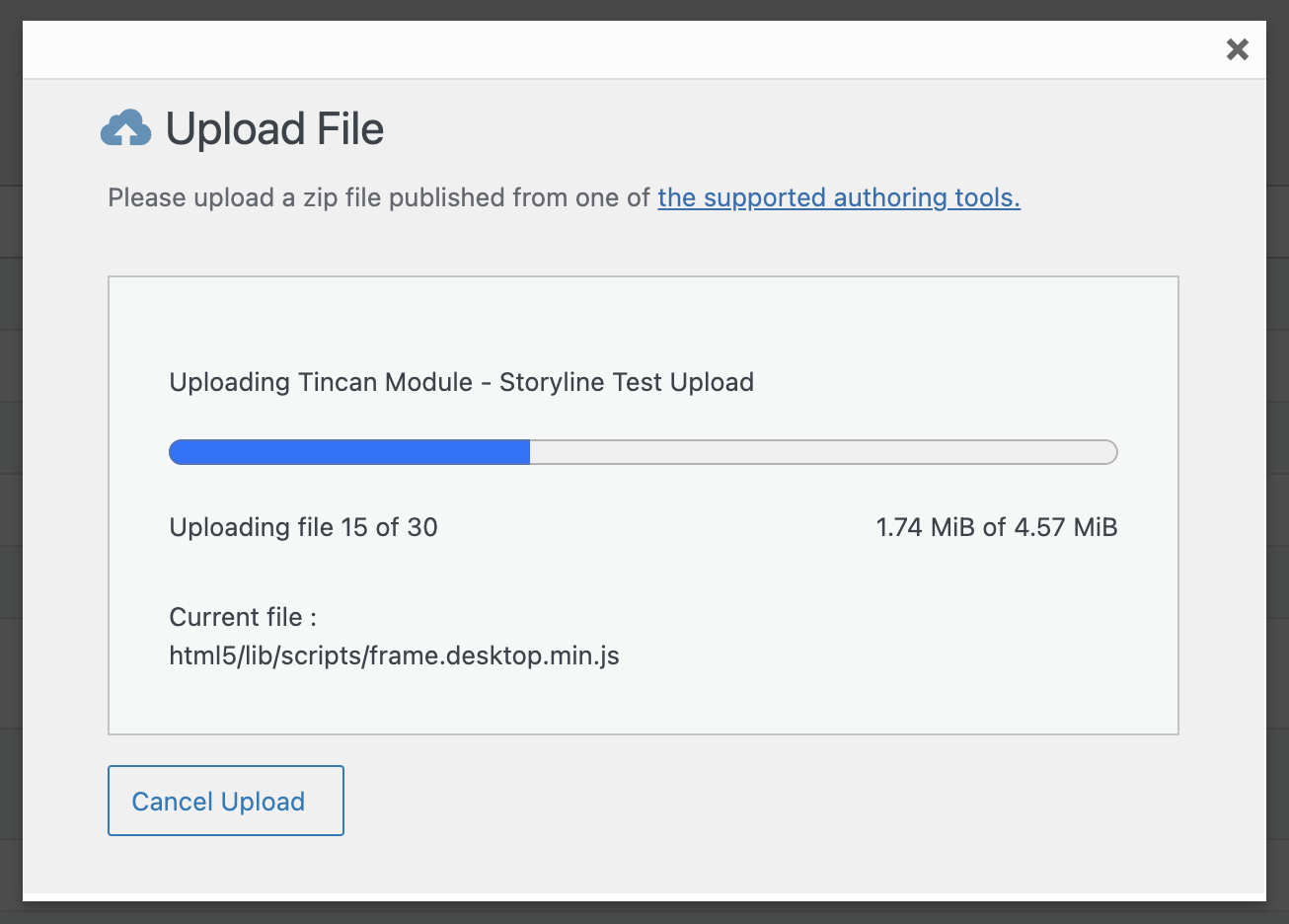
We’re excited to include the new uploader in our Tin Canny 4.3 release. This is what it looks like:
How it works is very different than the uploader in previous versions. Instead of relying on WordPress to upload a huge file to the website, then unzip and process it, the new uploader uses your browser to inspect files in the zip folder and upload them individually. For large files, they are uploaded in chunks. This approach ensures that all files, regardless of size, and even if the web server doesn’t support unzip extensions, should work without issue.
The new uploader works in all editors and page builders we currently support, as well as the Manage Content page in /wp-admin/. Modules uploaded with the previous tool will continue to work as before; the uploader will be used for new uploads.
Reporting tabs are separate pages
To help with some performance in the back end, reports in the Tin Canny menu (so the Course, User, Tin Can and xAPI Quiz report tabs) are now set up as separate pages rather than just different tabs on the same page. Everything will look the same and work the same way, but behind the scenes there are some different URLs (this may affect links if you used direct links to tabs in /wp-admin/).
Those are the highlights for the 4.3 release. We hope you find the changes helpful!
https://www.uncannyowl.com/wp-content/uploads/2023/05/Add-Custom-Columns-to-LD-Reports-Featured-Image.png330830Ryan Moorehttps://www.uncannyowl.com/wp-content/uploads/2016/04/uncannyowl-logo-600.pngRyan Moore2023-07-24 11:09:562023-07-24 11:09:56Tin Canny Update: New Uploader
We’re excited to announce that Tin Canny 4.2 is now available. It’s a big release with several new reports, performance improvements, new options for SCORM and xAPI users and some behind-the-scenes enhancements.
Lesson and Topic Completion Reports
We know that LearnDash site owners have faced challenges for years getting consolidated records for lesson and topic completions. For course completions, there are reports everywhere; we have different types of course completion reports in 3 of our plugins alone (Uncanny Groups, Tin Canny and Uncanny Continuing Education Credits). There’s no shortage of ways to find out whether or not a student has completed a course.
For lessons and topics, we offered a few ways to look up completions by user, but never for a group of users or all users. That’s what we’re adding in today’s Tin Canny 4.2 release.
To use the reports, just drop [uotc_lesson_report] or [uotc_topic_report] shortcodes onto a new page. Once that’s done, you’ll see something like this:
It’s as easy to use as it seems. Administrators or Group Leaders can just select a group, course and lesson (or topic) to see a list of everyone that has access to that lesson or topic and their completion status. Need to know which users in your group haven’t completed a specific lesson yet? Now it’s easy. The new shortcodes even support choosing which columns to display–including time data, if the Simple Course Timer module from Toolkit Pro is active.
New Completion Condition options
One issue we sometimes see on Tin Canny sites that use SCORM or xAPI assets is the uploaded modules not sending the verbs they expect, or no unique verb is sent at the end of a module. Maybe you’re one of those users and you have a module that just sends an “Experienced” verb for every slide, and what you really need is to tell Tin Canny, “Okay, I know every slide returns an Experience verb, but I need to unlock the Mark Complete button when there’s an Experienced verb for a specific slide.”
To use this new combined verb/target condition, just enter the name of the slide and the verb you want to target in the Completion Condition field of a lesson or topic page in this format:
uotarget TARGET_NAME::VERB
So if the slide name is “Slide 2” (make sure it matches what you see in the Tin Can report in the Target column) and the target verb is “attempted”, this would be your completion condition:
uotarget Slide 2::experienced
This is definitely for advanced users only, but it will help a lot of sites.
What else is new?
The Tin Canny Course reports had some big updates that change how we retrieve and populate data. With the availability of new LearnDash functions in (somewhat) recent versions, we changed some old queries to take advantage of improvements on the LearnDash side. If you have a huge number of users and saw performance issues or memory errors in the past, we hope you’ll try again.
Flywheel users will benefit from switching to a wp-load.php dependency to Ajax only for some xAPI and H5P behaviours, and there are several additional code improvements that will help all users.
At long last, the Tin Canny 4.0 release is now available! And it includes one major new feature that will transform what’s possible for small businesses running LearnDash sites: full SCORM and xAPI support.
Back when we originally launched Tin Canny it was an easy way for LearnDash sites to upload their modules from popular elearning tools like Articulate Storyline, Adobe Captivate and iSpring. Over the years we added support for Lectora, Quizmaker, H5P, Presenter, Rise… but all of that support was explicitly defined and we couldn’t offer fully SCORM or xAPI compliant solutions.
Introducing full SCORM and xAPI/Tin Can support
The 4.0 release should work with any standards-compliant SCORM 1.2, 2004 and xAPI / Tin Can file. It took us close to a year to get there, but the effort was absolutely worth it. Now we can stop saying “no” to people every time we get requests to add support for a custom authoring tool or something third party that we don’t support. Better yet, there’s no longer a need to ask! With this update, he’s a partial list of authoring tools we will be supporting with Tin Canny:
Camtasia
Elucidat
Adapt
Easygenerator
Of course, there are hundreds of authoring tools in the market and we have only been able to test a small number of them, but if you were part of our testing group and provided file samples (thanks to those of you who did, especially Dennis Hall!), we can confirm that Tin Canny 4.0 works well with all of those files. And, going forward, we will offer support for any SCORM and xAPI files, as long as they are standards compliant.
The rest of the 4.0 release is far less exciting (and how could it not be?).
Course and User reports will have improved performance on large sites and can now take advantage of object caching if it’s available. For some sites this will mean a huge performance difference ( note that cached results are only refreshed every 5 minutes), but unless you have at least several thousand users, the changes might not be as apparent.
There’s better translation support, LearnDash quizzes that were NOT linked to courses (it’s rare but does come up) are now shown in the front end quiz reports, and Tin Canny users not using SCORM and xAPI features will find fewer confusing references to those options. The rest of the changes can be reviewed at https://www.uncannyowl.com/knowledge-base/tin-canny-learndash-reporting-changelog/
https://www.uncannyowl.com/wp-content/uploads/2021/06/uo-blog-plugin-updates_lg-tin-canny-4.png330831Ryan Moorehttps://www.uncannyowl.com/wp-content/uploads/2016/04/uncannyowl-logo-600.pngRyan Moore2021-06-24 17:37:352021-06-24 17:37:44Expanded SCORM and xAPI/Tin Can support for LearnDash
It’s time for a new Tin Canny update! Version 3.6 adds support for microlearning using Single Page LearnDash courses, more flexible user details in reports, new column sorting options, a more visible X icon for modules in a lightbox and more.
Single page xAPI & SCORM LearnDash courses
Today’s Tin Canny 3.6 release adds support for something LearnDash and Tin Canny users have been wanting for years: the ability to build standalone courses with Articulate Storyline, iSpring, H5P and other module types without having to use LearnDash lessons and topics.
What does that mean? Well, with most (non-WordPress) LMS platforms, you can upload self-contained zip files and that uploaded module becomes the entire course. A user sees the course name, launches that uploaded course in a new window or lightbox, and that’s it — no digging into lessons or topics first, it’s just the course. LearnDash, however, normally requires that courses be structured into a hierarchy of WordPress posts that requires at least one “lesson” beneath a course. The SCORM or xAPI file would then be uploaded inside the lesson or topic, so students would have to click through a “course” level first that sometimes served no purpose.
Tin Canny 3.6 adds support for our Single Page Courses module in Toolkit Pro, allowing uploaded SCORM and xAPI files right to the course level while still allowing proper LearnDash tracking. Support is available for these content types:
Articulate Storyline
Articulate Rise
Adobe Captivate
iSpring
H5P
Lectora Inspire
The use of Single Page Courses for microlearning does require that the Toolkit Pro for LearnDash plugin be installed, active, and the module turned on.
Customizable user details in reports
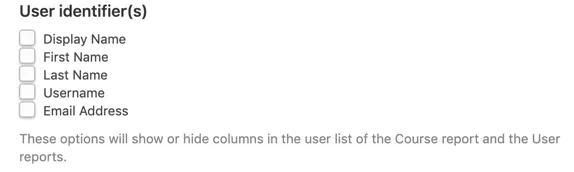
We’ve seen an increase in tickets with users not wanting to use our default “Display Name” record when we show student names in reports. Many sites would rather use first name and last name, perhaps even hide email address for privacy reasons. Tin Canny 3.6 allows site admins to choose which values and/or columns should be displayed in user listings of the Course and User reports with these settings:
Sort all columns in the User report
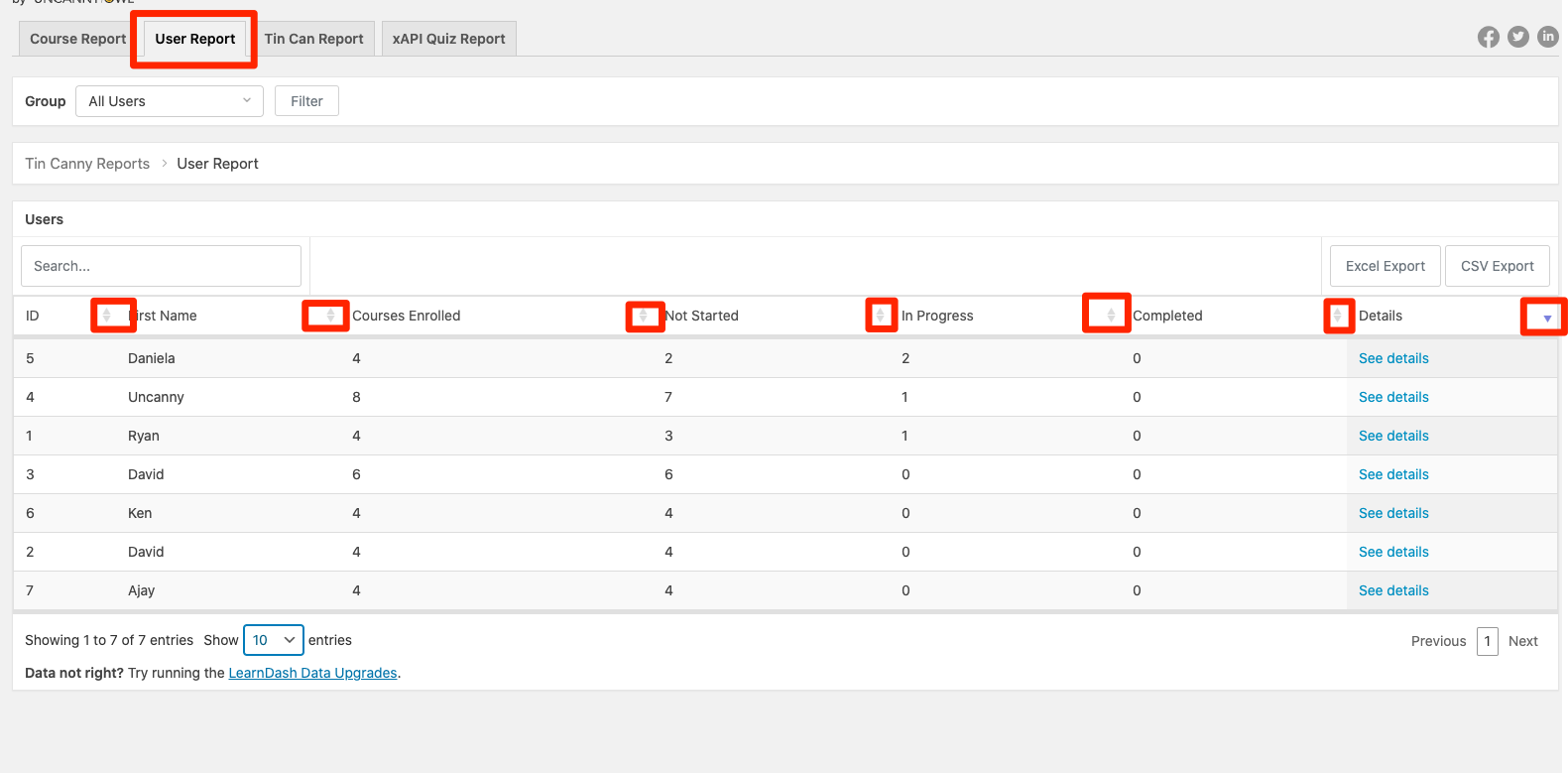
Adding the optional “Sort by % Complete” setting to User reports some time ago led to requests for sorting on other columns, as it should. This is still a setting we suggest using with caution on large sites, as there is a slight performance hit on load, but if Enable Sorting by % Complete in Tin Canny settings that all columns in the User report will become sortable. Look for the arrow icons in column headers when accessing the User report to sort by column and show current sort settings.
Other Tin Canny 3.6 changes
To round out this release, here are a handful of other highlights:
The Gutenberg block for Tin Canny content has a new Module ID indicator. This makes it a lot easier to reconcile uploaded modules in LearnDash courses with uploaded modules on the Management Content page in /wp-admin/ (useful when deleting content that’s no longer required or replacing modules with newer versions). With our Classic Editor support this was always easy, as the shortcode included the ID, but now management is easy with Gutenberg too.
We improved performance significantly in a recent update but on a very few number of sites (perhaps 2-3%) our old, slower method of tracking was preferred. There’s now a switch in the settings to use a compatibility mode if some Tin Canny uploads aren’t catching all statements when they’re closed.
Error messages are now more descriptive if an error is encountered during a Tin Canny module upload.
The Settings page has been completely reorganized.
The X icon to close modules in a lightbox has been made more visible.
As the Tin Canny 3.4 release goes out, the Uncanny Owl team is currently all working from home and sheltering in place. Like many other firms in the LearnDash space, we’ve been swamped with requests and tickets as more education goes online, and we’re doing our best to meet the demand.
Late last week, an agency in the UK approached us about work they were doing with part of the National Health Service. To support onboarding healthcare workers, they needed a way to get Lectora Inspire modules into LearnDash, specifically with Tin Canny. We’ve had a few requests for Lectora in the past, but not enough to justify the development effort (and adding support for new authoring tools does take a fair bit of time). Regardless, we wanted to help if we could, and between Friday and Wednesday of this week we built support for xAPI and SCORM 1.2 Lectora files.
Today’s release of Tin Canny 3.4 includes the Lectora support that we built for the NHS. It’s our first time working with Lectora Inspire but the data tracks well with Tin Canny
Tin Canny now also supports front end versions of the Tin Can and xAPI Quiz reports. Those reports, for Administrators and Group Leaders, make it easy to see records from uploaded SCORM, uploaded xAPI, and H5P modules. And with the customizable columns and filters, it’s now easier to get the right set of data (even when you might have millions of records).
For administrators that don’t want to give Group Leaders access to all of that data in the front end, there are switches to turn the reports on and off when you use the [tincanny] shortcode. Here’s how you can control it:
Tin Canny 3.4 is a big release, so we’re not done yet. Here’s what else is new that will help Tin Canny site owners:
Protection settings for uploaded modules are now available for non-LearnDash post types.
Support for Tin Canny uploads when using the Divi Builder
Performance of the Hidden and Autoadvance Mark Complete button integration is improved
We hope you find the changes and new Lectora support useful!
https://www.uncannyowl.com/wp-content/uploads/2020/04/lectora-tincanny.png2501200Ryan Moorehttps://www.uncannyowl.com/wp-content/uploads/2016/04/uncannyowl-logo-600.pngRyan Moore2020-04-03 13:42:412020-04-03 14:05:59Lectora Support and Front End Tin Canny Reports
Our Tin Canny LearnDash Reporting plugin offers the easiest way to add modules from tools like Articulate Storyline, Adobe Captivate, Rise, and iSpring to your LearnDash courses. It’s our second most popular LearnDash plugin and gives thousands of LearnDash sites xAPI and SCORM capabilities that rival bigger LMS vendors.
Since it was introduced, we gave LearnDash users a way to control progress in courses based on how learners interacted with uploaded modules. It was pretty simple: users could only click the LearnDash Mark Complete button to move forward if they completed, passed, or achieved some other condition inside the module.
For Tin Canny some users, that wasn’t enough. We got a lot of questions about Tin Canny like these:
Can we hide the Mark Complete button completely until the learner completes a module?
Can we change the text on the Mark Complete button if there’s Tin Canny content on the page?
Can we automatically mark the lesson/topic complete when the learner completes the module?
Can we automatically move the learner to the next lesson when they complete the module?
We wrestled with changes for a long time and couldn’t settle on the right way to handle autocompletion and autoadvancing for people that wanted those things. That led to some Tin Canny users adopting third party solutions, like Uncanny Automator.
Instead of coming up with a single solution, Tin Canny 3.2.2 offers—all of them!
Introducing the new Mark Complete Options
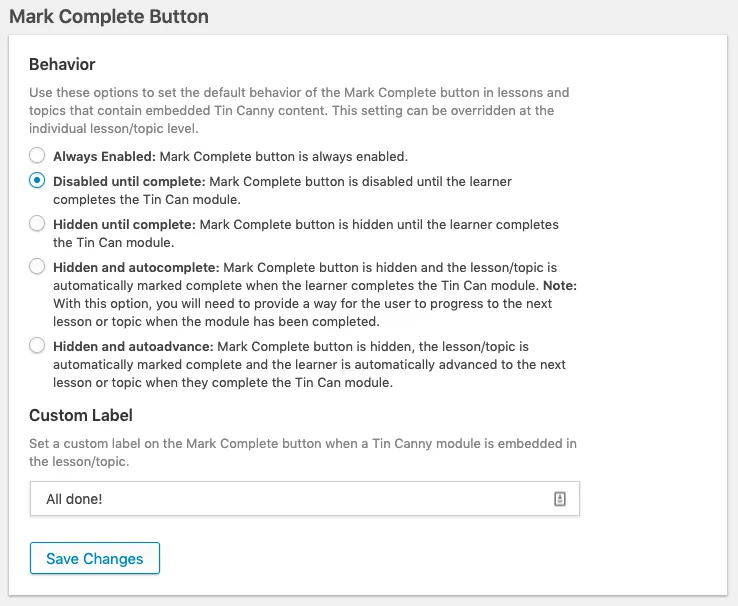
We heard your feedback and added every option we could think of to Tin Canny. They include:
Always Enabled: Mark Complete button is always enabled.
Disabled until complete: Mark Complete button is disabled until the completion condition has been satisfied. This is the current default behaviour when the Mark Complete control is turned on in Tin Canny.
Hidden until complete: Mark Complete button is hidden until the completion condition has been met. When the condition is met, Mark Complete appears.
Hidden and autocomplete: Mark Complete button is hidden and the lesson/topic is automatically marked complete when the completion condition has been met. (Make sure you have an intuitive way for users to know they finished the module and can move forward!)
Hidden and autoadvance: Mark Complete button is hidden, the lesson/topic is automatically marked complete and the learner is automatically advanced to the next lesson or topic when the completion condition has been met. (You may want to add an empty final slide or something similar so users aren’t automatically advanced when a results slide appears.)
For a full description of the options, visit our Knowledge Base. The options can be set globally from the settings screen, or individually at the lesson/topic level. We think these new options open some exciting new possibilities for an even more seamless learner experience.
These new options should address all requests that we’ve had for new behaviours in the Mark Complete controls, but as always, send us your feedback about how we can make things even better. Our goal is always to make Tin Canny the easiest and most feature-rich SCORM and xAPI solution for LearnDash platform!
https://www.uncannyowl.com/wp-content/uploads/2019/08/mark-complete-button-learndash.png125755Kenhttps://www.uncannyowl.com/wp-content/uploads/2016/04/uncannyowl-logo-600.pngKen2019-08-08 11:26:092019-08-08 12:07:54New Mark Complete Button Options in Tin Canny!
Today’s release of Tin Canny LearnDash Reporting added some extremely significant new features for anyone working with xAPI modules inside LearnDash. Because they are big changes and have not yet been tested extensively on live sites, for now we’re considering them “beta” additions and we recommend caution when trying them out.
Track xAPI Quiz Scores
The biggest change is that we now support collecting quiz data from xAPI records. For our current Tin Canny users, you know that in previous releases we collected scores and verbs from xAPI and SCORM records only. There were several reasons for this, but an important one was that earlier Tin Canny releases were not as efficient with very large sets of data and in early development we decided to capture and report on the most important data only so that we kept database records down and performance up. We estimate that around 10% of Tin Canny users requested that we add quiz data as well though, so now, in beta form, we’re making that option available.
Here’s what we came up with as a starting point:
This is going to be hugely beneficial to sites that offer quiz questions inside uploaded modules, because it now makes it possible to see specific questions in a quiz, the user’s answer, the choices available, the correct answer, and whether or not the user was right. Want to know who answered a specific question incorrectly? Now you can do that. Maybe you want to know how many users answered “C” for a specific multiple choice question? That’s also possible now. It’s a very big improvement, especially used in combination with the filters for LearnDash course, module, question, result and date.
And yes, we know that some of the columns are far too narrow for some quiz questions on sites. That’s why we made it possible to add and remove columns from the table using the Screen Options function at the top of the page. This one is really powerful and we haven’t seen anything like it from other xAPI tools.
Sorry SCORM users, the beta report for quiz data supports xAPI only, but we’re looking at SCORM support for an upcoming release.
Replace Content (beta), Site Check and More
Besides the lack of quiz data, the inability to easily swap out uploaded modules was a relatively common request from Tin Canny users. In previous versions, replacing a module meant deleting the old module, then uploading a new one and fixing all of the shortcodes if the module was embedded in multiple places. Now on the Manage Content page there’s a “Replace” link available for each module, which takes the new upload file, adds it, and replaces it in lessons and topics that used the old module automatically. If also deletes the old module and all related files. This feature should make a lot of users very happy. Please note that this feature is in beta, and requires the deletion of at least some of the stored progress data for users, so be sure to check the knowledge base article before using it on your site.
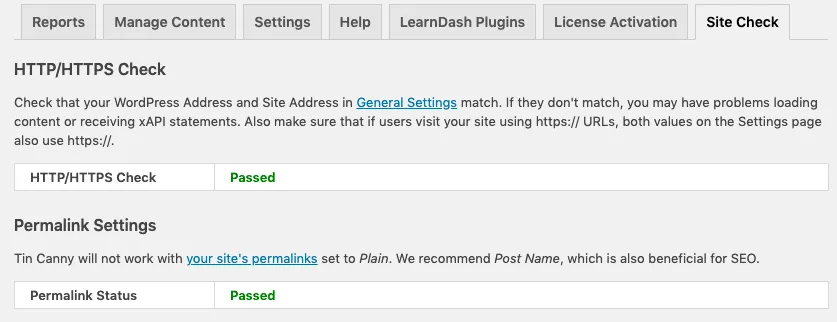
Next up, Site Check. We were getting too many of the same support requests over and over related to common environmental issues. Mark Complete button not updating? Something is probably blocking the endpoint, like a .htaccess password or security plugin. Content not showing up? Possibly an http vs. https mismatch. Nothing working? Maybe the permalinks are invalid. For some of these common issues, Tin Canny now offers a Site Check tool to rule out the most common problems, and if any are found, it suggests why they might be happening and how to fix them.
The 3.2 release also adds far more filters for developers, total course and learner stats to front end reports, and it takes care of a few additional translation issues (notably if you try to rebrand “Tin Canny”).
Most importantly: This update fixes an issue related to LearnDash 3.0 theme changes. If you use LearnDash 3.0 and controls over the Mark Complete button, you must use Tin Canny 3.2 or higher or the Mark Complete restrictions won’t work. LearnDash changed how the Mark Complete button is identified and the only solution is to update to the latest version.
We’ve had some big 3.0 plugin releases over the last few weeks, but today’s Tin Canny release is the biggest overhaul yet. It’s basically a complete rewrite of the reporting engine to improve performance and scalability on larger sites, with lots of smaller improvements and new features thrown in to round things out. Almost everything about reporting is now different, so if you’re an existing user, we highly recommend testing on a Staging site first.
Beyond the improvements behind the scenes, there’s a lot different on the front end too—starting with a complete redesign of all reports and charts. They’re far more mobile-friendly and easy to use.
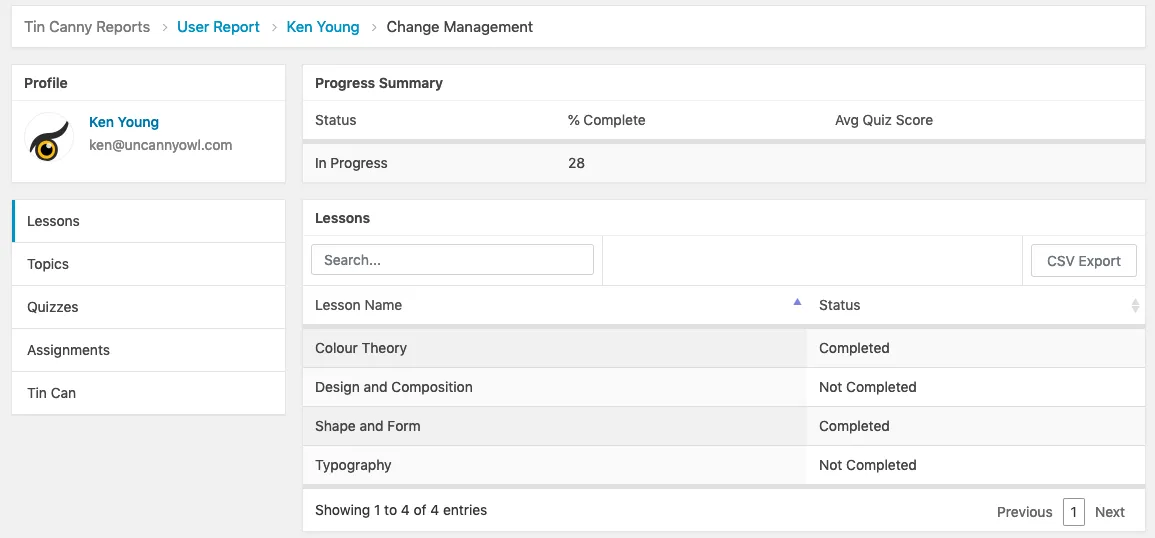
Breadcrumb links are new, and now individual user reports include Gravatar images if available for your users. This helps to personalize reports and make them more visually appealing.
Tin Canny hadn’t yet fully supported Adobe Captivate 2019, but now it does! The 3.0 release of Tin Canny will help you get more out of Captivate on your LearnDash sites—as will even more controls over resetting Tin Canny SCORM and xAPI records. Tin Canny 3.0 supports purging records for individual users. For testing purposes or clearing bad data, this is going to be a big help to a lot of sites that need to reset user records independently.
Rounding out the list of new features, Tin Canny users can now disable the Tin Canny dashboard widget to improve load times, and more Gutenberg block support has been added for the quiz reports.
Tin Canny 3.0 includes dozens of other behind-the-scenes improvements, including:
Support for additional H5P module types
Better navigation between reports, like going from Course > User > Course report for a user instead of Course > User > Course List > Course report
Improved compatibility with MySQL 8
Better notices when no data is available
Better translation support
Better consistency of data across courses and groups
Existing users: Please do consider testing this on a Staging or Development site before you deploy the release on your live site. Tin Canny 3.0 has been through a lot of internal testing but there may still be slight differences in report output compared to what you’re used to.
Are you ready for Gutenberg? Or, more importantly, are your plugins?
If you use Uncanny Owl plugins on your LearnDash site, you might be ready. Users of the Pro modules of the Uncanny LearnDash Toolkit, Groups, Continuing Education Credits and Codes plugins are all set with the latest versions available from our site without needing to update. But if you use Tin Canny, make sure to update to version 2.9.9 or higher to use the Tin Canny uploader! Without it, you will not be able to upload your SCORM and xAPI modules to your LearnDash courses.
Tin Canny 2.9.9 isn’t just about Gutenberg though. It’s a big release and the last update before the 3.0 release later this month, so we wanted to talk through some of the changes and what they mean for your site.
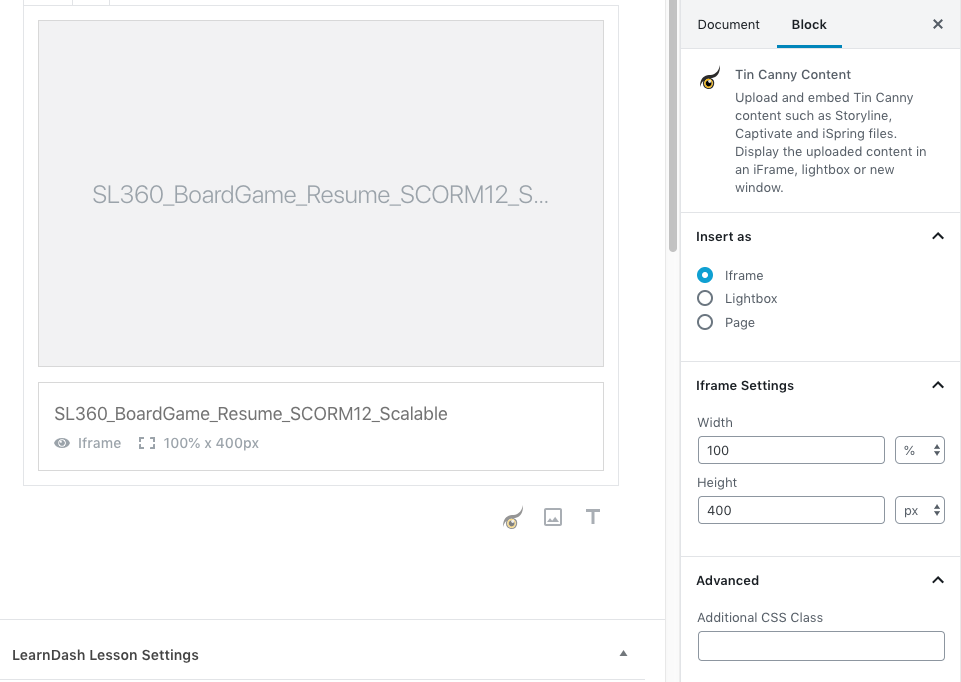
Most important is, of course, the Gutenberg uploader for Tin Canny. It’s completely different than what you’re used to seeing for Tin Canny.
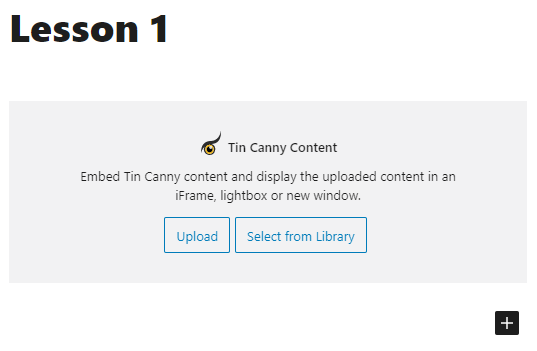
Uploading modules is now done in Gutenberg using the “Tin Canny Content” block. By clicking that, you can choose to Upload a new module or Select from Library any existing content.
All of the controls you’re used to for your modules are now displayed in the block settings on the right, including the settings you’re used to, like insertion type and dimensions.
And that’s it! Making the transition to managing your SCORM and xAPI with Gutenberg might seem strange the first time you do it, but it really is a simple transition once you’ve added 1 or 2 modules.
Outside of the Gutenberg-specific additions, we created a new page to find and manage your uploaded modules. The Manage Content page makes it easy to search through your uploaded Rise, Storyline, Captivate and iSpring modules, as well as preview them and delete them. No more having to dig through the Uploader tab in a post to look through and delete your modules (and we know many people didn’t even know that function existed).
There’s a lot more that’s new in the 2.9.9 release; here are some highlights:
An easy option to clear Answered and Experienced xAPI records from your database, freeing up space taken by these often less important verbs. (More data management records are coming in 3.0, including resetting Tin Canny data for individual users.)
Better support for the H5P Course Presentation content type.
Improved time zone support for the quiz reports.
The next big release will be 3.0, so stay tuned for more news on that in the near future!
One of our Tin Canny customers came to us with a great question: How can my instructors and students easily track performance across both LearnDash AND xAPI/SCORM modules? Tin Canny does a pretty good job with LearnDash results, but xAPI results are harder to analyze and none of our existing reports combine all scores together (LearnDash and xAPI). So, to help that client out, we created some new reports—and those new reports are now available in version 2.9.5 and higher of Tin Canny.
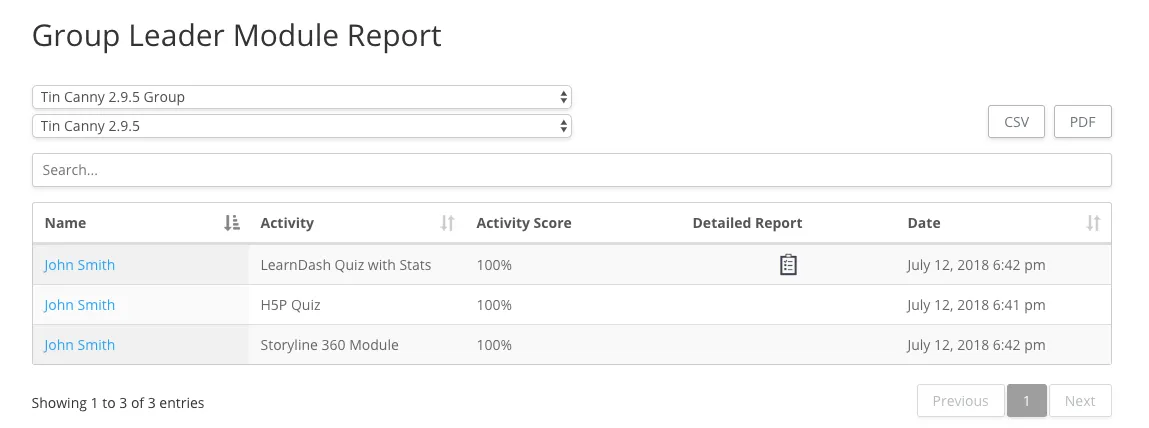
The first new report is a front end Group Leader quiz report. Administrators and Group Leaders can use the report to view LearnDash quiz and all scores tracked by Tin Canny (so H5P, iSpring, Adobe Captivate, Articulate Storyline and Rise) by group and by course. That means no digging into the Tin Can report in the back end and reconciling it with LearnDash quiz scores to get consolidated results. It’s all in a single report. Better yet, if quiz statistics were turned on for LearnDash quizzes, the new report also links to detailed quiz results, including a user’s answers and quiz times. (No such reports are available for Tin Canny scores, unfortunately, as those are LearnDash-only reports.)
Tin Canny users with version 2.9.5 or higher installed can add the new report to a page by using this shortcode:
[uo_group_quiz_report]
The second new report, also for the front end, outputs all scores for a particular user. Available to students themselves, Group Leaders and administrators, this one lists all LearnDash and scores tracked by Tin Canny across all courses.
Here’s the shortcode for the user quiz report:
[uo_individual_quiz_report]
The best part of the two reports is that they can be linked together for admins and Group Leaders using a shortcode attribute.
Here’s how to use it:
[uo_group_quiz_report user_report_url="%URL%"]
Just replace the URL in the example above with the URL that shows the new user report. And by doing that, all user names in the Group report will be linked to the user report with that person’s results. These 2 reports together make for a very powerful drill-down reporting solution for quiz scores, especially when paired with the CSV and PDF export options.
Please note that these 2 new reports are included in the Tin Canny LearnDash Reporting plugin only. It can be used without SCORM/Tin Can data as a LearnDash-only quiz reporting solution, but it is still only included in the Tin Canny plugin.
https://www.uncannyowl.com/wp-content/uploads/2018/07/new-tincanny-quiz-reports.png2731096Ryan Moorehttps://www.uncannyowl.com/wp-content/uploads/2016/04/uncannyowl-logo-600.pngRyan Moore2018-07-16 12:10:352018-07-16 12:45:45New Front End Quiz Reports
It’s been a constant request from LearnDash users ever since we started building WordPress platforms: “We need better front end reports.” End users don’t like CSV files. They also get confused in the back end, even if they’re Group Leaders. LearnDash users needed a better way.
Gradually some viable solutions started to appear in the LearnDash community. ProPanel add front end widgets a few months ago, and third parties like 247digitalclassrooms started to fill in some gaps. We added some compelling options ourselves, but after a year of countless requests, we’re finally bringing our most requested reports to the front end.
Front End Reporting Comes to Tin Canny
Version 2.2 of our Tin Canny LearnDash Reporting plugin adds the Course and User reports you’re familiar with in the back end to the front end. Group Leaders can finally access drill-down summary and student reports without requiring access to the back end of your WordPress site. On top of that, we have also added a filter for groups, so Group Leaders no longer have to look at combined data for all of their groups if they don’t want to.
It’s super simple to use the new front end reports. Simply drop a [tincanny] shortcode on any page of your site. If the user viewing the page is a Group Leader or Administrator, they’ll have access to the same reports they’re used to on the back end. (For technical reasons, the Tin Can report, which is separate from the Course and User reports, is still only available in the back end.) This is what it looks like:
Of course, the reporting tables appear below that, but we didn’t want to make the image too large here. When you do add the shortcode, we strongly recommend that you only use it on full-width pages and that no other content be on the pages. It’s a big report.
Other Front End Reporting Solutions
Tin Canny was what people have been asking for in the front end the most, but we do also have several other powerful front end reporting options.
Our Continuing Education Credits plugin adds a comprehensive public report that allows anyone to see and audit LearnDash course completion records. It’s explained in more detail here. Then our LearnDash Groups plugin adds front end course completion and quiz reports for Group Leaders. For both of those plugins, they do work as standalone reporting tools; you don’t need to issue CEU credits or sell group licenses if you just want the reports.
We’re pleased to be able to offer a diverse selection of front end reporting options for LearnDash users now, and we know our Tin Canny users will be especially excited about the new report shortcode!
https://www.uncannyowl.com/wp-content/uploads/2017/12/tin_canny_report_top.png3241104Ryan Moorehttps://www.uncannyowl.com/wp-content/uploads/2016/04/uncannyowl-logo-600.pngRyan Moore2017-12-08 23:42:552017-12-11 10:53:11Front End Reporting Solutions for LearnDash
It’s been a very busy 2 weeks in the LearnDash world.
Version 2.5 of LearnDash was released on November 7, bringing long-awaited features like a visual course builder and the ability to include lessons and topics in multiple courses. The latter is a fundamental change to how courses can be organized and developed.
For LearnDash users, the changes bring welcome new features and far more flexible ways to author courses. And for plugin developers like us, we have to rethink how course relationships work and find new solutions when there are significant architectural changes to the plugins we depend on.
For the last 2 weeks we’ve been working tirelessly to add proper support for LearnDash 2.5 to our plugins. This wasn’t always easy, as LearnDash changed how lessons, topics and quizzes mapped to courses—and with plugins as big and as complex as ours, we have a lot of code that has to look up course relationships, labels, and more.
We released a significant update to the Uncanny LearnDash Toolkit 2 weeks ago that addressed several 2.5 related issues and also added a simple new module for easy User Switching. That plugin has now crossed the 8,000 active installs barrier (yay!) and no issues tied to 2.5 have been reported. (As an aside, with 8,000 installs and only 6 reviews, I think we may have one of the lowest review to install ratios in WordPress; if you use the plugin, don’t forget to leave your review!)
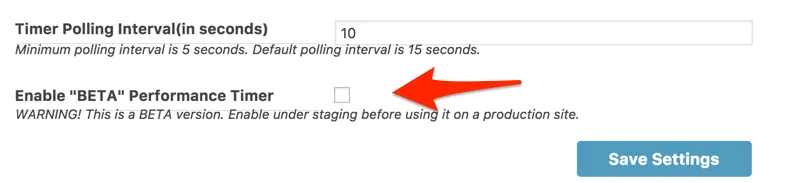
Last Wednesday we released a big update to Pro, addressing multiple 2.5 issues (with the timer, course expiry, group drip and autocompletion) and we added a completely new way to track time for courses. It’s still in beta, so we suggest testing it on Staging sites first, but it’s a more efficient way of recording time and can potentially reduce the resources used by our old timer by 80%. On less powerful sites where resources were already being pushed, we do suggest giving the new tracking method a try. And because it’s lighter, we do now allow a polling interval down to the 5 second level for increased accuracy (the previous limit was 10).
The update to our LearnDash Groups plugin was released on Thursday. It’s less related to 2.5 but covers a lot of fixes to our Groups plugin. It’s still our newest plugin and it receives the most feedback and suggestions for improvement, so if you use Groups, you should absolutely update. There are a lot of improvements.
The Tin Canny update with LearnDash 2.5 fixes was released earlier today. We had a lot of complications with this one to make sure course attributions were correct with the 2.5 changes, so it unfortunately took the longest to release.
That’s it! Those were a lot of plugin updates for us in a short span. Let us know if you do notice any new issues related to LearnDash 2.5 and we’ll happily take a look.
Wednesday’s update to our popular Tin Canny LearnDash Reporting plugin, which adds easy LearnDash and xAPI/Tin Can reporting to WordPress sites, introduced Group Leader access to the Tin Canny reports. With this change, LearnDash Group Leaders now have access to a powerful reporting tool to better understand the learning activities and training records of learners in their groups. Group Leaders can drill down into the courses and users assigned to their LearnDash Groups to see both summary and granular details about the activities of their learners.
As always, Tin Canny remains a back end reporting tool, making access consistent with ProPanel and LearnDash Group Leader tools. Access for Group Leaders is automatic; nothing needs to be turned on and Group Leaders can immediately see all existing records. Do note that Group Leaders see everything for their assigned groups as consolidated data, so if Group Leaders are assigned to multiple groups, they will see all data together in the LearnDash reports. (Tin Can reports can, as before, be filtered by LearnDash Group.)
We’re really excited with this release and it’s a very big change that took weeks of development. The new addition is going to make it a lot easier for Group Leaders to gain actionable insights about the activities of their learners. Combined with the SCORM support introduced in version 1.2 (which has seen a lot of positive feedback from users), Tin Canny is perhaps the most comprehensive reporting platform available for elearning in WordPress.
Be sure to check out the Tin Canny Knowledge Base articles, which have already been updated with information about the Group Leader changes. We hope your users find the addition of Group Leader support helpful!
https://www.uncannyowl.com/wp-content/uploads/2017/02/learndash-groups.jpg3271000Ryan Moorehttps://www.uncannyowl.com/wp-content/uploads/2016/04/uncannyowl-logo-600.pngRyan Moore2017-02-10 09:29:212020-11-26 15:20:58LearnDash Groups for Tin Canny
The Tin Canny LearnDash Reporting plugin has been a very interesting initiative for us. It opened up LearnDash in a bigger way to enterprise users and proved that it was possible to use WordPress as a viable Learning Record Store (LRS) with advanced reporting. Organizations around the world are now using it, but one thing that’s always been missing is a way to capture SCORM data inside LearnDash. Maybe a business had some content output to SCORM that they couldn’t republish to Tin Can/xAPI, or maybe they were using a product like Articulate Rise, which doesn’t even support Tin Can/xAPI. Whatever the case, today we’re very excited to announce that SCORM modules can be tracked natively inside WordPress with our Tin Canny plugin.
Please note that this is the first release for supporting all of this modules, so it’s a good idea to test your modules first and make sure data is being tracked as you expect it to be. The SCORM support is especially important to consider here, as what we’re doing is capturing the SCORM data and then using a wrapper to essentially translate it into Tin Can statements. This makes it reportable along with all Tin Can/xAPI data for consistency, but this also means it may look different than expected if you’ve been using another Learning Management System (LMS).
Version 1.2 of Tin Canny LearnDash Reporting includes all of these updates and more. We also added an easy way to clear all Tin Can data for testing purposes, additional quiz data validation and made some minor changes to user experience.
We hope you enjoy the addition to the Tin Canny plugin!
https://www.uncannyowl.com/wp-content/uploads/2017/01/SCORM-for-WordPress.jpg5721599Ryan Moorehttps://www.uncannyowl.com/wp-content/uploads/2016/04/uncannyowl-logo-600.pngRyan Moore2017-01-09 15:35:482017-03-06 14:38:24Introducing Native SCORM Support for WordPress
Yesterday marked the release of the ProPanel 2.0 plugin for LearnDash, which is a very exciting improvement for LearnDash users. We’re very pleased to see it available and it makes sense to include it on many of the LearnDash sites we support. Now that it is available, we expect to see a lot more questions from LearnDash users about whether it makes sense to use our Tin Canny LearnDash Reporting plugin or ProPanel, so in this post we’ll explain some of the differences and why one and/or the other might be appropriate for your site.
ProPanel 2.0
First, the 2 plugins are not directly competitive and they serve very different purposes. We fully expect to use both ProPanel 2.0 and the Tin Canny plugin on many of our sites. They actually work quite well together as complementary tools.
Our Tin Canny plugin is purely a reporting plugin for site administrators (at the moment). ProPanel 2.0 includes an invaluable tool for emailing learners by group and completion status, a learning activity stream, a Group Leader view, and easy access to assignments and essays. Tin Canny doesn’t do any of these things, and we never expect to add anything related to emailing, essays or assignments. If you rely on these things, you’ll want ProPanel.
Tin Canny, of course, does some things that ProPanel does not. The obvious, of course, is facilitating the upload and tracking of Tin Can modules, including Storyline, Captivate and H5P content. ProPanel doesn’t consider Tin Can/xAPI activity reporting. Our reporting also looks at activity trends and additional data points like time spent in LearnDash courses, quiz scores, specific activity inside a course, etc. Tin Canny is also going to push server load more, as it looks at a lot of data; it’s not recommended in shared environments where resources are limited, and it will provide the most value to large sites with a lot of users. If price is a consideration, our plugin is significantly more expensive than adding ProPanel.
In the end, both plugins can be invaluable additions to LearnDash sites, and choosing one doesn’t mean you can’t also use the other. The combination of both plugins really extends the reporting power of LearnDash.
https://www.uncannyowl.com/wp-content/uploads/2016/11/tin-canny-view.png7251197Ryan Moorehttps://www.uncannyowl.com/wp-content/uploads/2016/04/uncannyowl-logo-600.pngRyan Moore2016-11-16 11:58:002020-11-26 15:20:02ProPanel 2.0 or Tin Canny for LearnDash Reporting?
We’re continuously improving our plugins and making sure they’re the best possible products for our users. Unfortunately, sometimes we overlook communicating new features and talking about how they can make your LearnDash sites even better. Here’s what you may have missed over the last few months:
Pro Modules for Uncanny LearnDash Toolkit
In version 1.2 we added a new module to clearly label sample lessons. Out of the box it’s not always obvious to users which lessons are samples in LearnDash, so in tables that list lessons we add a very clear label and introduced controls styling that label. You can even change the text, so instead of “Sample” you could use “Preview” or “Free”. More information is available at https://www.uncannyowl.com/knowledge-base/sample-lesson-label/.
In version 1.3 we added a new quiz time control that restricts access to a quiz unless users have spent a certain number of minutes in a course. For courses where you need to prevent learners from completing a course unless they’ve spent a minimum amount of time within it, this can be invaluable. We also added some navigation controls that were removed in LearnDash 2.3 that make workflow more intuitive for learners when autocompletion behaviours are enabled. Finally, version 1.3 of the Pro modules plugin is more translation friendly.
Tin Canny LearnDash Reporting
In version 1.1 of the Tin Canny plugin, we added a new dashboard metric, CSV export options, more control over Mark Complete behaviours when Tin Can modules are present in a lesson/topic, and data for total time spent in a course (to supplement completion time. We’re very excited about all of the improvements, but version 1.2 will really change what’s possible for tracking elearning in WordPress—especially for our enterprise users. Stay tuned for most news in that area, because it will be a first for elearning in WordPress.
Coming Soon
Our next paid plugin will make it possible to manage free enrolment to courses and membership in LearnDash Groups in a much more polished and accurate way. We don’t want to give too much away just yet, but watch for an announcement in the next month. The new plugin represents the accumulation of months of development and has been used very successfully on 5 client sites.
Is there something you’d like to see next in the Pro plugin? The list below includes features we’re considering for the next release. Let us know what you would like most!
If you run one of the 2,500 LearnDash sites using our plugins, we could really use your help to make them even better.
First, we field a lot of support requests. If we’ve helped you with a question, it’s always extremely useful when you let us know if our guidance worked, especially if you posted on the WordPress.org support site.
Second, if you do use the free Toolkit, let us know how it helped your site by leaving a review in the WordPress repository. We do read them all and always appreciate feedback.
https://www.uncannyowl.com/wp-content/uploads/2016/11/tablet-class.jpg11482000Ryan Moorehttps://www.uncannyowl.com/wp-content/uploads/2016/04/uncannyowl-logo-600.pngRyan Moore2016-11-05 11:41:182017-03-06 14:39:23What’s New with Uncanny Owl Plugins?
The Tin Can API (also known as Experience API or xAPI) is a specification in learning technology that makes it possible to collect data about a wide range of learning activities. Similar to SCORM and AICC, the Tin Can API describes learning data in a consistent format so it is cross-platform compatible. This means different elearning authoring applications (such as Articulate Storyline and Adobe Captivate) and systems (such as a Learning Record Store) are able to capture and report on learning activities using a consistent vocabulary.
Why is Tin Can important?
Although SCORM (and the legacy AICC) are still the predominant elearning standards supported by most Learning Management Systems (LMS), they came about in a different era when elearning activities were limited to what happened in a single LMS. In the real world, of course, learners move around, use different devices in different locations, and do much of their learning outside of an LMS.
Tin Can was developed to address the need of learning beyond a single LMS. Mobile learning, simulations, games, and social learning are some of the things that can now be recognized and communicated well with the Tin Can API.
A Tin Can enabled authoring application (such as H5P, Storyline or Captivate) creates markers for learning activities that need to be recorded. When these activities take place, the elearning module sends secure statements in the form of nouns, verbs, and objects to a Learning Record Store (LRS).
The LRS records all of the Tin Can statements. An LRS can share these statements with other LRSs and turn the data into meaningful reports. An LRS can exist on its own, or interface with an LMS.
You may be wondering whether you need both an LMS and an LRS. The main function of an LRS is to store and report on learning records (not deliver learning), whereas an LMS includes many other functions (such as user management, content management, and assessments) that aren’t included in an LRS.
Do you need Tin Can in WordPress/LearnDash?
Out of the box, LearnDash does not track user progress or completion of elearning modules created with Articulate Storyline or Adobe Captivate, two industry-standard authoring programs that allow the creation of portable and interactive elearning modules. Authoring elearning directly in WordPress is not always the right fit, and sometimes it’s necessary to leverage software like Storyline or Captivate to create highly engaging content with elements that include branching, scenario-based case studies, simulations, or even games.
If your elearning content was (or will be) authored in Storyline, Captivate, or H5P and you would like to track learner interactions with such content and/or have it integrate with LearnDash, you will need a tool like the Tin Canny LearnDash Reporting plugin. This plugin includes an LRS that’s entirely native to WordPress (as well as advanced reporting tools, an upload tool and LearnDash integration). Just upload Storyline or Captivate zip files, or create your own H5P modules, and statements are automatically captured right inside an existing WordPress site. Combined with the most comprehensive reporting tools currently available for LearnDash, the Tin Canny LearnDash Reporting makes a powerful addition to elearning sites with more advanced reporting requirements.
https://www.uncannyowl.com/wp-content/uploads/2016/04/uncannyowl-logo-600.png00yuehchinhttps://www.uncannyowl.com/wp-content/uploads/2016/04/uncannyowl-logo-600.pngyuehchin2016-09-23 07:37:502017-11-28 15:04:39What Is Tin Can? Should You Care?
Uncanny Owl is very pleased to introduce the easiest way to incorporate Articulate Storyline, Adobe Captivate and H5P modules into LearnDash courses! We don’t just embed modules; we created the very first Tin Can (xAPI) Learning Record Store that’s completely native to WordPress. There are no other applications to install. No endpoints to configure, no complex upload tools, no segregated reporting or any of the other complications that have been historically required to track Storyline, Captivate and H5p modules in WordPress. Easy Tin Can/xAPI and LearnDash reporting is now available with the Tin Canny LearnDash Reporting plugin.
The Tin Canny LearnDash Reporting plugin is more than just a Learning Record Store. Capturing Tin Can statements is of no value unless there’s a great way to present the data—so we built a very powerful reporting tool that combines Tin Can data with all the rest of your LearnDash course data. In fact, even without the Tin Can piece, this is the most comprehensive reporting platform available for LearnDash sites. And that’s still not all—we wanted LearnDash and Tin Can integration to be as seamless as possible, so we modified LearnDash Mark Complete button behaviours so that they only appear after a user has completed all Tin Can modules on the page. (It’s all automatic; if are Tin Can modules on a page, we monitor Tin Can verbs to unlock the Mark Complete button at the right time.)
Everything that’s needed for effective Tin Can use is included in the plugin, from a Storyline and Captivate upload tool (that detects Tin Can vs. non-Tin Can automatically and parses XML files for slide names) and a Learning Record Store to dashboard, course, user and Tin Can reports. Simply install the plugin and everything is ready to go. In fact, the only setting is to toggle whether or not to use Tin Can (as this plugin is also a fantastic LearnDash reporting tool without Tin Can).
The reporting capabilities really can’t be understated. Here are just a few new metrics that are available for LearnDash courses in the drill-down reporting tool:
And on the Tin Can side, all of the following are available as report filters:
LearnDash Group
User
Course
Tin Can Module
Verb/Activity
Date Range
Head over to our Knowledge Base articles to read more about how the upload tool, LRS and reporting tools work.
At the time of writing, this is the first release of a very large plugin. We wanted to get the plugin out to users as soon as possible, so there a few features that we’ll be adding in the near future to round out the plugin. They include the following:
Group Leader reports (right now they’re for administrators only)
Additional export functions
A report builder that lets you choose your own columns and filters
Controls for disabling the Mark Complete integration (it’s currently forced if Tin Can is on a page)
These are all coming in the near future! We will also be making performance improvements to query millions of records in under 5 seconds. Development testing included data for 10,000 learners, but we know we can make report generation even faster.
Please also note that the Learning Record Store is ONLY for on-site use (there is no endpoint for external Tin Can data) and has been built specifically to support Storyline, Captivate and H5P modules only.
https://www.uncannyowl.com/wp-content/uploads/2016/08/tin_can_dashboard.png3831076Ryan Moorehttps://www.uncannyowl.com/wp-content/uploads/2016/04/uncannyowl-logo-600.pngRyan Moore2016-08-22 14:14:152022-01-04 10:16:56A Tin Can LRS and LearnDash Reporting for WordPress!
Update: Our Tin Can/XAPI LRS plugin with LearnDash reporting is now available. Read the announcement.
We’ve seen a lot of excitement for Tin Can use in WordPress in the past but very little use of it in the real world. After all, every Tin Can solution relied on a reporting application outside of WordPress. It meant segregating reporting and figuring out how to send Tin Can statements externally, plus reports tended to be too granular and not practical. Many LRS solutions obfuscated code and prevented customizations, so making improvements was impossible. We discouraged Tin Can use for our clients because capturing data—and, more importantly, making the data meaningful—was just too cumbersome. Of course, the lack of a viable Tin Can solution also meant that WordPress wasn’t a useful platform for larger organizations that tended to create elearning modules with tools like Articulate Storyline, Adobe Captivate and others.
We decided it was time to add Tin Can to WordPress. We just finished building a complete Learning Record Store (LRS) that’s entirely native to WordPress. It captures Tin Can statements with no configuration. Just upload Storyline or Captivate zip files, or add H5P modules, and statements are automatically captured right inside an existing WordPress site. And it integrates seamlessly with LearnDash, the leading WordPress LMS plugin.
Please note that all images in this post may change before the final release but were all generated with our plugin from live data. Additional charts will be added before release.
Of course, Tin Can data isn’t of much use unless it’s feeding a robust reporting platform. We built that too! We’re still wrapping up the reporting work, but it’s going to add a lot of insight to administrators of elearning programs powered by LearnDash. It fact, it reimagines reporting for LearnDash data in a big way. Here are just a few of the metrics you’ll be able to see with our reporting:
Average completion time of every course
Tin Can statements by verb, LearnDash Group, module, user, or almost any other combination you can think of
Course completion trends
Tin Can statement trends
There’s a lot more available, of course, but the metrics above are examples of data that was never before available for LearnDash courses. There are also drill down capabilities, so you can start from a view of overall course activity and click down to seeing which topics have been completed by a particular user. It’s all inside WordPress too—there are no CSV files or external applications to worry about. We support instant sorting, filtering and searching inside javascript data tables too.
The plugin will be available before the end of August, 2016. We’re very excited about it, but it’s also new territory for us and we want to make it as useful as possible to people using Tin Can modules in WordPress. Do you use Tin Can on your LearnDash sites, or are you considering it? Tell us what we can do to improve Tin Can in WordPress in the comments below!
https://www.uncannyowl.com/wp-content/uploads/2016/08/course_table.png2981136Ryan Moorehttps://www.uncannyowl.com/wp-content/uploads/2016/04/uncannyowl-logo-600.pngRyan Moore2016-08-15 15:16:132016-08-26 07:58:43Tin Can for WordPress is Coming!
The cf_use_ob cookie informs Cloudflare to fetch the requested resource from the Always Online cache on the designated port. Applicable values are: 0, 80, and 443. The cf_ob_info and cf_use_ob cookies are persistent cookies that expire after 30 seconds.
session
__cfwaitingroom
The __cfwaitingroom cookie is only used to track visitors that access a waiting room enabled host and path combination for a zone. Visitors using a browser that does not accept cookies cannot visit the host and path combination while the waiting room is active.
session
cf_chl_rc_i
These cookies are for internal use which allows Cloudflare to identify production issues on clients.
session
cf_chl_rc_ni
These cookies are for internal use which allows Cloudflare to identify production issues on clients.
session
cf_chl_rc_m
These cookies are for internal use which allows Cloudflare to identify production issues on clients.
session
__cfruid
Used by the content network, Cloudflare, to identify trusted web traffic.
session
__cf_bm
Cloudflare's bot products identify and mitigate automated traffic to protect your site from bad bots. Cloudflare places the __cf_bm cookie on End User devices that access Customer sites that are protected by Bot Management or Bot Fight Mode. The __cf_bm cookie is necessary for the proper functioning of these bot solutions.
session
__cflb
When enabling session affinity with Cloudflare Load Balancer, Cloudflare sets a __cflb cookie with a unique value on the first response to the requesting client. Cloudflare routes future requests to the same origin, optimizing network resource usage. In the event of a failover, Cloudflare sets a new __cflb cookie to direct future requests to the failover pool.
session
_cfuvid
The _cfuvid cookie is only set when a site uses this option in a Rate Limiting Rule, and is only used to allow the Cloudflare WAF to distinguish individual users who share the same IP address.
session
cf_clearance
Whether a CAPTCHA or Javascript challenge has been solved.
session
__cfseq
Sequence rules uses cookies to track the order of requests a user has made and the time between requests and makes them available via Cloudflare Rules. This allows you to write rules that match valid or invalid sequences. The specific cookies used to validate sequences are called sequence cookies.
session
cf_ob_info
The cf_ob_info cookie provides information on: The HTTP Status Code returned by the origin web server. The Ray ID of the original failed request. The data center serving the traffic
session
These cookies are needed for adding comments on this website.
Name
Description
Duration
comment_author
Used to track the user across multiple sessions.
Session
comment_author_email
Used to track the user across multiple sessions.
Session
comment_author_url
Used to track the user across multiple sessions.
Session
Easy Digital Downloads is a WordPress plugin for selling digital products effortlessly and managing transactions.
Name
Description
Duration
edd_session_
Stores information about the current user session.
Session
edd_items_in_cart
Stores information about the cart contents.
Session
These cookies are used for managing login functionality on this website.
Name
Description
Duration
wordpress_test_cookie
Used to determine if cookies are enabled.
Session
wordpress_logged_in
Used to store logged-in users.
Persistent
wordpress_sec
Used to track the user across multiple sessions.
15 days
Stripe is a payment processing platform that enables businesses to accept online payments securely and efficiently.