
Whether you’re onboarding new hires, rolling out annual compliance training, or upskilling a department, Uncanny Groups gives you a structured way to organize learners, hand day-to-day management to the right people, and prove who completed what.
The challenge with team training
Training a team in plain LearnDash quickly gets messy. You end up managing every enrollment yourself, you can’t easily see who’s behind, and there’s no clean way to let a department head run their own group. For onboarding and compliance, you also need evidence of completion you can stand behind.
Uncanny Groups solves all of this by mapping naturally onto how organizations already work: teams, managers, and reporting lines.
Organize learners the way your org actually works
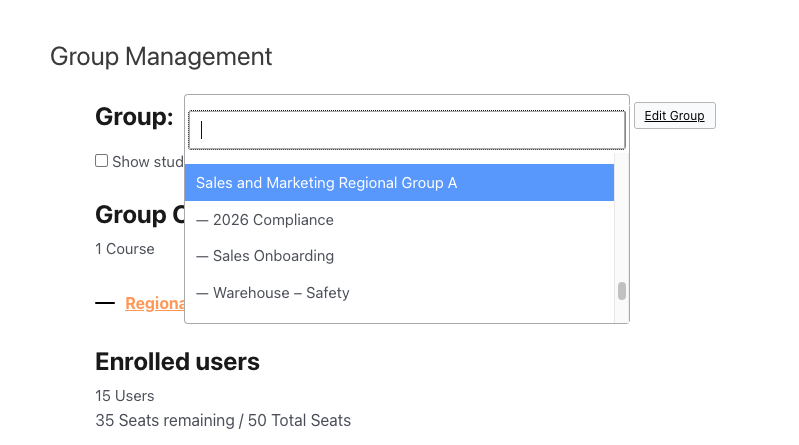
Create a group for each team, cohort, department, or location — “Sales Onboarding”, “2026 Compliance”, “Warehouse – Safety”. Each group has its own courses, its own members, and its own leader. Parent and child groups let you mirror a larger structure (e.g. a regional group containing several store-level groups) and roll child-group progress up into the parent’s reports.
Delegate management to team leads
You don’t have to be the bottleneck. Assign a Group Leader — a manager, team lead, or HR coordinator — and they get a front-end page to:
- Add new hires and remove people who leave.
- Send invitations and password-reset emails.
- See exactly who has and hasn’t finished.
All of this happens without WordPress admin access, so you keep your dashboard locked down while still empowering managers. See Using the Group Management Page.
Prove completion for compliance and audits
For mandatory training, “I think they did it” isn’t good enough. Group Leaders and admins can pull course and quiz reports showing each learner’s status and scores, and export them to CSV for HR records or audits. See Using the Group Reports.
Tip: Pair Groups with Uncanny Continuing Education Credits when you need to award and track formal credits, or with Tin Canny Reporting for deeper, site-wide analytics.
Onboard new hires on autopilot
New people join all year round. Instead of manually enrolling each one, a manager simply adds them to the onboarding group — they’re enrolled in the right courses instantly and receive a welcome email with their login. As they finish, the manager watches progress fill in on the same page.
Why this wins
- Less admin for you — managers run their own teams.
- Clear accountability — every learner’s status is visible to the right leader.
- Exportable completion records — pull status, scores, and completion dates to CSV for your HR or compliance files.
- Scales cleanly — parent/child groups handle multi-team and multi-location structures.
How to set it up
- Install Uncanny Groups — see Getting Started.
- Create a group per team and enroll the relevant courses.
- Assign each team’s manager as the Group Leader.
- Have managers add their team members by invite or CSV.
- Use reports to track completion and export records.