
How does Uncanny LearnDash Groups manage user roles?
Uncanny Groups adds the Group Leader role on top of a user’s existing roles rather than replacing them. Some sites don’t natively support users having multiple roles, so editing a Group Leader’s profile in the WordPress backend can strip the Group Leader role. If you manage roles manually, install a plugin like User Role Editor that supports multiple roles, so all permissions are preserved when profiles are updated.
Can I show content to specific groups?
Yes. Use the restrict-content shortcode:
[uo_groups_restrict_content user_groups="123"]Welcome![/uo_groups_restrict_content]Target multiple groups by separating IDs with commas. To find a group’s ID, edit the group as an administrator and read the number in the URL’s ?post= parameter.
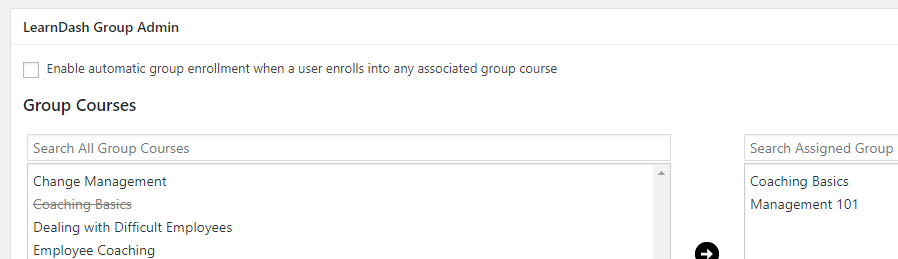
Why are users randomly being added to my groups?
LearnDash has an automatic group-enrollment setting that’s rarely useful with Uncanny Groups. Keep it disabled so group membership stays under your control.
Can I sell courses to individuals as well as groups?
Yes. Install the official LearnDash WooCommerce integration and create Course-type products for individual sales. Group Course products can also be sold to individuals for single-seat enrollment.
Do Group Leaders have access to courses?
You decide. A setting controls whether group leaders are also enrolled as group members — useful when a leader manages a group but doesn’t need to take the course themselves.

Why can’t my Group Leaders add courses to their group?
The Add Courses button only appears for groups created through the Custom Group License process. It isn’t available for pre-configured licenses (including subscription licenses), or manually created groups.
Why can’t my Group Leaders add seats to their group?
The Add Seats button is available only for groups created through a Custom Group License or a pre-configured license. It isn’t shown for manually created groups.
Why can’t a Group Leader see their group on the Group Management page?
Groups created in LearnDash’s native interface must be upgraded before they appear on the front-end Group Management page. See Upgrade Existing LearnDash Groups.
Why can’t I find my group options after updating WordPress?
WordPress 7.0 redesigned the block editor and, by default, hides classic plugin metaboxes behind a collapsed “Meta Boxes” pane. After upgrading, some group options could appear to be missing for that reason.
As of Uncanny Groups 6.1.8, every Uncanny Groups setting for a group is grouped under a dedicated Uncanny Groups tab at the top of the group’s edit page — so they’re always easy to find. Open a group under LearnDash LMS > Groups and click the Uncanny Groups tab. If you’re on a version older than 6.1.8, update to 6.1.8 or later, or open the Meta Boxes pane in the editor to reveal the options.
WooCommerce orders must reach Completed status to trigger group creation and enrollment. Orders stuck in Processing won’t create a group. An autocompletion plugin (such as Autocomplete WooCommerce Orders), or the plugin’s auto-complete setting for virtual products, resolves this.