
Overview
Pre-configured licenses are ready-made group packages you define in advance — a fixed course bundle at a set per-seat price, like “Compliance Training – 25 seats.” Buyers simply pick a quantity and check out; the group is created and they become its Group Leader automatically. It’s the simplest way to sell predictable team packages.
When Uncanny Groups and WooCommerce are both active, you get two product types:
- LearnDash Group Course — the individual course(s) that can be sold into groups.
- LearnDash Group License — the purchasable package that bundles seats with one or more Group Courses.
A pre-configured license is a Group License Admins build, so the courses and pricing are fixed before the buyer arrives. (Prefer to let buyers choose their own courses? Use custom group licenses instead.)
Prerequisites
- Uncanny Groups installed — see Getting Started.
- Your LearnDash Group Course products created first.
Choose a license type
| One-time payment | Subscription | |
|---|---|---|
| Product type | LearnDash Group License | Simple Subscription |
| Requires | WooCommerce | WooCommerce + WooCommerce Subscriptions |
| Best for | One-off team purchases | Recurring/renewing team access |
Create a one-time payment license
- Make sure your Group Course products exist.
- Create a new WooCommerce product (Products > Add New).
- Set the product type to LearnDash Group License.
- Set a per-seat price. Leave it blank to auto-calculate from the linked courses.
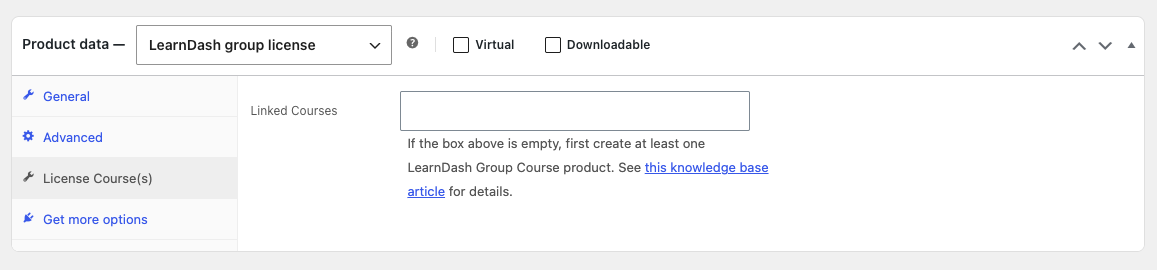
- Open the Licensed Course(s) tab and select the courses this license includes.
- Set catalog visibility so the product shows where you want it.
- Publish.
Create a subscription license
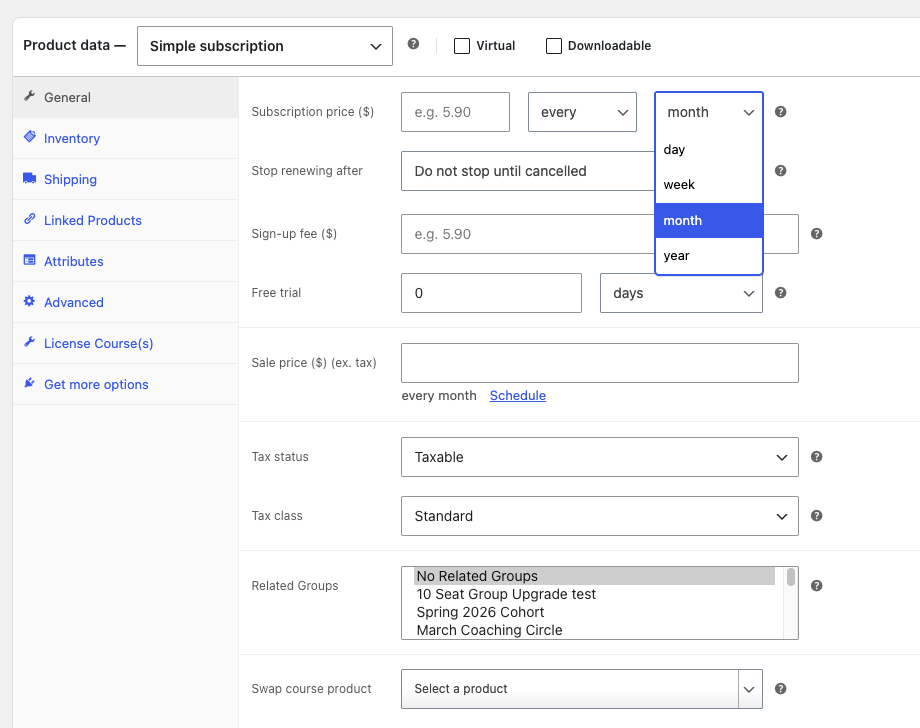
Follow the same steps, but at step 3 choose Simple Subscription as the product type and configure the subscription billing interval.
Note: With subscription licenses, only administrators can change the included courses after purchase — Group Leaders cannot.
Pricing and quantity controls
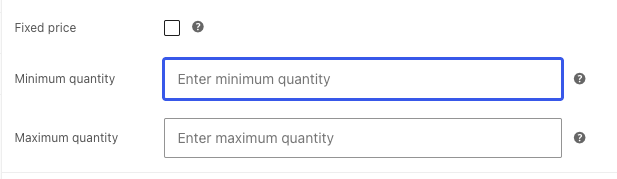
After the Group License product has been published, additional options will appear in the General tab that allow you to set fixed pricing as well as minimum and/or maximum quantities.
| Control | What it does |
|---|---|
| Fixed price | Overrides the auto-calculated per-seat price with a price you set |
| Minimum quantity | The fewest seats a buyer must purchase |
| Maximum quantity | The most seats a buyer can purchase |
At checkout
Buyers see a Group Name field during checkout — this names their group. The order must reach Completed status before group access is granted, so enable order auto-completion if needed (see the FAQ).
Admins have the option to hide the Group Name field on checkout and or product pages. They can also make the “Group Name” field non-editable on cart page. These options can be enabled/disabled on the Groups > Settings page.
Group Product Swap
A single product can serve double duty: bought at quantity 1 it grants individual course access, and at quantity 2 or more it creates a group. This lets you sell to individuals and teams from the same product.
Things to know
- Orders must be Completed to create the group — use auto-completion to avoid stuck “Processing” orders.
- Don’t delete products or orders tied to active groups; it can break group functionality.
- A group can be downgraded to a basic LearnDash group if you ever need to.
I’m stuck – when I create the product as described above and do a test purchase I get an error… the error says ‘please enter group name’ but there’s no where for user’s to enter their name. Please assist.
The issue is going to be because you either have custom checkout pages or your theme is overriding standard WooCommerce ones. If you can submit a support ticket, we should be able to provide some assistance to have the group name field show up a different way.
“In the Licensed Course(s) tab, choose one or more LearnDash Courses that should be part of the license.”
The course names simply highlight when selected, but there’s no other indication (checkmark) that a course has been linked. Is this the expected behavior?
Yes, that’s correct. Selected courses will be highlighted, that indicates the selection.
Is there away to make the Group Name Field a drop down list?
This wouldn’t be possible, Group Name is to set up new groups on purchase. A drop-down would mean mapping a purchase to an existing group, but you can’t do that with this product type. Buying this type of group product is only for creating new groups.
If you have a different workflow in mind, where an existing group is somehow updated, maybe you could open a ticket and we can comment.
I have tried multiple tests of creating a Group product course/license with woo-commerce. I have a single group course attached to a separate group licence product in woo-commerce. It is definitely highlighted as a linked/attached course, however, when I test a purchase of said license with a couple seats, the group gets created but the courses are not getting attached. So when the invited user logs in they just see “you are not enrolled in any courses” error. A backend check shows the group was created but the single course was not attached to the group. Please advise.
You should definitely create a ticket for this type of issue. If you’re using the LearnDash Woo integration, are you sure you’re selecting a GROUP course from the License Course(s) section, not a course from the General tab? Is the order status complete? Since we do need more information though a ticket would help, as well as screenshots of the product edit page and order details page in /wp-admin/ if possible.