
Overview
The Manage Learner Progress page lets Group Leaders and Administrators view — and optionally mark complete or incomplete — individual learners’ progress through courses, all from the front end of your site.
When Uncanny Groups for LearnDash is activated, it automatically creates a Manage Progress page containing the [uo_groups_manage_progress] shortcode. This gives Group Leaders a hierarchical view of every course, lesson, topic, and quiz assigned to their groups, with checkboxes to mark items complete or incomplete without touching the WordPress back end.
Whether Group Leaders can edit progress (or only view it) is controlled by the plugin’s admin settings. Administrators always have full edit access.
Important: Progress changes are applied instantly and cannot be undone. Marking a course complete triggers any associated certificates and LearnDash notifications immediately. We recommend confirming with the learner before making changes on their behalf.
Setup
The Manage Progress page is created automatically on plugin activation. If you need to add it to a different page, add the Progress Report block (search Uncanny Groups in the inserter), or use the [uo_groups_manage_progress] shortcode:
[uo_groups_manage_progress]Block Settings / Shortcode Attributes
| Settings / Attribute | Values | Default | Description |
|---|---|---|---|
orderby | "title", "date", "menu_order", "ID" | "ID" | How courses are sorted in the progress view |
order | "asc" / "desc" | "desc" | Sort direction for courses |
expand_by_default | "yes" / "no" | "no" | Whether all lessons and topics are expanded when the page loads |
Example — sorted alphabetically with all items expanded:
[uo_groups_manage_progress orderby="title" order="asc" expand_by_default="yes"]Finding a learner
Use the search bar at the top of the page to locate a learner by first name, last name, or email address. Partial matches are supported — entering “smi” will match “Smith,” “Smithson,” and so on.
Scope of search results:
- Group Leaders see only users enrolled in their managed groups. The search is further scoped to the currently selected group (available since v4.0), so selecting a group first narrows results to that group’s members.
- Administrators can search across all users on the site.
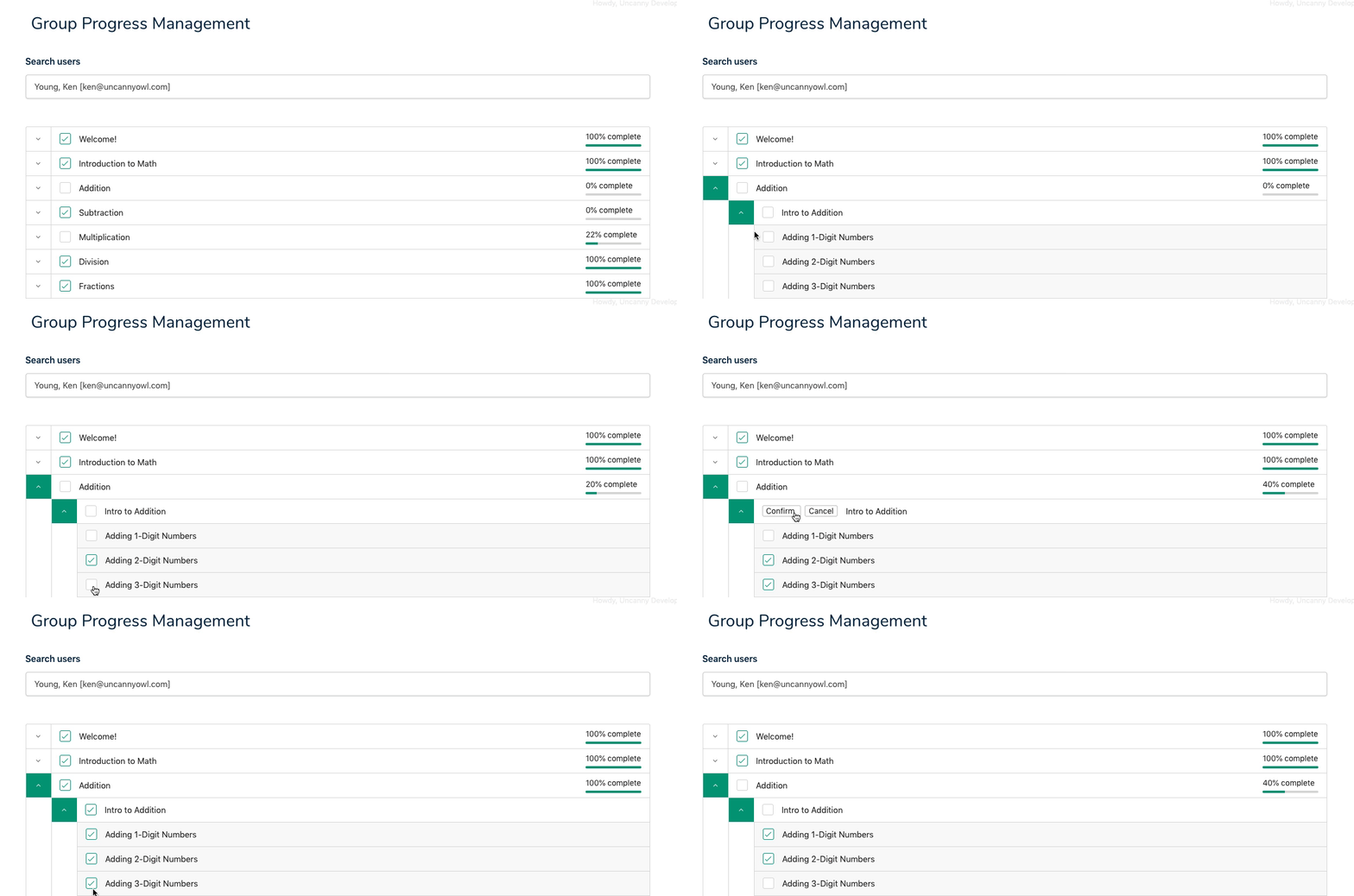
Viewing progress
After selecting a learner, the page displays a collapsible tree of all courses they are enrolled in through the group:
- Courses — top-level items, each expandable to show lessons
- Lessons — expandable to show topics (when applicable)
- Topics — individual content items
- Quizzes — shown inline at the course, lesson, or topic level
Completed items are checked. Items not yet started or in progress are unchecked.
Set expand_by_default="yes" on the shortcode to open the full tree automatically, which is helpful for shorter courses or when you need a complete overview at a glance.
Editing progress
When the plugin settings allow Group Leaders to edit progress (or for Administrators), a checkbox appears next to each item in the tree.
Marking an item complete
- Locate the course, lesson, topic, or quiz in the progress tree.
- Check the checkbox next to the item.
- If the item has children (e.g., you are completing a lesson that contains topics), a confirmation dialog appears asking whether to mark all child items complete as well. Confirm to proceed.
Marking an item incomplete
- Uncheck the checkbox next to a completed item.
- Confirm the dialog if prompted. Unchecking a parent item can also mark child items incomplete.
Reminder: These changes are instant. Completing a course that has a certificate assigned will generate and send that certificate immediately — this cannot be reversed.
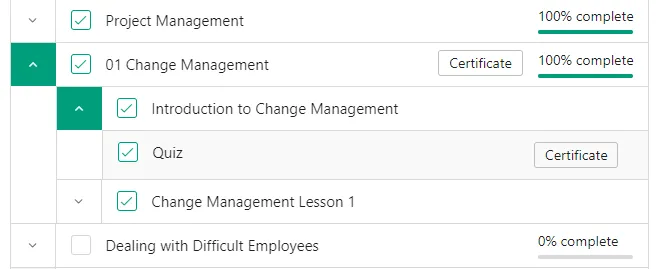
Certificates
Group Leaders can download or print certificates directly from the progress view:
- A Certificate button appears next to a course or quiz that has a certificate assigned and that the learner has completed.
- For quizzes, certificates are only available for completions made by the learner themselves — quizzes marked complete by a Group Leader or Administrator using this tool do not display a downloadable certificate button in this view, though the completion is still recorded.
Related Articles
- Using the Group Management Page — The main front-end hub for managing group members
- Using the Group Reports — Course and quiz completion reports for Group Leaders
- Set Up Group Management Pages — Configure and customize the Manage Progress page
- Front End Assignment Management — Review and approve learner assignment submissions from the front end
- Front End Essay Question Management — Grade learner essay responses from the front end
I need to be able to manually add hours to the “In course time” of some students that have done training outside of the course. Is there a module to do that? Thank You
There isn’t an option for this if you mean time tracked by LearnDash (the difference between the start and end date of the course). It also can’t be modified in our Simple Course Timer module, if you mean that one. If you mean credits in our CEU plugin, the latest version of that plugin does now support it (by deleting the credit value and then adding a new record).
Hello. I’m logged in as admin and it says that “You do not have any groups available to manage.” Any ideas?
Use of this tool is group-based, so for an admin to use it, the user would still need to be assigned to groups as a Group Leader for the associated groups.
Got it! One question then. When configuring leader settings, for example, the ability to edit user progress, would this apply to admins assigned as leaders as well? Or if someone is an admin, would he/she be able to edit user progress regardless of leader status and leader settings?
Well, I will note that we designed this tool primarily for Group Leaders working in the front end with a Group Leader role; administrators can do what this page makes available and more by editing a user in /wp-admin/. But, yes, if an admin is set up as a leader of one or more groups then they can use this tool.
Ryan thanks for the answers. We love this plugin and we love Uncanny products. I know admins should be able to do more via the backend site, but your plug-in is really a life saver in many scenarios. Two of them we have right now are: due to other plugins conflicts we cannot edit user progress via the wp user backend, this option is gone for us. And second, we prefer to have a front end tool for junior admins rather than having them going through the backend. Now, my question in the last comment was not if admins could use this tool. I now understand they must be registered as group leads for some functions. My question was regarding editing user progress, if admins still require and were bound by group leader configuration. We did some tests and it turns out that no. Admins can edit user progress without being group leaders. And even if they are group leaders and the option is turned off for group leaders to be able to override user progress, admins can still to do so. As feedback, I would love to have usernames clickable in the Group Reports, and having that leading me to view or edit their individual progress. Maybe that is possible today somehow, I’m still new and learning. Thanks a lot!
is there any way where we can send weekly emails to learners with course progress automatically & push them to do the course?
This is unfortunately not currently possible, but we are considering something like this for a possible future release.
Hi dear, is it possible in this page to dispaly all learner without search them in the field?
Right now it is not possible, but this is something that would be useful and that we’ll consider for an upcoming release.