
When you sell or deliver training to organizations, every client manager wants the same thing: “How is my team doing?” Answering that one-by-one — exporting spreadsheets, taking screenshots, fielding emails — doesn’t scale. Tin Canny’s front-end reports let managers and Group Leaders pull their own up-to-the-minute reports, without ever logging into WordPress.
The bottleneck this removes
In a typical setup, only administrators can see reporting in the WordPress dashboard. So the admin becomes a reporting help desk: every “can you send me my team’s progress?” lands on one person. Tin Canny fixes this by putting reports on the front end, scoped automatically to what each Group Leader is allowed to see.
How it works
1. Put reports on a page
Add a single shortcode (or block) to any page and you have a live reporting hub:
- [tincanny] — the full reporting interface (Course, User, and optionally Tin Can/Quiz reports)
- [uo_group_quiz_report] — consolidated quiz scores by group and course
- [uotc_lesson_report] / [uotc_topic_report] — lesson and topic completion
See the Tin Canny Shortcodes & Blocks Quick Reference for the full list.
2. Scope is automatic
A Group Leader who opens the page sees only their own groups’ learners — never the whole site. If they lead multiple groups, a group selector dropdown lets them switch between teams. Administrators see everything. You don’t configure permissions per page; Tin Canny reads each viewer’s role and group membership.
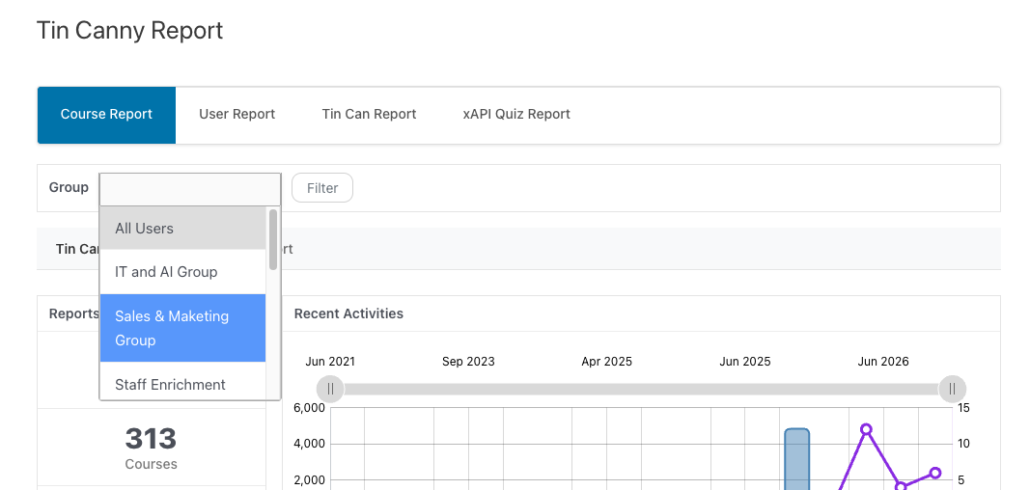
3. Managers self-serve
From that page a manager can:
- Check each learner’s status — Not started, In progress, Completed — by course
- Sort by % Complete or Avg Quiz score (front-end columns are sortable as of v5.1.1)
- Review quiz scores, including SCORM/xAPI results
- Export to CSV for their own records
No dashboard, no training, no support ticket.
Pairs perfectly with Uncanny Groups
Front-end reporting is most powerful when each client organization is a LearnDash group with its own Group Leader. Uncanny Groups gives leaders a front-end management page to enroll and manage their own people; Tin Canny adds the reporting layer on top. Together they let an organization run its entire training program — enrollment and reporting — without touching your admin.
Why this matters
- Frees up your admins. Reporting requests stop landing in one inbox.
- A better client experience. Customers get instant, always-current answers.
- A sellable feature. “Your managers get their own live dashboards” is a strong differentiator for B2B training providers.
Related Articles
- Front End LearnDash Reports — placing reports on a page
- Front End Quiz Reports — the quiz report shortcodes
- Tin Canny Shortcodes & Blocks Quick Reference — every report shortcode and block
- Uncanny Groups for LearnDash – START HERE! — front-end group management