
If your organization has to show that training happened — to an auditor, a regulator, a client, or your own leadership — “they clicked complete” isn’t enough. Tin Canny turns LearnDash into a defensible record of who completed what, when, how well they scored, and how long they spent.
The problem with completion-only tracking
Standard LMS reporting answers one question: did the learner finish? Compliance teams need more:
- Did they actually engage, or click through?
- What did they score, and did they pass a required threshold?
- When did they complete it — before or after the deadline?
- Can we produce the evidence months later, on demand?
Tin Canny captures all of this automatically from your SCORM and xAPI modules and keeps it in a Learning Record Store built into your own WordPress site — so the data is yours, not a third party’s.
How Tin Canny builds your compliance record
1. Gate completion on real engagement
Embed your training as a Tin Canny module and require it for lesson completion. In the lesson or topic’s Tin Canny tab (in the LearnDash tab bar; added in v5.1.3.3), set Restrict Mark Complete to Disabled until complete. The Mark Complete button then stays locked until the module reports done — so a “complete” status genuinely means the learner reached the end. No more skipped content.
2. Capture scores and pass/fail
For modules and quizzes with scoring, the xAPI Quiz Report and Tin Can Report record each learner’s results — including individual question responses. If your policy requires an 80% pass, you can show exactly who cleared it.
3. Timestamp everything
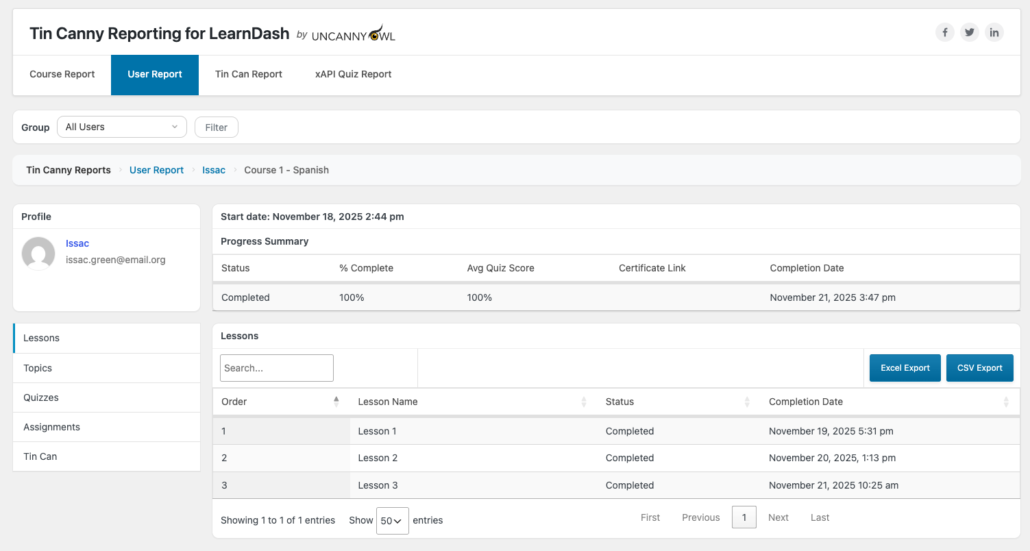
The User Report records course start dates and lesson/topic completion dates (added in v5.0), so you can demonstrate that training was completed within a required window — and in what order.
4. Measure time spent
Pair Tin Canny with the Simple Course Timer (Uncanny Toolkit Pro) and a Time column appears in your Lesson & Topic and Course reports. For “minimum seat-time” requirements common in regulated industries, this is the evidence you need.
5. Export the evidence
Every Tin Canny report exports to CSV/Excel. When an auditor asks for proof, you produce a dated, per-learner record in minutes — not a frantic week of screenshots.
A typical compliance workflow
- Build your policy/training as a SCORM or xAPI module and upload it to a LearnDash lesson.
- Require the module for completion, and set a passing score on any quiz.
- Let learners complete it; Tin Canny records scores, dates, and time automatically.
- At audit time, open the User Report (or run a front-end report for a manager), filter to the relevant group, and export to CSV.
Why this matters
- Defensible records. Scores, dates, and time spent — not just a checkbox.
- Your data, your server. The LRS lives in WordPress; nothing depends on an external service that could change terms or disappear.
- Self-serve for managers. Front-end reports let department leads pull their own team’s compliance status without a WordPress login.
Related Articles
- Getting Started with Tin Canny Reporting — set up your first tracked module
- User Report — per-learner completion dates and scores
- xAPI Quiz Report — question-level scoring evidence
- Lesson and Topic Completion Reports — time-in-content with Simple Course Timer