
Overview
These front-end reports show, for a specific lesson or topic, exactly which learners have completed it. They’re built for administrators and Group Leaders who need granular completion data without digging through the full back-end reports.
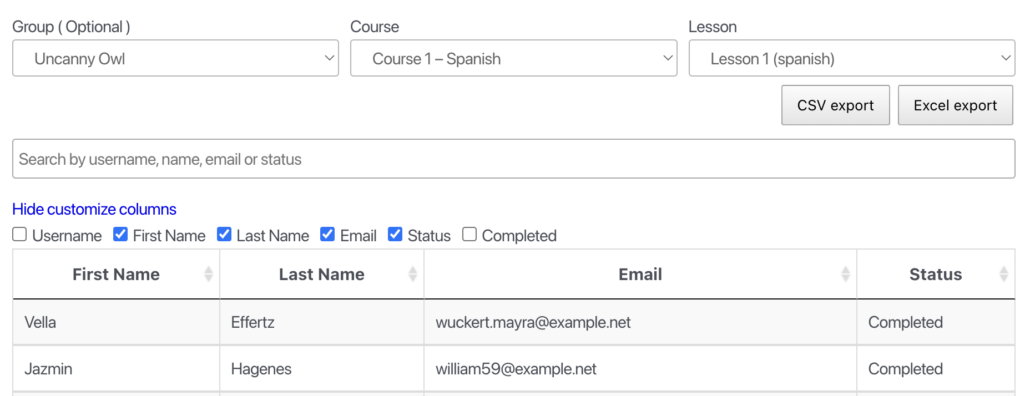
Lesson and Topic Completion Reports display completion status per learner for a chosen lesson or topic. Access is limited to administrators and Group Leaders — learners don’t see them.
Adding the reports to a page
Place either a block or shortcode on a page (a full-width layout works best):
| Block Name / Shortcode | Shows |
|---|---|
Tin Canny Lesson Report / [uotc_lesson_report] | Completion of a chosen lesson |
Tin Canny Topic Report / [uotc_topic_report] | Completion of a chosen topic |
Using the report
- (Optional) Select a group to scope the report.
- Select a course.
- Select the lesson or topic.
The table populates with the enrolled learners and their completion status. Use Customize columns to choose which fields appear.
Time spent
When the Simple Course Timer module (Uncanny Toolkit Pro) is enabled, a Time column is added showing how long each learner spent in the lesson or topic. (Added in v4.4.1.) This is invaluable for “minimum time-in-content” requirements and for spotting learners who rushed through.
Exporting
Reports export to CSV and Excel for filtering and record-keeping.
Related Articles
- Front End LearnDash Reports — the combined front-end report interface
- Tin Canny Shortcodes & Blocks Quick Reference — every report shortcode and block
- Prove Training Compliance with Tin Canny — using time-in-content as audit evidence
Subject: Assistance Required for Creating a Comprehensive Report with Tin Canny xAPI
Dear Tin Canny xAPI Support Team,
I hope this email finds you well. I am writing to seek assistance with the Tin Canny xAPI plugin.
Currently, I am using Tin Canny xAPI to generate reports for each lesson in my eLearning course. However, I would like to generate a comprehensive report that includes all lessons in one document.
I have searched through the documentation and user manual, but I have not found any information on how to create such a report. Therefore, I am reaching out to you for help in creating a comprehensive report that includes all lessons in my eLearning course.
I would be grateful if you could guide me through the process of creating a comprehensive report that includes all lessons in my course. If there are any resources or tutorials that you could direct me to, that would also be helpful.
Thank you for your prompt attention to this matter. I look forward to hearing from you soon.
Best regards,
Mehdi
Hi Mehdi, just a reminder that support tickets should go to our Help Desk, as Knowledge Base comments are generally unmonitored and we cannot provide individual support through this channel. The lesson report on this page is the only summary-level lesson reporting tool available in our plugins. On an individual basis, lesson completions are reported in the User report in Tin Canny.