
See at a glance which LearnDash Groups a user belongs to, right on their WordPress profile screen, without clicking through every group to check.
Overview
On sites with more than a handful of LearnDash Groups, answering a simple question like “which groups is this user in?” can mean opening each group one by one. The Groups in User Profiles module from the Uncanny Toolkit for LearnDash solves this by listing every group a user belongs to directly on their WordPress admin profile (edit-user) screen.
This is a read-only convenience for administrators. It surfaces group membership where you’re already working, making it faster to trace a user’s access and troubleshoot enrollment or permissions questions.
This module is part of the free Uncanny Toolkit for LearnDash. If you haven’t installed the Toolkit yet, see Install the Uncanny LearnDash Toolkit.
How to Enable It
- In your WordPress admin, go to Uncanny Toolkit.
- Locate the Groups in User Profiles module.
- Click Activate to turn the module on.
There are no additional settings to configure. Once activated, the group list appears automatically on user profile screens.
What It Shows
Once the module is active, the user’s profile screen displays a list of all LearnDash Groups that user currently belongs to. This gives administrators a quick way to trace group membership and access across sites that manage many groups.
The list is display-only. You cannot add or remove a user from a group from this view. To change a user’s group memberships, you’ll still need to open the associated LearnDash Group and manage its users there.
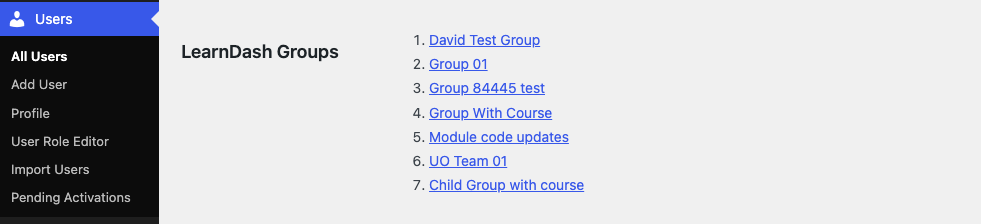
Where to Find It
The group list appears on the WordPress backend, not the front end. To view it:
- Go to Users > All Users.
- Click the user you want to inspect (or use the Edit link).
- Scroll down the profile screen to find the section listing the user’s LearnDash Group memberships.
Displaying Groups on the Front End (Pro)
The Groups in User Profiles module is built for administrators working in the WordPress dashboard. If you want to show a user their own group memberships on the front end of your site, the Uncanny Toolkit Pro plugin includes a Group List shortcode for that purpose.
The Group List shortcode is part of Toolkit Pro, so you’ll need Pro installed with that module activated to use it. For more on what Toolkit and Toolkit Pro offer, see the Introduction to the Uncanny LearnDash Toolkit.
Is there a shortcode for this plugin so you can show the user what group they’re in from other pages?
Have a look at our Group List shortcode here: https://www.uncannyowl.com/knowledge-base/ld-group-logo-list/#LearnDash_GroupList_Shortcode. It is part of the Pro plugin though, so you must have that installed and the module activated to use it.