
Overview
Keep learners moving through your course without breaking their stride. When this module is active, finishing a quiz sends learners straight to the next step instead of leaving them on the quiz results screen to find their own way forward.
What This Module Does
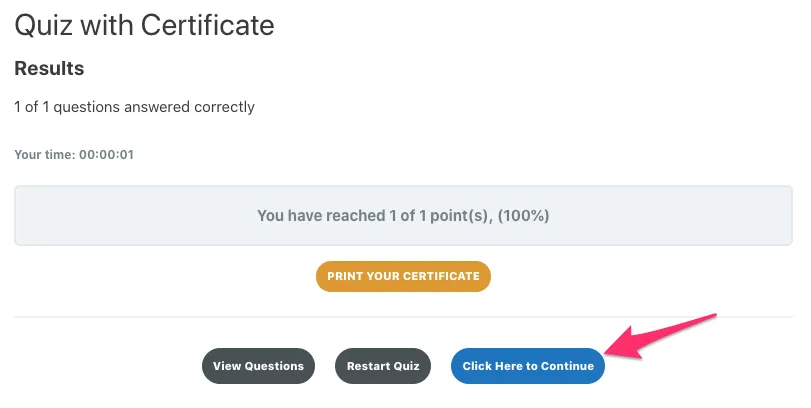
When a learner finishes a quiz, LearnDash shows a quiz results screen with a continue action. The Quiz Completion Advances to Next Step module changes where that continue action goes — instead of returning the learner to the quiz’s parent, it sends them to the next step in the course, based on LearnDash’s course structure. For example, a quiz attached to the last topic in a lesson advances the learner to the next lesson.
The module only affects quizzes that are associated with a lesson or topic. Course-level and global quizzes are left to LearnDash’s own handling. There are no settings to configure.
Before You Enable It
For the smoothest experience, your lessons should mark themselves complete when their quizzes are finished. Otherwise a learner can be advanced past a lesson that LearnDash still considers incomplete and may hit the message: “Please go back and complete the previous lesson.”
How to Enable It
- In your WordPress dashboard, go to Uncanny Toolkit.
- Find Quiz Completion Advances to Next Step in the list of available modules.
- Click Activate.
There are no additional settings to configure. Once active, qualifying lesson/topic quizzes route learners to the next course step.
How It Works in Practice
- The module applies only to quizzes associated with a lesson or topic — course-level and global quizzes are unaffected.
- Whether and when LearnDash shows the continue action (for example, after a passing grade) is governed by your LearnDash quiz settings, not by this module. The module simply redirects that action to the next step.
- The destination step is determined entirely by LearnDash’s course structure, so the learner always lands on the next logical step in their progression.
Troubleshooting
If learners are not advanced as expected, confirm the following:
- The quiz is attached to a lesson or topic (not a course-level or global quiz).
- Lessons mark complete correctly — consider a lesson/topic auto-completion module (see Before You Enable It above).
- Your LearnDash installation is up to date.
the biutton doesn’t appear. No way to see why
Do you mean the “Click here to continue” button? It wouldn’t be related to our module, but the first thing I would check is that the user passed the quiz. If you have a passing grade set, make sure you’re meeting or exceeding it for your quiz attempt.
Can a lesson ever follow a quiz? It seems impossible.
It sounds like perhaps you’re using quizzes associated with a course? If you link a quiz to a lesson, you can have that lesson with the quiz come before another lesson.
Hi there! The button does not appear. The user did pass the test (and the passing grade is set on 0% now so..). What could be the problem? The quiz is associated with a course and a module and.
This sounds like an issue in LearnDash that was fixed in the 4.5.1.2 release. Hopefully updating resolves the problem for you.