
Overview
Send your learners exactly where you want them to go after they log in or log out. This Uncanny Toolkit for LearnDash module lets you set custom destination URLs for non-administrator users, so members land on a course dashboard, a profile page, or any URL you choose instead of the default WordPress screen.
What This Module Does
The Log In/Log Out Redirects module sends non-administrator users to URLs you specify:
- After login — for example, your course list, a “My Courses” page, or a personalized dashboard.
- After logout — for example, your homepage, a sales page, or a custom goodbye page.
Administrators are intentionally excluded from these redirects so they continue to reach /wp-admin/ as usual. This keeps your management workflow intact while giving members a tailored experience.
How to Set It Up
- In your WordPress admin, go to Uncanny Toolkit.
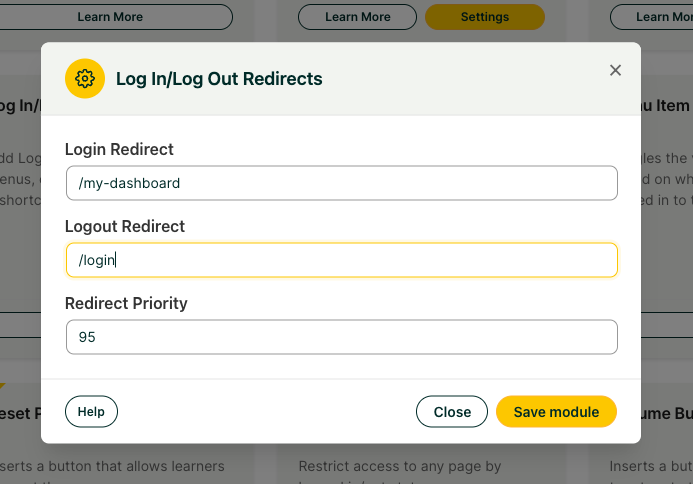
- Locate the Log In/Log Out Redirects module and click Activate (then Settings if it doesn’t open automatically).
- Enter the full destination URL in the Login Redirect field (for example,
https://yoursite.com/my-courses/). - Enter the full destination URL in the Logout Redirect field (for example,
https://yoursite.com/). - Click Save to apply your changes.
We recommend using complete URLs (including https://) rather than relative paths to avoid protocol mismatches.
Important: If you have any other plugin on your site that can redirect users on login or logout, it will, in all likelihood, override this Toolkit redirect. See the Troubleshooting section below before activating this module.
Adjusting Redirect Priority
The module includes an adjustable redirect priority value in its settings. If another plugin or theme is intercepting the redirect before Toolkit can act, increasing this value can help Toolkit take priority. This is a common fix for conflicts with page builders such as Elementor Pro.
Troubleshooting
Conflicts With Other Redirect Plugins
Plugins that manage login behavior, such as LoginWP (formerly Peter’s Login Redirect), Theme My Login, and UserPro, will all take priority over this module. If your redirect isn’t working, a competing plugin is the most likely cause.
- Temporarily deactivate other login/redirect plugins to confirm the conflict.
- If you can’t remove the conflicting plugin, configure the redirect within that plugin instead, or try increasing the redirect priority value (see above).
Note: If a conflict can’t be resolved through Toolkit, a dedicated redirect plugin such as LoginWP can be configured to override other plugins and handle the redirect for you.
Redirects Not Firing or Caching Interference
Server-side caching can serve a cached page before the redirect runs, especially on your homepage.
- Ask your host to add cache exclusions for the pages involved in the redirect.
- Pay particular attention to homepage caching layers such as Varnish.
Important: Always clear your cache after changing redirect settings, and test in a private/incognito window to rule out browser-cached results.
Redirect Loops or Repeated Login Prompts
If users are bounced back to the login screen repeatedly, you’re likely dealing with an HTTPS/HTTP mismatch.
- Confirm your SSL certificate is installed and that your WordPress Address and Site Address (under Settings > General) both use https://.
- Make sure the redirect URLs you entered use the same protocol (https://) as the rest of your site.
- Avoid pointing a login redirect at a page that itself redirects logged-out users back to login, which can create a loop.
Created LearnDash course. I followed the Uncanny LearnDash Toolkit tutorial on creating a login/ logout redirect so that anyone who logs in after they purchase my course is redirected to the course page and nothing works. I’ve even uninstalled and re-installed the plug in. I would GREATLY appreciate your suggestions.
It’s likely that something else is overriding the login redirect. If you use WooCommerce, it will. Other plugins can as well. In the note above it doesn’t confirm where users are directed (which might tell us what plugin is doing it), but you might instead try a plugin like Peter’s Login Redirect, which can in turn override other plugin redirect behaviours.
Thanks Ryan. I did install Peter’s redirect. That didn’t work either. All users, customers, subscribers, admins. When a user logs in it redirects them to create a WordPress account.
Not super clear how Woocommerce could have any effect. Customers needs to be redirected to cart page, check out page, etc.
Sorry, WooCommerce automatically directs users on login to its My Account page if you use Woo; it’s just one example of plugins that have their own login redirect behaviours. Try disabling other plugins in a Staging environment to try to narrow down the culprit.
Having said that, from your first paragraph it sounds like users log in then they’re redirected to log in again. That could instead indicate an https/http conflict on your site. Make sure that if you’re using an SSL cert that everything on the site is https.
I have added a /login/ page with the [uo_login_ui] shortcode but when I turn on ‘Front End Login’ and set the ‘Login Page’ to Login, All users get invalid username or password and I am forced to FTP in and kill the plugin. Can you point me towards a solution?
Hi Andrew, make sure that there is no caching whatsoever on your /login/ page. If the host does caching, ask them to exclude that page. Note that this comment is attached to the incorrect Knowledge Base article, and for Toolkit support it’s easier for us to see comments if you log them on the WordPress.org support site.
peters login redirect not working with learn dash plugin. can you refer some other plugin that will work for all user roles.
It definitely works with LearnDash; if it’s not, another plugin is taking priority over the redirection. Try temporarily deactivating other plugins and then reactivating them to trace which one is creating the override. If the redirect issue is with Group Leaders and you use Improved Group Leader Interface in Pro, make sure you update to the latest version and set your Group Leader redirects there.
Hi!
How do I create a redirect to the last page accessed by the user?
Ty!
I’m afraid our plugins can’t support that scenario. It would be possible with a bit of development, but for now I can’t offer an easy solution.
I second the request for contextual redirect, e.g., back to the last page accessed!
I’ve been running a course with uncanny and learndash and it works very well but lately I’ve noticed something strange: When a user is logged in and navigates to the home page the menus change as if the user isn’t logged in but if they go back to “my account” then the menu looks like the user is logged in again.
Can you think of any reason why the home page would cause this change? It seems to be the only page that has this problem.
It’s definitely going to be caching. A lot of hosts that use server-side Varnish caching don’t allow the homepage to be excluded either, and this can be difficult to work around. Maybe chat with them (assuming it’s not a caching plugin) or even make it so signed in users trying to access the homepage are redirected to a learner dashboard or something similar.
Hello. I use both modules “Log In/Log Out Links” and “Log In/Log Out Redirects” and “Front End Login”, but I need that Log In link redirect to my Front End Login, not the ugly WordPress standard login. Any suggestion? Thanks, very useful modules for LearnDash system
Hi, for WordPress to know where to redirect the user, you must have a page on your site that includes the uo_login_ui shortcode and that page must be selected in the Front End Login module settings as the login page. That’s what determines the target for the Log In link. I hope that makes sense.
I love the login/logout redirect, and it works great, but there are certain places on my website where I use Elementor Pro’s login widget to set a different redirect. Uncanny Owl is overriding this. I can’t seem to figure out how to make my specific EP logins override Uncanny. Any suggestions?
Hi Tammy,
It may be possible to resolve the conflict by reducing the priority value in the settings for our module. Maybe Elementor could confirm the redirect priority value they’re using for theirs so you’ll know what to set ours up with.
That would be ideal. I will look into that. If it works, I’ll come back and let you know. Thank you!
Hi,
Can the log out redirect be an external link? I’ve set it to be our Facebook group. At the moment, it’s not (yet) working.
Cheers,
Henk
Yes, it can be anything you want.
It could be that something else is taking priority.
Hi, is there a way to have only users in the Participant list redirect? We have several non-admin types that should not be redirected elsewhere. Code would be fine.
I’m not sure what you mean by “Participant list”, but if you want role-based redirects we like Peter’s Login Redirect plugin.
Hi, I use the “Log In/Log Out Redirects” which is working great until I add the “Front End Login” add-on, then the redirect is not working anymore. When login, it redirects to the home page and after logout to the login page mentioned in the “Front End Login” add-on.
Is there a way to fix that?
Are you using the new modal system for the front end login? If you are, it triggers a page refresh that will unfortunately block the redirect from working as it should (it will be changed in the next release). If that’s not it, maybe you can file a ticket with more details (including the redirect priority you’re using for the redirect module) and we can provide more feedback.
Like user Zzo I would also very much like to use Front End Modal and Redirect on the same site (same page) and they won’t work together. Looking forward to the refresh going away. Also it would be great if the Redirect after logging in function could be set to certain pages. Thanks!