
Overview
Uncanny Codes can add a code redemption field directly to the WooCommerce checkout page. This allows customers to enter a code while purchasing a product, so that their code is redeemed as part of the checkout process. This is particularly useful for enrolling users in LearnDash Groups at the point of purchase, since the native LearnDash WooCommerce integration only supports adding users to courses — not groups.
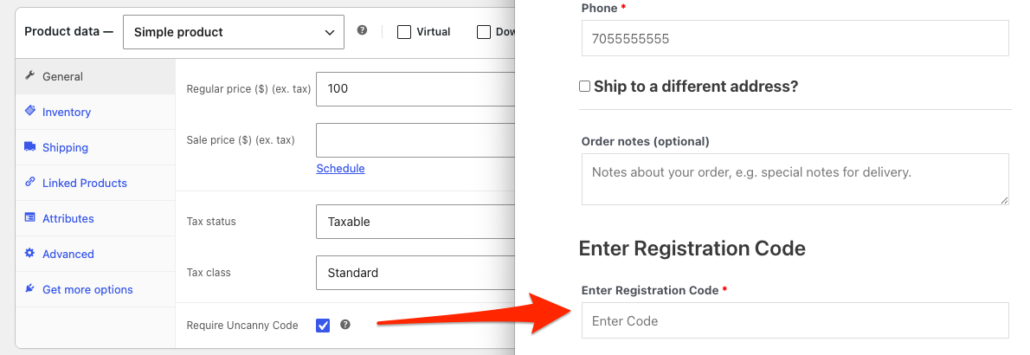
How It Works
Once the Uncanny Redemption Codes plugin is activated, a new Require LearnDash Code checkbox is automatically added to the Product data section of all WooCommerce products. When this checkbox is enabled on a product:
- A code redemption field is added to the WooCommerce checkout page whenever that product is in the cart.
- The customer must enter a valid code to complete the purchase.
- Upon successful checkout, the code is redeemed and the customer is enrolled in the associated course or group.
Important: Only one code can be redeemed per checkout. If a customer is purchasing multiple products, only one code field is displayed. For this reason, we recommend mapping a single code to multiple courses or groups rather than requiring users to redeem separate codes for each.
Setup
To enable code redemption on the WooCommerce checkout page:
- Navigate to Products in your WooCommerce admin and edit the product you want to require a code for (or create a new product).
- In the Product data section, locate the Require LearnDash Code checkbox.
- Check the box to enable the code field at checkout for this product.
- Publish or Update the product.
That’s it — the code field will now appear on the checkout page whenever this product is in the customer’s cart.
LearnDash Enrollment Validation
(New in v5.0)
As of Uncanny Codes v5.0, the plugin validates whether the customer is already enrolled in the course or group associated with the code before allowing redemption at checkout. If the customer already has access, the checkout will display a message indicating they are already enrolled, and the code will not be consumed.
This prevents customers from accidentally using codes for access they already have, which is especially valuable when codes are purchased or distributed in limited quantities.
Usage Tips
- Best for group enrollment. This feature is most useful when you want to combine a WooCommerce product purchase with LearnDash Group enrollment. The native LearnDash WooCommerce integration doesn’t support group enrollment at checkout, but Uncanny Codes fills that gap.
- One code per order. Only one code can be redeemed per checkout. If you need to grant access to multiple courses or groups, create a single code that maps to all of them.
- The code field appears for all products with the checkbox. If any product in the cart has the Require LearnDash Code checkbox enabled, the code field will appear at checkout. Make sure this is intentional for each product.
- Works alongside product-based code sales. This feature is separate from selling code batches as WooCommerce products. You can use both features on the same site — one for selling codes and another for redeeming codes at checkout.
Related Articles
- Sell Code Batches as WooCommerce Products — How to sell code batches as purchasable WooCommerce products
- Set up Uncanny Redemption Codes for WordPress — Plugin installation and settings
- Standalone Code Redemption — Let existing users redeem codes from any page
- Troubleshooting & FAQ — Common issues and solutions
- Getting Started with Uncanny Codes — Overview of all code distribution workflows