
Overview
Professional associations, certifying bodies, and training providers award continuing education to members so they can maintain a license or designation — CME for clinicians, CLE for lawyers, CPD for accountants and engineers, PDUs for project managers, and so on. Uncanny CEUs gives you the credit-tracking, certificates, and member-facing transcripts these programs depend on, right inside LearnDash.
A continuing education program has a few defining needs:
- Credits that use the right terminology for your profession.
- A way for members to see and prove the credits they’ve earned.
- Certificates members can submit to a licensing board.
- Reporting for your team and for partner organizations.
Uncanny CEUs covers all four, and works alongside WooCommerce and Uncanny Groups when you sell courses or serve organizational members.
Why Associations Choose Uncanny CEUs
- Your terminology, everywhere. Label credits as CME, CPD, PDUs, contact hours — whatever your accreditation uses. The label flows through reports, certificates, and emails automatically.
- A permanent member record. Earned credits are stored permanently and independently of course data, so a member’s history stays accurate for years — exactly what audits and renewals require.
- Certificates on autopilot. Issue a certificate the moment a member earns enough credits or finishes a required series of courses.
- Member self-service. Members look up their own totals and download what they need, reducing email to your staff.
Setting Up Your Program
Step 1: Set Your Credit Terminology
Under Uncanny CEUs > Settings, set the singular and plural credit labels to match your accreditation — for example, “CME Credit” / “CME Credits” or “PDU” / “PDUs.” This is the first thing to configure, because the label appears everywhere members and staff see credits.
Step 2: Assign Credit Values to Courses
Give each course its accredited credit value on the course edit screen. Decimal values are supported (for example, 1.5 credits), which matters when accreditation bodies award partial credits. See Adding Credits to Courses.
Step 3: Issue Certificates of Completion
Configure certificates to award members automatically:
- Per credit milestone — e.g., a certificate when a member reaches 20 CME credits.
- Per course series — e.g., a certificate for completing all courses in a designation track.
Members receive the certificate by email, and a copy can be stored on your server for your records. See Continuing Education Certificates.
Step 4: Give Members a Credit Transcript
Add a front-end report or credit shortcodes to a member dashboard so members can view and verify their credits at any time:
[uo_ceu_total]— Lifetime credits earned[uo_ceu_earned course-id="123"]— Credits earned for a specific course[uo_ceu_report]— A searchable record of completions and credits
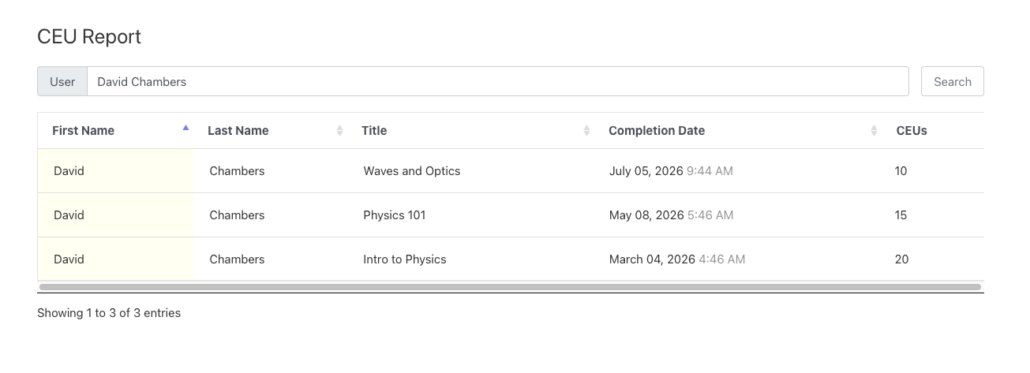
See Continuing Education Report and Continuing Education Shortcodes.
Step 5: Account for Pre-Existing Credits
If members completed courses before you installed the plugin, backfill their records so transcripts are complete from day one. See Generate Historical LearnDash Course Credits.
Handling Credits Earned Outside Your Courses
Members often earn credits at conferences, webinars, or partner events that aren’t courses on your site. Add those credits manually so a member’s transcript reflects their full continuing education — enter a title, the credit amount, and the date from the Credit Report. See Add, Edit, and Remove Credits.
Serving Organizational Members
If your association serves companies or chapters — not just individuals — pair Uncanny CEUs with Uncanny Groups for LearnDash. A chapter administrator becomes a group leader who can:
- Enroll their members
- Run continuing education reports on their group from the front end
- Track each member’s credits toward designation requirements
For multi-level structures (national → regional → local chapters), enable the child groups option so a parent’s report rolls up its sub-groups. See Continuing Education Admin Reports.
Related Articles
- Continuing Education Certificates — Credit-based and multi-course certificates
- Continuing Education Report — Member-facing transcripts
- Use Case: Selling Accredited & Continuing Education Courses — Monetize your CE program
- Getting Started with Uncanny Continuing Education Credits — Choose the right workflow