
Adding community to your online courses is a proven way to increase engagement, build trust, and improve completion rates. Students who feel connected to other learners—and to someone actively facilitating the experience—show up more often, finish what they started, and come back for more.
The harder question is how to deliver that on WordPress. LearnDash and other LMS plugins like Tutor LMS or LearnPress handle the actual content delivery—courses, lessons, quizzes, certificates, basic group structure. But they aren’t community platforms.
So how do you add community elements like forums, chats, webinars, and the like to your LMS? And how do you get all of those pieces to stay in sync as enrollments shift?
The good news is that WordPress has lots of plugins designed to help you build a thriving community around your online courses. You don’t have to migrate to Circle, Skool, or Mighty Networks to build an engaging digital campus life.
In this article, I’ll show you how Uncanny Groups for LearnDash and Uncanny Automator work together to help you build the community your learners have been asking for.Want to start building your online course community right now? Get Uncanny Groupsand download Uncanny Automator for free >>>
The two components of online course communities
No two communities are the same—but the infrastructure that supports them and the experience that they deliver usually are.
First, the infrastructure of your LMS—whether that’s LearnDash, LearnPress, or another plugin—needs to reflect the community that you want to build. This controls everything from how and where learners enroll in courses, to what they can see and interact with.
LearnDash has some limited group functionality, but it’s a far cry from the full scaffolding you need to support an online community.
Next, you need the experience that sits on top of that infrastructure—the actual place your members come together and talk to each other, whether on your WordPress site or in a separate community platform.In short, Uncanny Groups handles the “infrastructure” side of things, creating the framework for your community on the back-end and operational side of your site. What you learners experience—the seamless sync between enrollments and platforms like BuddyBoss—is handled by Uncanny Automator.
Three types of community to consider before you build
As I said before, no two communities are the same. Some online course communities revolve around webinars. Others center around lively forums. A growing number of them resemble full-fledged social platforms with profiles, chats, feeds, and more.
Broadly speaking, you can break these down into three types of communities.
Cohorts and Learning Groups
These types of communities consist of groups of learners moving through the same material together—a January 2026 cohort working through your flagship program, the Acme Corp leadership team rolling out compliance training, for example.
Cohorts matter most when the people buying course access are already buying in groups. These are usually B2B sales where one company purchases batches of seats for employees, or firms in regulated industries like healthcare and financial services.
In all of those cases, the cohort isn’t just a roster of names—it’s the unit of sale and the unit of operation.
Forums and Discussions
Forums provide learners with a platform where they can come together to discuss course material, learning experiences, and share insights. Someone gets stuck on a specific lesson, and another learner who got past that same point last week answers the question.
Forums and discussion boards are what many course creators and eLearning admins rely on to turn static course material into interactive learning experiences.
Membership Hubs
Membership hubs (BuddyBoss, PeepSo, etc.) create the social space your learners spend time in beyond any one course. They provide real-time chat, member profiles, activity feeds, and a brand presence that lives between your course offerings.
Membership hubs are what most people have in mind when they say they want to build “a community” around their work, not just around one program.
The elements of each type of online course community that you want to implement on your own site will determine which tools you need and how you use them.
Building cohorts and learning groups with Uncanny Groups for LearnDash
Cohorts are where most online course communities start. LearnDash has a built-in concept of a group (its term for a cohort of learners sharing access to a set of courses), but the built-in functionality is bare-bones. You can create a group, assign courses, and add learners by hand. That’s about where it ends.
Uncanny Groups for LearnDash extends that starting point into a full cohort management system you can actually sell from, operate in, and report on.
Group leaders and front-end management
A group leader—LearnDash’s term for a designated cohort facilitator—is the person who actually runs the cohort day-to-day.
With Uncanny Groups, group leaders work from a front-end dashboard on your site, not from WordPress admin. They can add and remove learners, view individual and group progress, grade assignments, and pull reports on their cohort’s activity.
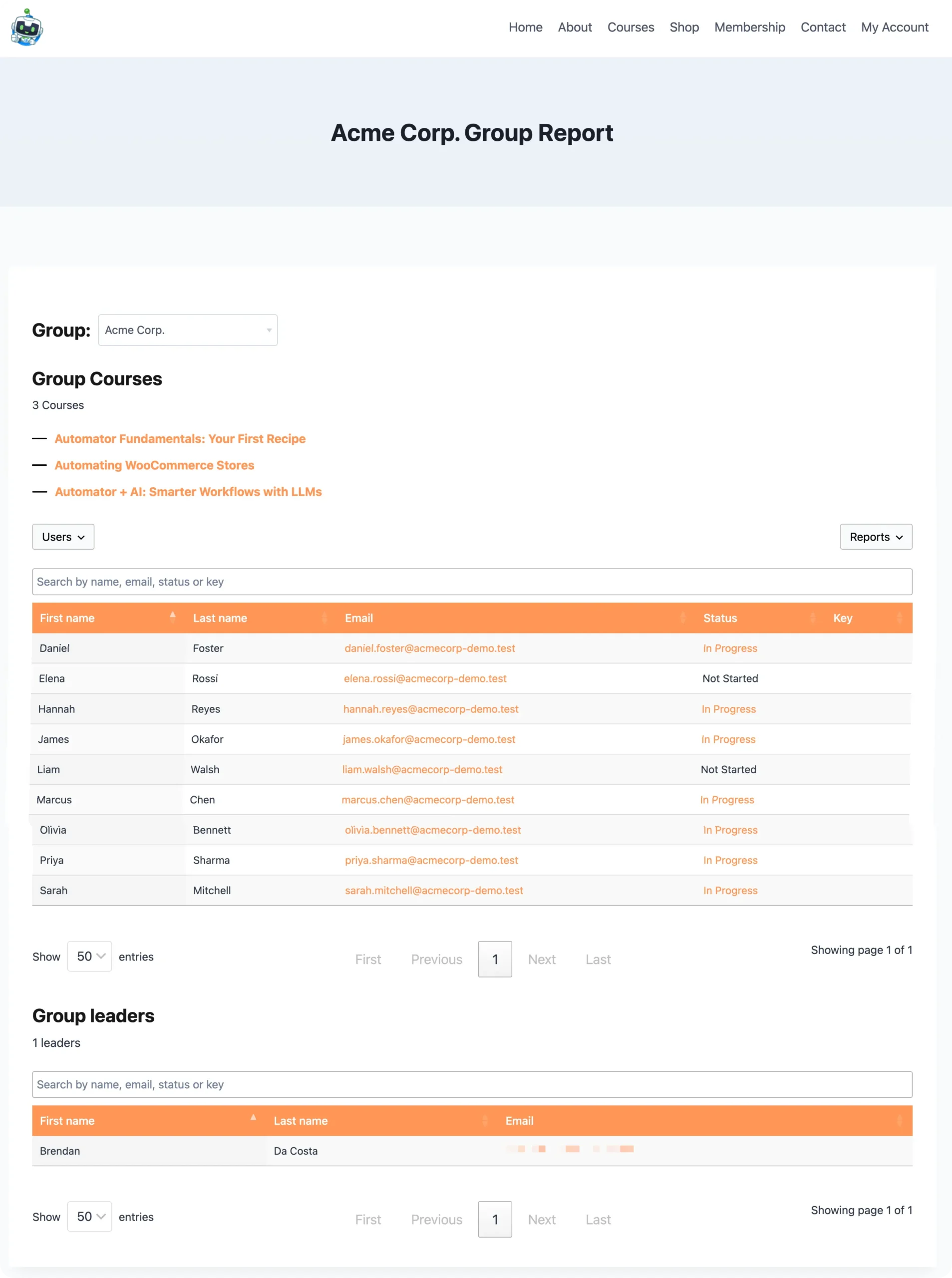
For a B2B sale, this is the feature that lets your client manage their own people. A training coordinator at Acme Corp logs in, sees who’s stalled, and follows up directly. You’re not in the middle of it.
For a compliance program, the same dashboard is what lets a designated training officer prove who completed what and when, without asking you for CSV exports every quarter.
Group registration and B2B licensing
Group registration allows communities within your broader platform to stick together from the beginning. Uncanny Groups adds pre-configured group licenses through WooCommerce, allowing group leaders to purchase seats in bulk.
Group leaders then download enrollment keys for their cohort and distribute them to learners, who self-register and redeem the key on your registration form.
Native BuddyBoss group sync
If your community ends up living on BuddyBoss, Uncanny Groups syncs LearnDash group membership to BuddyBoss social groups natively. When a learner joins a LearnDash group, they’re added to the corresponding BuddyBoss social group automatically. When they leave, they’re removed.
If you’re already running a BuddyBoss community alongside LearnDash, this is the missing piece that connects learning to social engagement. Cohorts stay in sync without you doing anything.
Adding forums and discussions
Cohorts give your community a shape. Forums and discussions give it a voice.
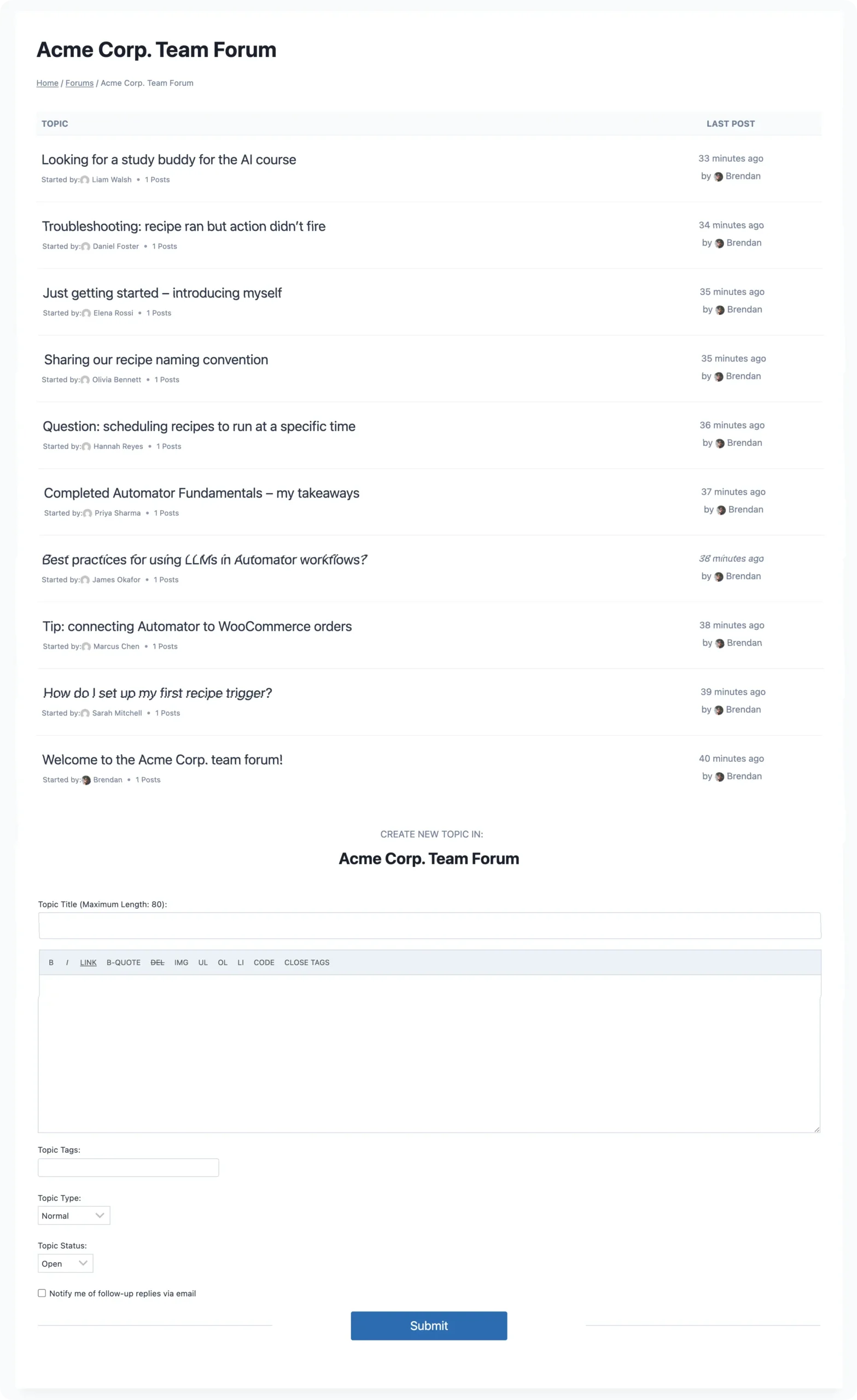
The lightweight option is to use bbPress forums (it’s free to download from the WordPress.org repository, by the way), which Uncanny Groups can attach directly to a LearnDash group.
When you turn on group forums, every member of that cohort gets access to a private discussion space tied to their courses. New members are added automatically when their seat is assigned. When they’re removed from the group, they lose access to the forum too. No second user database, no second login.
For organizations that want richer conversation than bbPress provides—threaded replies, mentions, reactions, media uploads—BuddyBoss is usually the next step up.
BuddyBoss adds full social-network functionality to WordPress: profiles, activity feeds, real-time notifications, private messaging, and group-level forums that look and feel closer to Facebook Groups than a traditional bulletin board.
Building membership hubs with Uncanny Automator
Cohorts and forums are scoped to a specific course or program. Membership hubs are evergreen—the space members spend time in for as long as they’re members, regardless of which course they’re working through this month.
A membership hub usually lives on a BuddyBoss social group, a Discord server, a Slack workspace, or something similar. The challenge isn’t picking the platform—it’s keeping membership accurate and the activity meaningful as people move through your courses.
That’s where Uncanny Automator earns its place in the stack.
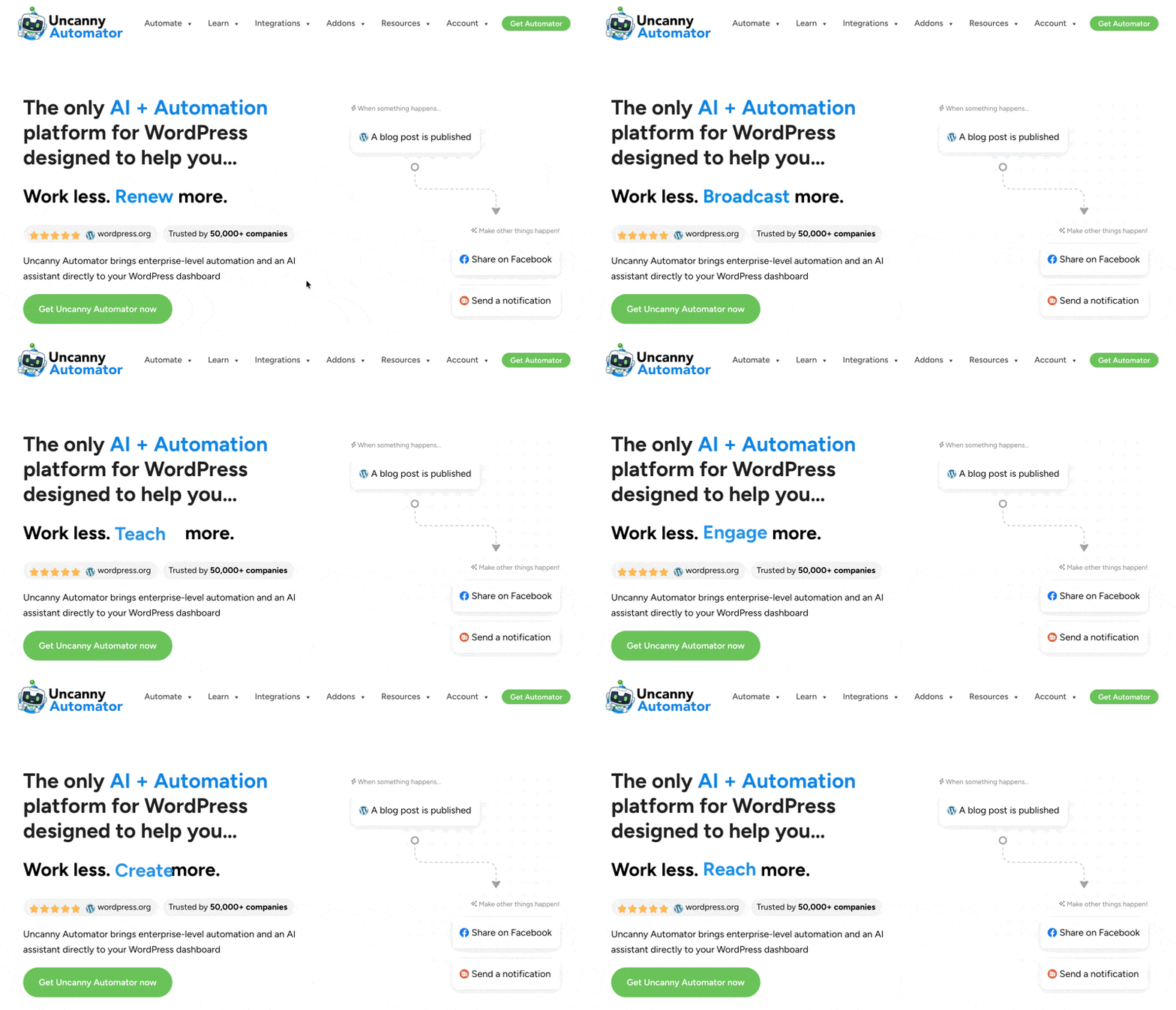
Automator is the experience-layer connector. It sits between LearnDash and your community platform of choice and uses no-code recipes (i.e., automations) to wire them together. A few examples of what that looks like in practice:
- Auto-enroll new members in your hub. When a learner is added to a LearnDash group (or purchases a course, completes onboarding, or submits a registration form), Automator adds them to the right BuddyBoss group, Discord channel, or Slack workspace in the same step.
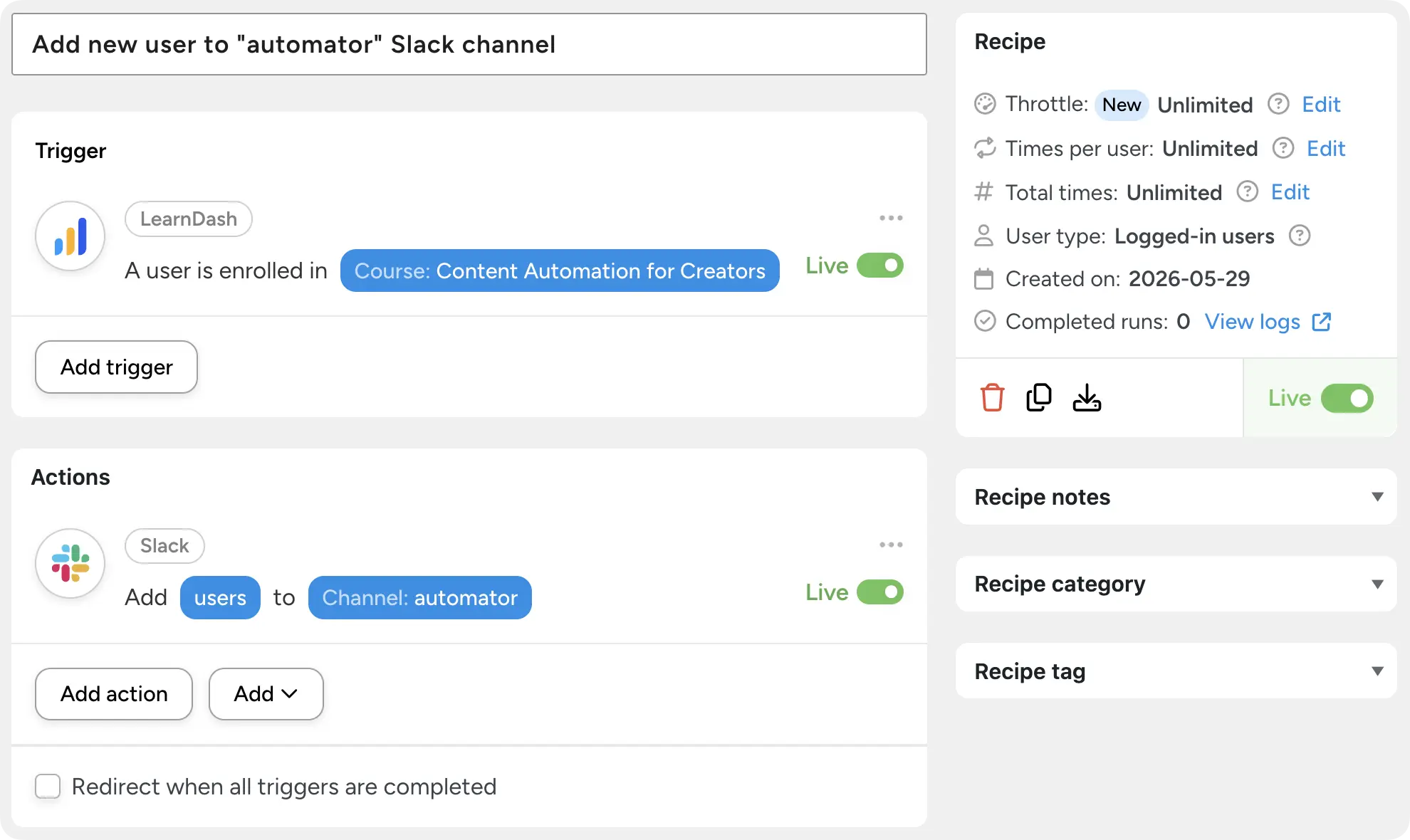
- Promote learners as they progress. When a member completes a foundational course, Automator can move them into an “alumni” group, set the user’s Xprofile data in BuddyBoss and tag them as an alumni in your CRM.
- Celebrate milestones in the feed. When someone passes a certification quiz or earns a certificate, Automator can post a congratulatory update to the activity feed, mentioning the learner—turning private achievements into community moments.
- Re-engage quiet members. Use a scheduled recipe to contact learners who have fallen behind and send a nudge to the leader’s Slack channel, or email them a relevant new lesson.
- Remove access cleanly. When a group license expires, Automator can remove the user from BuddyBoss groups, revoke their Discord access, and tag them in your CRM as a re-engagement target—all in one recipe.
Automator integrates natively with BuddyBoss, BuddyPress, bbPress, PeepSo, wpForo, Discord, Slack, Telegram, and WhatsApp, alongside hundreds other WordPress and cloud apps. If the community platform has a way in, Automator usually has a recipe for it.
How your online course community actually works
If you’re building a community for your online courses with all three elements—cohorts, forums, and a membership hub—the stack ends up looking like this:
- LearnDash delivers courses, lessons, quizzes, and certificates.
- Uncanny Groups for LearnDash turns those courses into managed cohorts, with group leaders, B2B licensing, and other group management tools.
- bbPress forum sync that powers cohort-level discussion.
- BuddyBoss (or your social platform of choice) hosts the evergreen membership experience.
- Uncanny Automator keeps all of it in sync—enrolling, promoting, removing, and notifying members based on what they do in their courses.
You don’t have to build all three at once. Most of the LearnDash sites we work with start with cohorts and group forums, then add a membership hub later once they have enough members to make it worthwhile.
The point is that nothing here requires leaving WordPress. The same admin, the same user database, the same hosting, the same login—just more capability layered on top.
Want to see how Uncanny Owl addons and plugins improve your WordPress community? Try it out live on our demo site >>>
A note on hosted alternatives
It’s fair to ask: why not just move to Kajabi, Teachable, Thinkific, or Mighty Networks, which bundle community features in the box?
If a hosted platform fits your needs, that’s a legitimate choice. The tradeoff is the one you already know—you rent your platform instead of owning it, your data and members live inside their walls, your pricing scales with the number of users (or arbitrarily based on their roadmap), and your customizations are limited to what they expose.
For creators and organizations that want full control over the learning experience, the member data, the integrations, and the long-term cost curve, building on WordPress with LearnDash and the Uncanny stack remains the more durable path. You’re not just adding community to your courses—you’re keeping the keys to your digital castle.
Bringing it together
Adding community to your online courses doesn’t have to mean migrating off WordPress, learning a new platform, or paying per-seat for software you’ll outgrow.
The pieces already exist in the LearnDash ecosystem. Uncanny Groups gives you the cohort infrastructure and group forums. BuddyBoss (or bbPress, for lighter needs) gives you the social experience. Uncanny Automator connects everything together so membership, progress, and engagement stay in sync without anyone manually moving users from list to list.
Or, if you already know you want the whole stack, the All Access Pass bundles Uncanny Groups with Tin Canny Reporting, Uncanny Toolkit Pro, CEUs, and Codes at a single annual price—along with a discount on Uncanny Automator to bring it all together.
Get the All Access Pass >>>
Frequently Asked Questions
No. If your needs are limited to per-cohort discussion, the bbPress forums integration in Uncanny Groups is enough. bbPress forums are free, lightweight, and tied directly to LearnDash group membership through Uncanny Groups. BuddyBoss makes sense when you want activity feeds, private messaging, member profiles, and a richer social experience on top of the cohort layer.
Yes. Automator integrates with BuddyPress, bbPress, PeepSo, wpForo, Discord, Slack, Telegram, and WhatsApp natively, plus anything you can reach with a webhook. The same recipe patterns work across platforms—you’re just swapping out the action.
No. You can create groups manually as an administrator and add learners directly, or sell group licenses through WooCommerce as one-time products or subscriptions. You can even let Group Leaders create their own groups, if that’s your desired workflow. Cohorts work the same way regardless of how members got into them.
A LearnDash group is a learning unit—it controls which learners have access to which courses. A BuddyBoss group is a social unit—it controls who can post in a feed, see a forum, and message each other. Uncanny Groups’ BuddyBoss sync keeps the two aligned automatically, so adding someone to a LearnDash group adds them to the matching BuddyBoss group in the same step.
Group leaders manage their cohort from the front-end Group Management page that Uncanny Groups installs—adding and removing learners, viewing progress, grading assignments, and downloading reports. Once those members are synced into BuddyBoss, the group leader can also act as a BuddyBoss group organizer if you give them that role, letting them moderate discussions and post announcements from the same login.
Uncanny Groups is LearnDash-specific. Uncanny Automator, however, integrates with LearnDash, Tutor LMS, LearnPress, LifterLMS, MasterStudy LMS, and WP Courseware, so you can still wire course events to a community platform—you’d just lose the native cohort infrastructure Uncanny Groups provides.