
Overview
In this report, you will see the learning records resulting from users’ interactions with Articulate Storyline/Rise, Captivate, iSpring, H5P*, or any other supported content. These records are stored in a Learning Record Store (LRS) entirely native to your WordPress site. All you need to do is publish your file using the xAPI or SCORM 1.2/2004 standard, and use the Tin Canny Uploader to add it to a lesson or topic associated with a course.
* See the full list of authoring tools supported by Tin Canny
Report Filters
Let’s take a look at the Tin Can Report view.
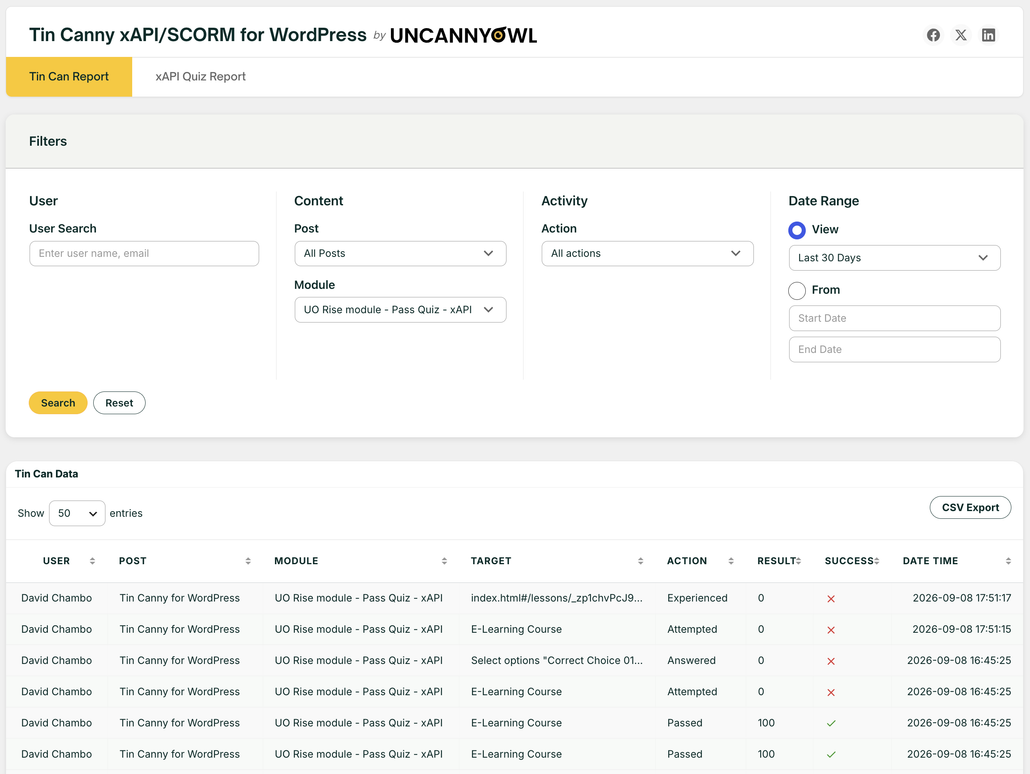
The report view includes many filtering options for you to narrow in on data you are interested to see. For example, you may want to view all the learning records related to a particular Storyline module. You may want to check all the activities that took place within a certain time period. Or you may want to find out whether or when a particular user completed the module.
Note: Some modules send duplicate passed statements when users successfully complete quiz interactions. Tin Canny automatically filters out any passed statements sent from the same module and user within 10 seconds of each other to reduce clutter and confusion in the reports. The statements are still collected and stored, but the duplicates are omitted from the report.
Export to CSV
For a large course, you can potentially be looking at hundreds of thousands of records. The Export to CSV button lets you download the filtered result as a CSV file so you can do further analysis in Microsoft Excel or statistical programs.