
If you offer online courses on your WordPress site, your students are probably cheating more than you might expect. A 2024 study found that nearly 45% of students self-reported cheating on online exams. Artificial Intelligence is making the problem worse, as the majority of students now use generative AI for academic work and even test-taking. With online courses, it’s impossible to eliminate cheating entirely, but there are steps you can take and tools you can use that reward genuine understanding and reduce the feasibility of cheating. In this post, we’ll look at some of the ways you can make your WordPress courses more cheat-resistant.
How Students Cheat in WordPress Courses
Reducing the likelihood of cheating starts with understanding how your students are doing it. Here are some common ways that students cheat in online courses:
Viewing answers in the page source. Some WordPress quiz plugins send correct answers to the browser before users answer questions. By inspecting the page, tech-savvy students can trace the answer key with minimal effort. And no, blocking students from right-clicking on your pages doesn’t really help.
Brute-forcing quizzes. When quizzes allow unlimited attempts, students can retake a quiz over and over again, noting correct answers each time until they pass.
Sharing answers. Easy screenshots, group chats, and discussion forums make it easy for students to share their answers. It’s even easier to share if quizzes offer the same questions in the same order to all students.
Using AI tools. Students can copy questions into their favorite AI tool and get an answer in seconds. This is especially effective against recall-based multiple choice questions, which are what most WordPress quizzes use.
Skipping course content. When course progress isn’t enforced, students can treat the quiz as the only thing that matters and skip everything else.
Start With Your LMS Settings
If you’re using LearnDash (and if you’re visiting this website, there’s a good chance that you are!), there are a variety of built-in features that can help to reduce cheating.
Set course progression to Linear, which requires that students complete lesson and topic content in a specific order. Enable forced lesson timers so that students must spend a minimum amount of time on a page before they can mark it as complete. Then over on the quiz side, you can limit the number of allowed attempts (limiting the risk of brute-force test-taking), add a time limit (so users have less time to share answers and look things up), and randomize questions and answers (to also reduce the risk of sharing). These are all features built into LearnDash, and only take a few minutes to configure when you set up new quizzes.
Extend Protections with Uncanny Owl Plugins
The built-in settings offered by LearnDash are a great foundation, but third-party tools can help to fill additional gaps. We offer several plugins that reduce cheating opportunities.
The Simple Course Timer module in Uncanny Toolkit Pro tracks cumulative active time across an entire course (not just per lesson or topic), and it includes a setting to block access to quizzes unless users have spent a minimum amount of time in a course. This way, you can make sure users spend enough time looking at course content before they can attempt a quiz and mark a course as complete. And don’t worry, it includes idle detection so that users can’t just load up a lesson and leave it onscreen to accumulate time.

The Tin Canny Reporting plugin adds support for SCORM and xAPI content, which also provides a means of controlling the Mark Complete button in a LearnDash course. By using uploaded assets, you can also control a user’s path and progression in a course.
Use a Quiz Plugin That Prioritizes Security
The assessment platform you choose for your online course is an important consideration—and one of the best ways to control the risk of cheating during a test.
One example of a quiz plugin that integrates with LearnDash and offers robust anti-cheat controls is PressPrimer Quiz. Designed with assessment integrity in mind, here are some of the ways it can offer protection for your LearnDash course beyond what LearnDash quizzes can natively offer:
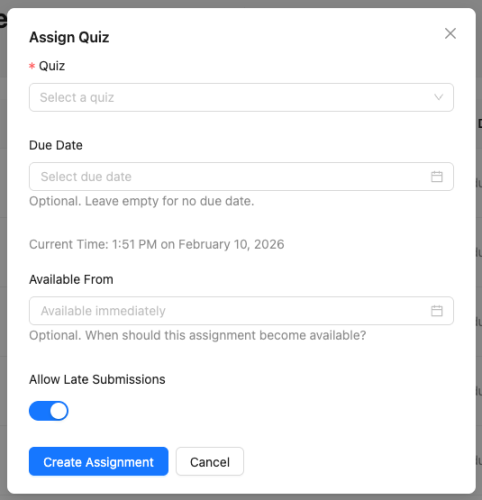
- Tight availability windows. Assign quizzes with precise start and end times. If a quiz starts at 10:00 a.m. and is set to end at 10:30 a.m., and a student doesn’t start until 10:15 a.m., they only have 15 minutes to complete it before it’s automatically submitted. This significantly limits sharing opportunities.
- Large question banks with dynamic generation. If you generate quiz questions from a pool of 3 banks of hundreds of questions each, there’s very little opportunity to share results when every attempt is virtually unique.
- Attempt limits with forced delays. By controlling how long users have to wait between retakes, there’s much less risk of them brute-forcing attempts.
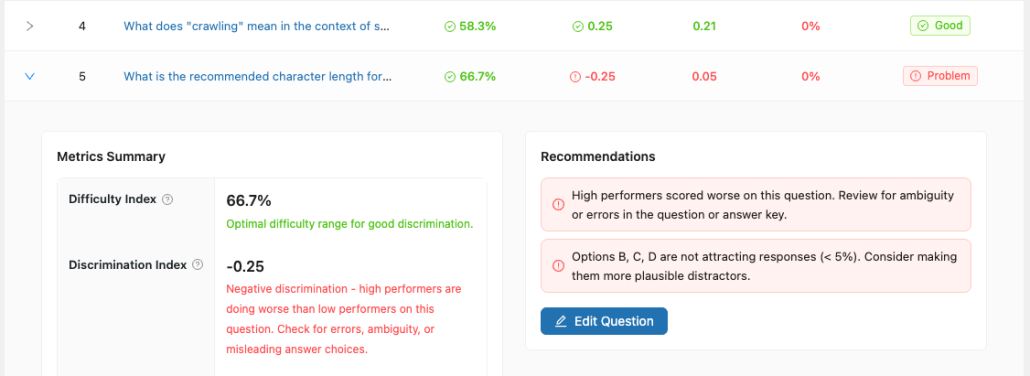
- Question analytics that reveal problems. With reports for question quality, you can evaluate difficulty and distractor effectiveness to make sure quizzes are effective and properly measure student performance and learning in a course.
- Proctoring tools. Alert instructors when cheating behaviors are likely taking place by detecting how often students are changing tabs or exiting full-screen mode for quizzes.
Putting It All Together
No single WordPress plugin or platform eliminates cheating, but taking a layered approach with the right tools make it a lot harder and less tempting to cheat. By configuring your LMS plugin settings properly, extending protections with Uncanny Owl plugins, and considering additional tools like PressPrimer Quiz, your courses will soon be locked down and experience far fewer instances of cheating. When the effort to cheat is greater than the effort needed to learn the material, most students will choose the honest path.