Update: Please note that this post is a summary of tests we conducted to assess the number of simultaneous learners a site can support, not total learners in a system. LearnDash can accommodate tens of thousands of users in the database, but most hosts can’t accommodate that number of learners being on the site at the same time. The tests in this article were to assess how many simultaneous learners the hosting plans could accommodate.
At Uncanny Owl, we’ve been building and managing LearnDash sites for several years. In that time, you might think that we’d have a hosting solution for every possible type of LearnDash site, but we simply don’t. We have LearnDash sites on Flywheel, WP Engine, Cloudways, Kinsta, even Digital Ocean and Vultr instances. We set each site up on a platform that’s a suitable fit for the site and volume of learners, and generally we target accommodating 25 to 50 simultaneous learners. That might sound like very few, but we find it’s enough even for sites with several thousand learners. It’s just very rare for a large group of learners to visit the site and complete learning activities at the same time. As such, we target the site’s actual load to make sure our clients aren’t paying for more than the site needs.
Recently, a client asked us to develop a plan for ramping up to tens of thousands of learners quite quickly. It’s been a long time since we last did load testing on LearnDash, and we’ve never done it with higher-end tiers on managed providers. We decided to try out the client’s existing LearnDash site that was reasonably heavy (University theme with Visual Composer, a few dozen plugins and various customizations) to see how it would hold up. The site wasn’t one we created, but it’s representative of what a lot of people create with LearnDash.
We loaded the site up on 3 different hosts: a Professional plan at WP Engine ($99/month), Business plan at Kinsta ($287/month) and an 8-core/16GB Vultr instance at Cloudways ($264/month). We knew the load would really push the cores to their breaking point, so we had high hopes for the 8 core Vultr VM. We created a complex script for Blazemeter that had 1,000 total users sign in to WordPress and complete/navigate close to 60 LearnDash pages. Each page had a lot of shortcodes and a number of images or embedded video. We even had users complete a quiz. Clicks were mostly timed about 30 seconds apart, which was on the aggressive side for LearnDash use, but we wanted to see what it took to break the servers. Activity was spread out over an hour, with the number of users gradually ramping up. Because the activities didn’t take an hour to complete, we planned to see some virtual users roll off the test as others started (so we would never see 1,000 simultaneous learners, but we did want to see a few hundred).
Cloudways Results
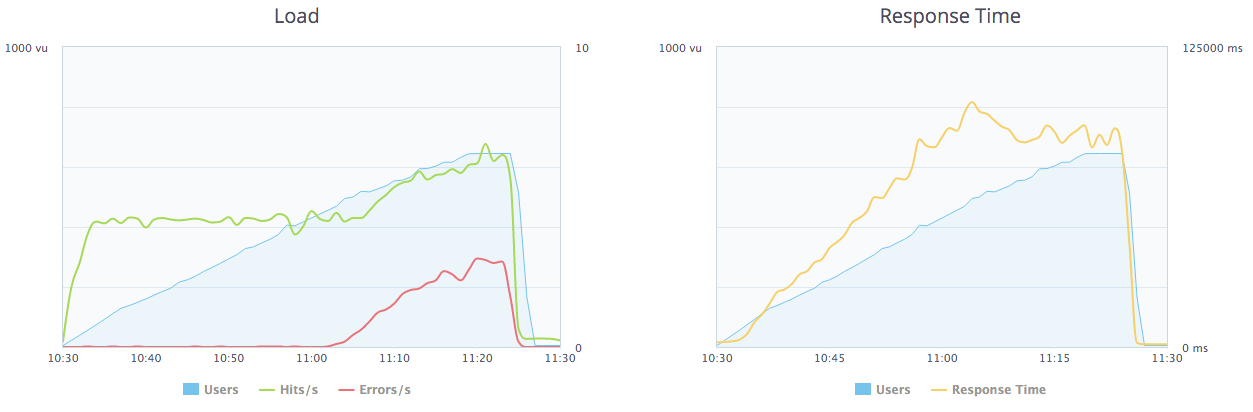 It’s hard to tell from the chart, but Cloudways was great until about 75 users. Then page load times climbed to 5 seconds—and kept climbing. The test ended up peaking at a very high number of users because it got too slow for users to complete the script. By 100 users the response time was an unacceptable 10 seconds, and by 400 users, the error rate shot up. Because Cloudways kept getting worse and worse, and further behind, average page load time ended up being 67 seconds. The server was fine for 75 learners, but definitely no more. All cores were maxed out after that point. One thing to note: this server was held back a bit by not using a CDN. Both other sites benefitted from a CDN.
Kinsta Results
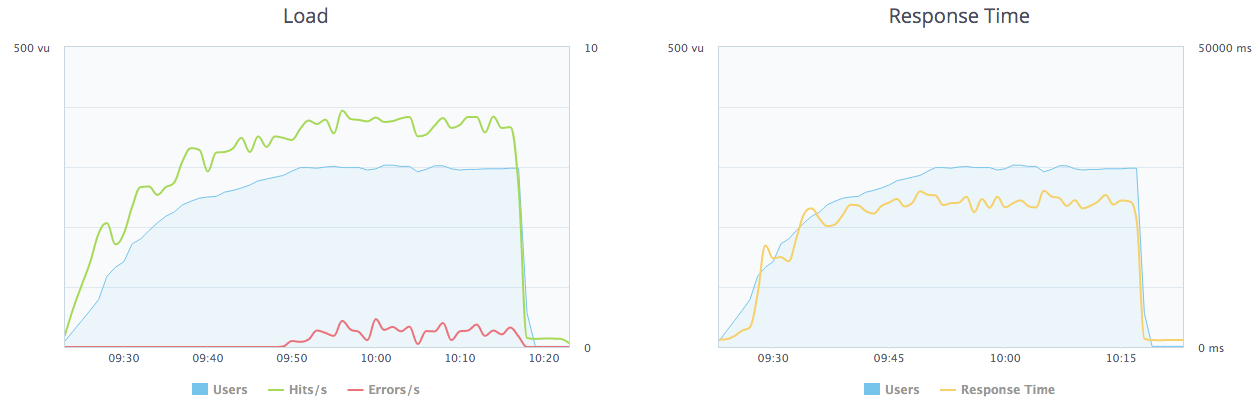 The Kinsta graph looks a lot better, right? The response time looks stable—until you notice that it’s stable at about 25 seconds. That’s far too long for users to wait. Response time on Kinsta is good until about 100 users. After that, it’s just too slow, and at 300 users we start seeing errors on top of that. On a side note, this was our first time using Kinsta and developer tools just weren’t as useful or efficient as on WP Engine. It’s not reflected in the numbers, but it’s definitely a consideration when we’re choosing where to host a site.
WP Engine Results
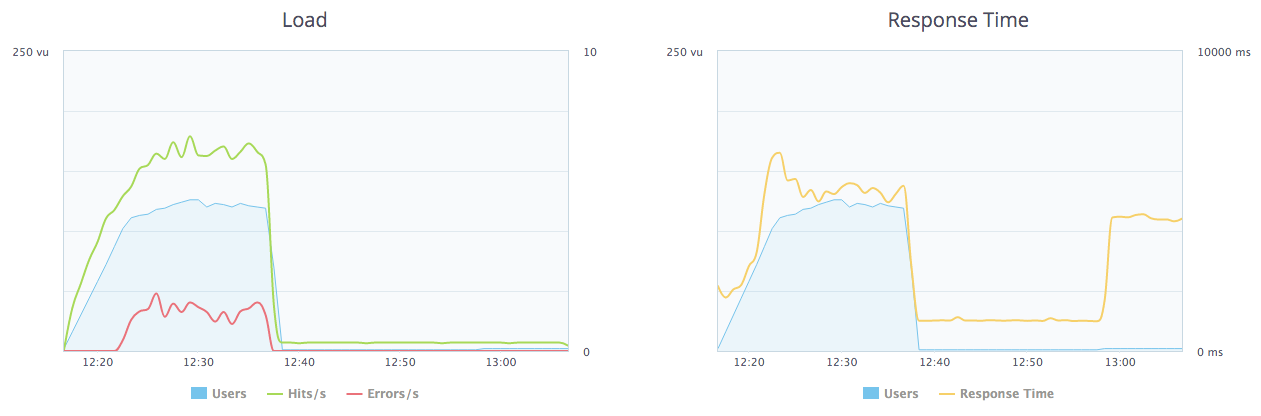 We ended this test early because we had the info we needed after 20 minutes. WP Engine failed early too; right at about 85 users. What was different on WP Engine was that load times didn’t increase; if response times got high WP Engine just threw (a lot of) 502 errors. A poor user experience, to be sure, but still better than Cloudways serving pages in 60+ seconds—at least users saw something. And the key takeaway is that the site was ok up to 85 simultaneous learners, which surprised us, given that WP Engine was the only shared environment and it’s one third the price of the others.
None of the results really impressed us; we hoped that at least one of the servers could have accommodated over 100 simultaneous learners. For now, at least, we put that particular client site on WP Engine. Performance is good enough for the current number of learners, it’s the lowest cost of the 3, we have an upgrade path there for additional learners, and the site tools we need are the easiest to work with. We just wish we didn’t have to always deal with caching and session/cookie issues on complex LearnDash sites hosted on WP Engine.
If you’re managing a LearnDash site that has a lot of simultaneous learners, we would love to hear how you’re hosting it in the comments!

 We love helping people discover WordPress and use it in creative ways. In fact, its one of the things that sets us apart in the LearnDash consulting space—we’re educators first, developers second. Every project we work on puts heavy emphasis on training clients to use their platforms effectively and delivering a great learning experience to users. We spend a lot of time teaching people to use WordPress and we’re always looking for better ways to deliver WordPress training.